
Service Electrical
Battery Statement
Service the Battery Safely

Checking Battery Electrolyte Level (Maintenance-Type Battery)
NOTE: Add only distilled water to replace normal electrolyte loss.
1. Park the machine safely. (See Parking Safely in the SAFETY section.)
2. Remove battery from machine and set it on a level surface.
3. Remove battery cell caps. Make sure cap vents are not plugged.
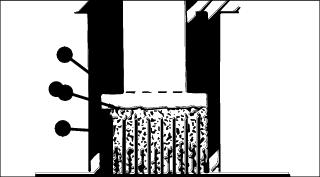
4. Check electrolyte level. Electrolyte (A) should be approximately halfway between bottom of filler neck (B) and top of plates (C).
IMPORTANT: Avoid damage! Do not overfill battery. Electrolyte can overflow when battery is charged and cause damage. |
5. Add only distilled water if necessary.
Removing and Installing Battery
Removing:
1. Park machine safely and lift hood. (See Parking Safely in the Safety Section.)
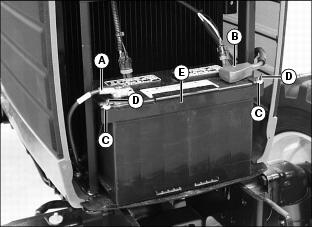
3. Disconnect negative (-) battery cable (A).
4. Push red cover (B) back away from positive (+) battery cable and remove cable from battery.
5. Remove hex flange nuts (C), threaded rods (D) and hold-down clamp (E).
Installing:
1. Install battery into machine.
2. Connect positive (+) cable to battery first, then negative (-) cable.
3. Apply dielectric grease to terminals to prevent corrosion.
4. Slide red cover over positive battery cable.
5. Install battery hold-down clamp, threaded rods and nuts. Do not overtighten.
Cleaning Battery and Terminals
1. Disconnect and remove battery.
2. Wash battery with solution of four tablespoons of baking soda to one gallon of water. Be careful not to get the soda solution into the cells.
3. Rinse the battery with plain water and dry.
4. Clean terminals and battery cable ends with wire brush until bright.
5. Apply petroleum jelly or silicone spray to terminal to prevent corrosion.
Using Booster Battery
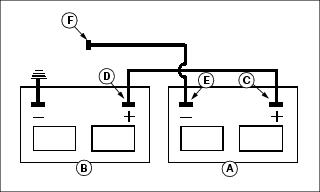
1. Connect positive (+) booster cable to booster battery (A) positive (+) post (C).
2. Connect the other end of positive (+) booster cable to the disabled machine battery (B) positive (+) post (D).
3. Connect negative (-) booster cable to booster battery negative (-) post (E).
4. Connect the other end (F) of negative (-) booster cable to a metal part of the disabled machine frame away from battery.
5. Start the engine of the disabled machine and run machine for several minutes.
6. Carefully disconnect the booster cables in the exact reverse order: negative cable first and then the positive cable.
Replacing Headlight Bulb
 c CAUTION: Avoid injury! The halogen bulb contains gas under pressure. The bulb may shatter if the glass is scratched or dropped. Wear eye protection and handle bulb with care when replacing.
|
1. Park machine safely. (See Parking Safely in the SAFETY section.)
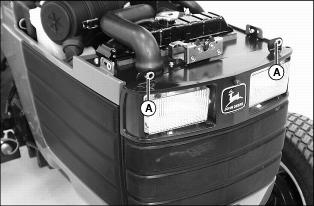
3. Flip and turn fasteners (A) to the horizontal position.
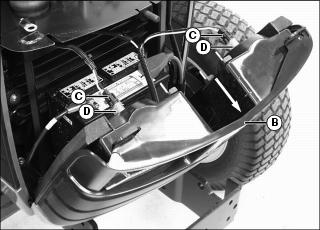
4. Carefully move top of grille (B) forward.
5. Disconnect wire harness (C) from defective headlight bulb assembly (D).
6. Rotate bulb assembly to remove from housing socket.
7. Install new bulb assembly into housing socket and rotate to lock in place.
8. Connect wire harness to bulb assembly.
9. Check operation of headlights.
Adjusting Headlights
1. Park machine safely on a level surface at least 5m (15ft.) away from a flat vertical surface. (See Parking Safely in the SAFETY section.)
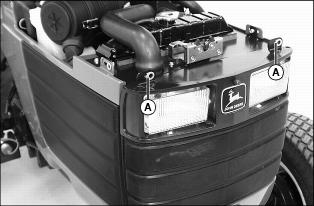
4. Flip and turn fasteners (A) to the horizontal position. Carefully move top of grille forward.
NOTE: Do not remove clips (B) when making a headlight adjustment.
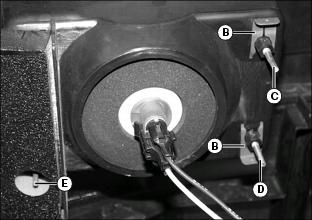
5. Adjust headlights to desired operating position:
· Turn screw (C) counterclockwise or screw (D) clockwise to adjust light beam up.
· Turn screw (C) clockwise or screw (D) counterclockwise to adjust light beam down.
· Turn screw (E) clockwise to adjust light beam toward center of machine or counterclockwise to adjust light beam away from center of machine.
8. Repeat procedure if additional adjustment is required.
Replacing Taillight Bulb
1. Park machine safely. (See Parking Safely in the SAFETY section.)
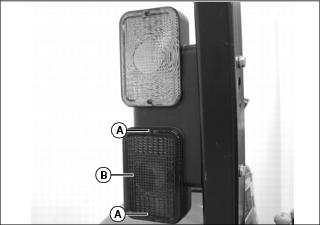
2. Remove two screws (A) and lens (B).
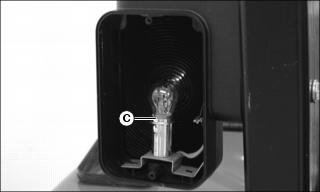
3. Rotate bulb (C) to remove. Do not twist bulb.
4. Push and rotate new bulb into socket.
5. Check operation of taillights.
Replacing Warning Light Bulb
1. Park machine safely. (See Parking Safely in the SAFETY section.)
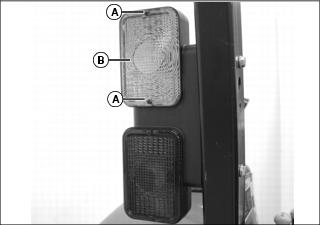
2. Remove two screws (A) and lens (B).
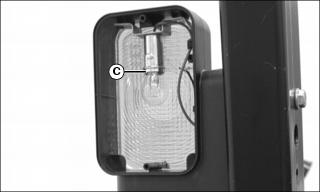
3. Rotate bulb (C) to remove. Do not twist bulb.
4. Push and rotate new bulb into socket.
5. Check operation of warning lights.
Replacing Instrument Panel Light Bulb
1. Park machine safely. (See Parking Safely in the SAFETY section.)
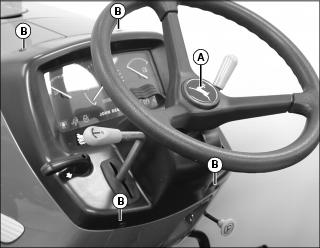
2. Remove steering wheel center cap (A), nut and steering wheel.
3. Remove four screws (B) from instrument panel housing. Carefully move housing rearward.
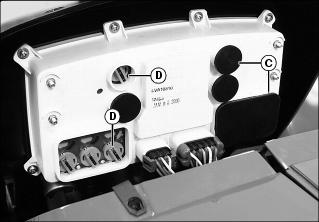
4. Identify defective bulb location.
5. Remove rubber plug(s) (C) to locate indicator light bulb assemblies.
6. Rotate bulb assembly (D) counterclockwise and remove from the housing socket.
7. Install new bulb assembly into housing socket and rotate clockwise into a locked position.
10. Install instrument panel housing and screws.
11. Install steering wheel, nut and center cap (A).
Replacing Fuses
IMPORTANT: Avoid damage! The electrical system may be damaged if incorrect replacement fuses are used. Replace the bad fuse with a fuse of the same amp rating. |
1. Park machine safely. (See Parking Safely in the SAFETY section.)
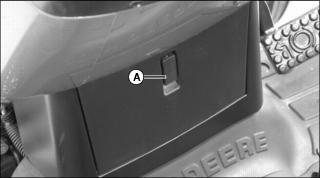
2. Raise lever (A) and lower fuse block access door.
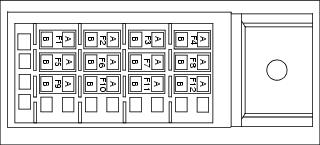
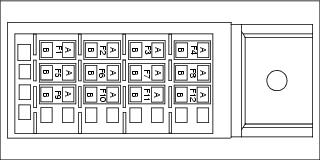
5. Pull defective fuse from socket.
NOTE: Do not place a fuse in the "Diagnostic" position. A fuse placed in this position will disable the machine.