
Service Miscellaneous
Filling Fuel Tank
Use diesel fuel Grade No. 1-D for cold air temperatures or Grade No. 2-D fuel for warm air temperatures. Diesel fuel must be cetane Number 40. A cetane number of 50 or more is preferred, especially for air temperatures below - 20°C (- 4°F) or elevations above 1500 m (5000 ft).
Add John Deere fuel stabilizer to fuel before using it in your machine to prevent engine damage due to stale fuel. Follow directions on stabilizer container.
1. Park machine safely. (See Parking Safely in SAFETY section.)
2. Allow engine to cool several minutes before adding fuel.
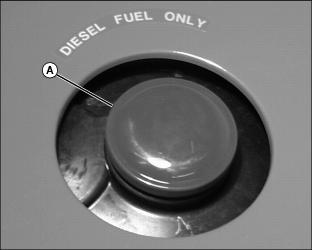
4. Fill fuel tank at end of each day's operation to prevent condensation in fuel tank as moist air cools.
5. Fill tank with fresh fuel only to bottom of filler neck.
· If fuel is spilled, raise hood and clean up spilled fuel immediately.
6. Fill fuel tank when fuel gauge shows 1/4 or less fuel in tank.
Removing Front Grille
NOTE: The bottom of the grille has two alignment tabs (A) which sit in grooves in the machine frame.
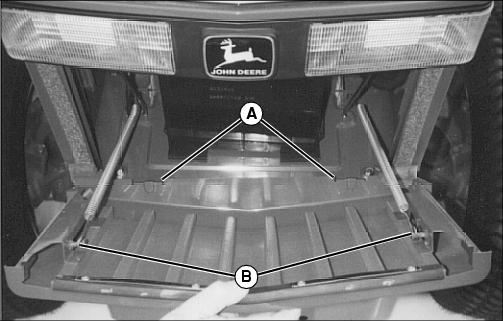
3. Lift grille to clear alignment tabs (A) and remove grille.
Opening Hood
 c CAUTION: Avoid injury! To prevent injury from moving parts, stop engine and remove ignition key before opening the hood.
|
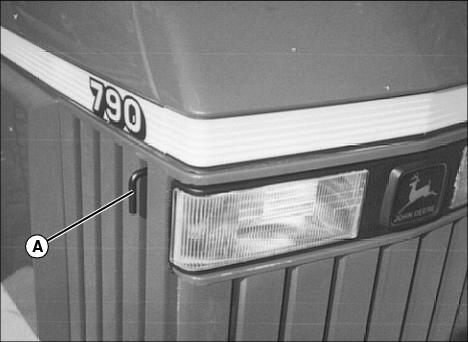
1. Pull hood latch (A) out and lift hood
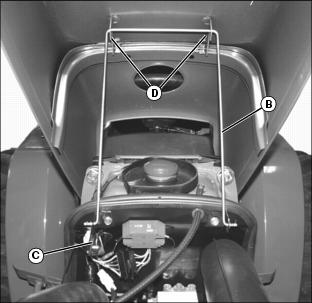
2. Remove hood support rod (B) from clip (C).
3. Put hood support rod (B) in holders (D).
Lowering Hood
|
c CAUTION: Avoid injury! To prevent injury, release hood latch only when hood is supported to control the lowering of the hood.
|
1. Lift hood slightly to remove weight from hood latch.
2. Put hood support rod in clip and lower hood.
3. Push down on front of hood to lock latch.
Removing and Installing Side Service Shields
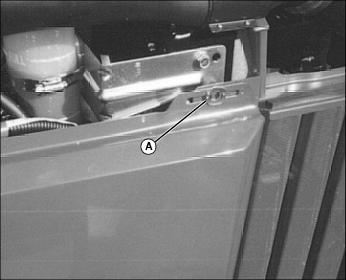
2. Open and turn spring loaded fastener (A) to the horizontal position. Repeat for rear fastener.
3. Lift shield off two lower rod supports to remove.
Adjusting Toe-In
2. Turn steering wheel so front wheels are in the straight-ahead position.
3. Park machine safely. (See Parking Safely in SAFETY section.)
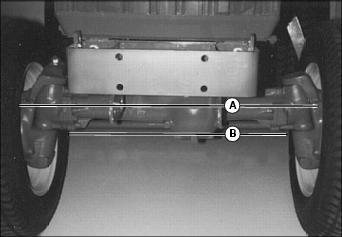
4. Measure distance between tire beads (A) at front of tire, hub height.
5. Measure distance between tire beads (B) at rear of tire, hub height.
6. Front distance should be 3 - 9 mm (1/8 - 3/8 in.) less than rear distance. If not, adjust tie rod length.
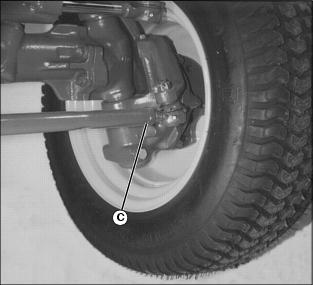
7. Loosen tie rod nut (C) on both tie rod ends.
8. Turn tie rod until toe-in is to correct specification.
Adjusting Brakes
|
c CAUTION: Avoid injury! To insure that brakes will not pull to one side when pedals are locked together, pedals must be adjusted evenly.
|
2. Measure distance each pedal travels at top of stroke before engaging brakes. Adjust free travel if it is more than 35 mm (1-3/8 in.).
NOTE: Tighten locknuts. Adjust other side in same manner.
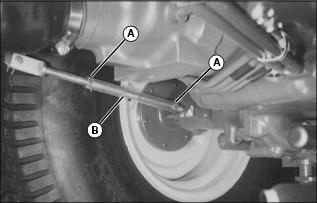
3. Loosen linkage rod lock nuts (A). Rotate turnbuckle (B) to shorten rod. Adjust free travel to 25 mm (1 in.). Keep both pedals adjusted evenly.
4. When linkage has no adjustment remaining, see your John Deere dealer for repair service.
Adjusting Clutch
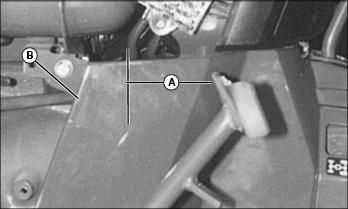
1. Measure free travel at top of pedal stroke (A). If free travel is 15 mm (5/8 in.) or less, adjust linkage to obtain 35 mm (1-3/8 in.) travel.
2. Remove shield (B) to adjust clutch.
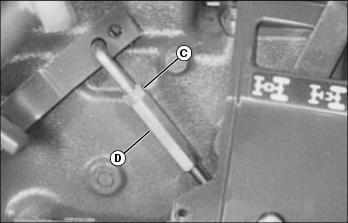
3. To adjust linkage, loosen lock nut (C) and rotate turnbuckle (D). Recheck free travel and retighten lock nut.
Selecting Front Tire Rolling Direction
|
c CAUTION: Avoid injury! Support machine securely on stands before removing a wheel.
|
Machines equipped with directional type tires (such as bar tires) have directional arrows located on the tire sidewall. Under most conditions, tires should be installed with the directional arrow pointing in the direction of travel.
If machine is mainly used for loader operations, lug direction may be reversed to increase tire life and improve traction while backing out of dirt piles.
Move wheel from one side of machine to the other.
Changing Rear Tread
To provide best stability, operate machine with rear wheels mounted in the wide tread position whenever possible.
|
c CAUTION: Avoid injury! Support machine securely on stands before removing a wheel.
|
IMPORTANT: Avoid damage! Always make sure tires rotate in proper direction. Arrows on sidewall should point in direction of forward rotation. |
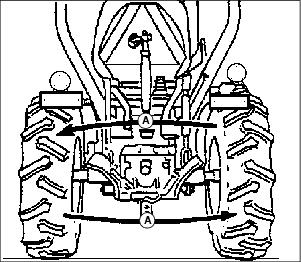
· Move wheel from one side of machine to the other (A) to maintain proper direction of tire rotation.
· Tighten front wheel lug bolts to 133 N·m (98 lb-ft). Tighten rear wheel lug bolts to 186 N·m (137 lb-ft). Check and retighten bolts as instructed in service section.
· Tread width is measured between centers of tires. See chart in the Specifications Section for proper dimensions.
Cleaning and Repairing Plastic Surfaces
Your John Deere dealer has the professional materials needed to properly remove surface scratches from any plastic surfaces, do not attempt to paint over marks or scratches in plastic parts.
1. Rinse hood and entire machine with clean water to remove dirt and dust that may scratch the surface.
2. Wash surface with clean water and a mild liquid automotive washing soap.
3. Dry thoroughly to avoid water spots.
4. Wax the surface with a liquid automotive wax. Use products that specifically say "contains no abrasives."
5. Buff applied wax by hand using a clean, soft cloth.
Cleaning and Repairing Metal Surfaces
Cleaning:
Follow automotive practices to care for your machine painted metal surfaces. Use a high-quality automotive wax regularly to maintain the factory look of your machine's painted surfaces.
Repairing Minor Scratches (surface scratch):
1. Clean area to be repaired thoroughly.
2. Use automotive polishing compound to remove surface scratches.
3. Apply wax to entire surface.
Repairing Deep Scratches (bare metal or primer showing):
1. Clean area to be repaired with rubbing alcohol or mineral spirits.
2. Use paint stick with factory-matched colors available from your John Deere dealer to fill scratches. Follow directions included on paint stick for use and for drying.
3. Smooth out surface using an automotive polishing compound. Do not use power buffer.