Removing and Storing
Removing Implement from iMatch™ AutoHitch™
1. Follow instructions for removing implement in your implement operator’s manual.
2. Back implement into desire storage location.
3. Fully raise implement. Raise locking levers on both sides of iMatch Quick-Hitch.
4. Rotate locking lever on AutoHitch upward to unlocked position.
5. Use a quick, smooth motion to move locking lever fully rearward to disengage it from implement.
6. Rotate locking lever downward into locked position.
7. Lower implement fully and drive tractor forward.
Removing iMatch™ AutoHitch™
NOTE: If installing a PTO driven implement on iMatch Quick-Hitch that is not compatible with AutoHitch, remove the AutoHitch.
1. Park tractor and engage parking brake. Stop engine.
3. Ensure ground beneath 3-point hitch is clean.
4. Disconnect chains restraining driveshaft shielding.
5. Raise tractor PTO shield and remove AutoHitch driveshaft from tractor by pulling locking collar rearward.
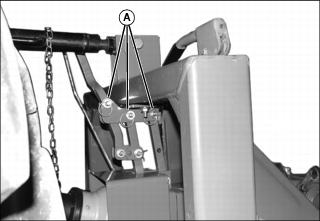
6. Remove top three pins (A) holding AutoHitch and its hangers to iMatch Quick-Hitch. Lower assembly carefully, spray inside of coupler with a light coat of lithium grease and store in a dry place.