
Operating
Daily Operating Checklist
o Test safety systems. Perform safety interlock system checkout procedure.
o Check transmission oil level.
o Check coolant level on liquid cooled engine.
o Remove grass and debris from machine.
o Check area below machine for leaks.
Avoid Damage to Plastic and Painted Surfaces
• Do not wipe plastic parts unless rinsed first. Using a dry cloth may cause scratches.
• Insect repellent spray may damage plastic and painted surfaces. Do not spray insect repellent near machine.
• Be careful not to spill fuel on machine. Fuel may damage surface. Wipe up spilled fuel immediately.
• Prolonged exposure to sunlight will damage hood surfaces.
Adjusting Seat
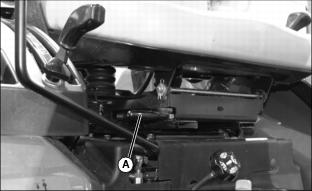
2. Lift seat lever (A) up to unlock seat position.
3. Slide seat forward or rearward to desired position where all controls can be easily reached.
4. Release lever to lock seat in position.
Using Seat Belt
Fasten Seat Belt
1. Connect both ends of seat belt.
Adjusting Seat Belt
1. Tighten or loosen seat belt until firmly held onto the seat.
Release Belt
1. Press red button on buckle to release seat belt ends.
Using Light Switch
NOTE: Normal use of turn signals is possible when light switch is in either warning flasher position. Turn signals will temporarily override warning flashers when activated. When turn signals are de-activated, warning flashers will resume operation.
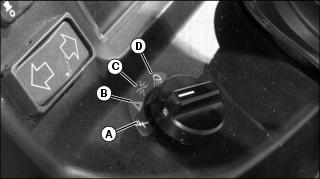
C - Headlights and Taillights On
D - Headlights, Taillights, Warning Flasher Lights On
Using Key Switch
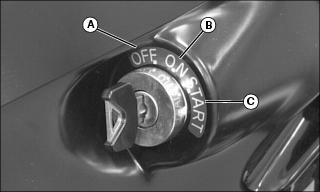
A - OFF Position - In this position the engine will not run.
B - ON Position - Move key from OFF to this position and the engine oil pressure light and battery charging light will turn on. You will also hear the engine fuel shut-off solenoid engage with a click.
C - START Position - Move key from ON to this position and the starter will engage the engine flywheel to start the engine. Release the key to the ON position.
Using Instrument Panel

A - Park Brake Light - This light should illuminate when the park brake is set and locked.
B - Engine Coolant Temperature Light - This light will turn on when the engine coolant is approaching a dangerously hot temperature. If this light turns on during operation, remove load on machine immediately. Reduce engine to idle speed and check for something blocking air flow to the radiator and check engine coolant level. If light stays on after cleaning grille, stop engine.
C - Alternator/Battery Charging Light - This light will turn on when the ignition key is in the ON position and the engine is not running. If this light turns on while the engine is running, the alternator output is too low. Move the throttle lever to the full throttle position. Stop the engine if light remains on.
D - Engine Oil Pressure Light - This light will turn on when the ignition key is in the ON position and the engine is not running. If this light turns on while the engine is running, engine oil pressure is too low. Stop engine.
E - MFWD Light - This light will turn on when Mechanical Front Wheel Drive (MFWD) is activated.
F -Warning Flasher/Turn Signal Indicator Light - This indicator light will turn on and flash when the light switch is turned to the warning flasher lights ON position, the headlights, taillights, and warning flasher lights ON position or the turn signal switch is moved to the left hand turn position.
G -Warning Flasher/Turn Signal Indicator Light - This indicator light will turn on and flash when the light switch is turned to the warning flasher lights ON position, the headlights, taillights, and warning flasher lights ON position or the turn signal switch is moved to the right hand turn position.
H - PTO Engaged Light - This light will illuminate when the PTO is engaged.
I - Glow Plug Light - This light will illuminate for 15 seconds when the key is turned to the ON or start position.
J - Fuel Gauge - Shows approximately how much fuel is in the fuel tank.
K - Tachometer - Shows engine speed. Engine speed is shown in 100’s. Example: If indicator is pointing at 20 (20 x 100 = 2000 RPM). Note the special marker labeled RATED. With the indicator pointing at the RATED marker, this is the proper engine speed for the 540 RPM Power Take Off (PTO).
L - Hour Meter - Shows total number of accumulated running hours at rated speed. Use the hour meter as a guide when servicing various components of this machine.
Using Turn Signal Switch
NOTE: The turn signal switch will operate only when the ignition key switch is in the ON position.
NOTE: Normal use of turn signals is possible when light switch is in either warning flasher position. Turn signals will temporarily override warning flashers when activated. When turn signals are de-activated, warning flashers will resume operation.
1. Depress right side of turn signal switch to operate the right turn signal light.
2. Depress left side of turn signal switch to operate the left turn signal light.
3. Move switch to the centered position to turn lights off.
Testing Safety Systems
The safety systems installed on your machine should be checked before each machine use. Be sure you have read the machine operator manual and are completely familiar with the operation of the machine before performing these safety system checks.
Use the following checkout procedures to check for normal operation of machine.
If there is a malfunction during one of these procedures, do not operate machine. See your authorized dealer for service.
Perform these tests in a clear open area. Keep bystanders away.
Testing the Neutral Start Switch
1. Sit on the operator’s seat.
3. Push the PTO switch knob to the disengaged/off position.
4. Move the transmission range shift lever to the H (high) or L (low) position.
5. Turn the key to the START position.
Testing the Power-Take-Off (PTO) Switch
1. Sit on the operator’s seat.
3. Push the PTO switch knob to the disengaged/off position.
4. Move the transmission range shift lever to the N (neutral) position.
5. Pull the PTO switch knob to the engaged/on position.
6. Turn the key to the START position.
Testing the Seat Switch
1. Sit on the operator’s seat.
3. Push the PTO switch knob to the disengaged/off position.
5. Move the transmission range shift lever to the H (high) or L (low) position.
6. Raise up slightly from the operator’s seat. Do not dismount the machine.
7. Turn the key switch to the OFF position.
Testing Mid-PTO/Seat Switch Interface
1. Sit on the operator’s seat.
3. Push the PTO switch knob to the disengaged/off position.
4. Move the transmission range shift lever to the N (neutral) position.
6. Move the PTO selector lever to the mid-PTO only position.
7. Pull the PTO switch knob to the engaged/on position.
8. Raise up slightly from the operator’s seat. Do not dismount the machine.
9. Push the PTO switch knob to the disengaged/off position.
11. Move the PTO selector lever to the mid and rear PTO position.
12. Pull the PTO switch knob to the engaged/on position.
13. Raise up slightly from the operator’s seat. Do not dismount the machine.
14. Push the PTO switch knob to the disengaged/off position.
15. Turn the key switch to the OFF position.
Testing Rear PTO/Park Brake Interface
1. Sit on the operator’s seat.
3. Push the PTO switch knob to the disengaged/off position.
4. Move the transmission range shift lever to the N (neutral) position.
6. Move the PTO selector lever to the rear PTO only position.
7. Raise up from the operator’s seat. Do not dismount the machine.
8. Pull the PTO switch knob to the engaged/on position.
• The rear PTO should operate.
9. Sit on the operator’s seat.
11. Raise up from the operator’s seat. Do not dismount the machine.
12. Push the PTO switch knob to the disengaged/off position.
13. Turn the key switch to the OFF position.
Using Brake Pedals
Using Brake Pedals As Driving Brake:
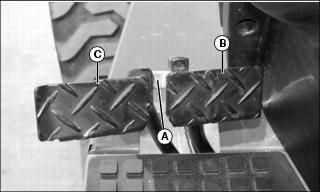
1. Rotate brake pedal latch (A) clockwise until it locks into right turn brake pedal (B) as shown.
2. Depress either brake pedal to slow or stop the machine.
• With latch down, brakes should stop machine in a straight line.
Using Brake Pedals to Assist In Turning:
IMPORTANT: Avoid damage! Do not apply turn brakes while an implement is engaged with the ground. Damage to the 3-point hitch and implement may occur. |
NOTE: Turn brake pedals can be used to make tighter turns and may reduce unnecessary backing.
1. Rotate brake pedal latch (A) counterclockwise until it stops against left turn brake pedal (C). The brake pedals will now function independently.
• To make a tighter left turn, depress left turn brake pedal (C) while turning to the left.
• To make a tighter right turn, depress right turn brake pedal (B) while turning to the right.
Using Park Brake
Locking Park Brake:
1. Lock both brake pedals together using brake pedal latch.
2. Press down on brake pedals with foot.
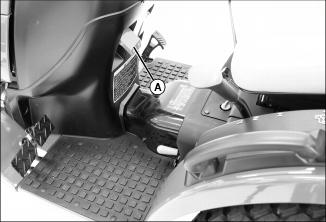
3. Lift park brake lock (A) completely up to the locked position. The park brake light should illuminate.
4. Remove foot from brake pedals.
Unlocking Park Brake:
1. Press down on brake pedals with foot.
2. Push park brake lock (A) down to the unlocked position.
3. Remove foot from brake pedals. Both pedals should now be released from the locked position.
Using Throttle
Use the throttle to change engine speeds. Use the throttle in conjunction with the tachometer to set engine speeds.
Using Fuel Shut-Off Valve
 c CAUTION: Avoid injury! Close fuel shut-off valve when performing any type of engine service, during transport of the machine, and during storage.
|
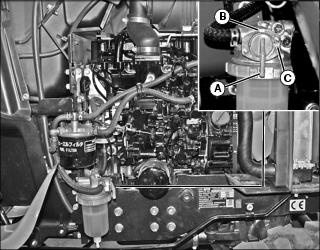
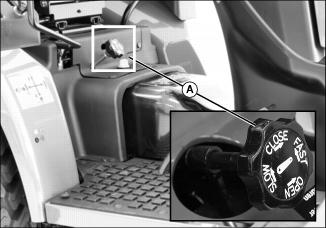
1. Open or close fuel shut-off valve lever (A) as required:
Starting the Engine
1. Open the fuel shut-off valve.
3. Move the transmission range shift lever to the N (neutral) position.
4. Push the PTO switch knob down to the disengaged/off position.
|
c CAUTION: Avoid injury! Check to be sure area is clear of any bystanders before lowering implements to the ground.
|
5. Lower any implements to the ground.
6. Set the engine speed hand throttle to the 1/2-3/4 fast position.
7. Turn ignition key switch to the ON position.
• Engine oil pressure light will glow.
• Alternator/battery charging light will glow.
• Engine glow plug light will glow for 15 seconds. Engine is now ready to start.
IMPORTANT: Avoid damage! Starter may be damaged if starter is operated for more than 20 seconds at a time: • Wait two minutes before trying again if engine does not start. |
9. Turn key switch to START position. Release key when engine starts.
• Engine oil pressure light should go out within 5 seconds.
NOTE: Set engine speed at full throttle if indicator light does not go out after 10 seconds.
• Alternator/battery charging light should go out within 10 seconds.
• If indicator lights stay on longer than the given time interval, stop engine and check for cause.
IMPORTANT: Avoid damage! In cold weather, run engine several minutes to allow engine oil and transmission oil to warm. |
NOTE: It is normal for the engine to be louder and for blue-white exhaust smoke to be present during engine warm-up. The amount of exhaust smoke depends on air temperature.
11. Set the engine speed hand throttle to the 1/2 fast position for 1 minute without load.
Cold Weather Starting Aids
• Turn key to ON position for 15 seconds to activate glow plugs.
• Install optional engine coolant heater if you operate machine in temperatures below -18? C (0? F).
• Install optional transmission oil heater if you operate machine in temperatures below -18? C (0? F).
Warming and Idling the Engine
IMPORTANT: Avoid damage! In cold weather, run engine several minutes to allow engine oil and transmission oil to warm. |
NOTE: It is normal for the engine to be louder and for blue-white exhaust smoke to be present during engine warm-up. The amount of exhaust smoke depends on air temperature.
Warming Engine:
• Set the engine speed hand throttle to the 1/2 fast position for 5 minutes without load.
Idling Engine:
• Adjust engine speed hand throttle rearward to set engine speed at slow idle.
Starting a Stalled Engine
IMPORTANT: Avoid damage! If engine stalls while operating under load, start engine immediately to prevent abnormal heat build-up in engine. |
1. Move the transmission range shift lever to the N (neutral) position.
2. Push PTO switch knob down to the disengaged/off position.
3. Start engine. Continue with normal operation, or set engine speed at slow idle speed for 1 or 2 minutes before stopping.
Stopping Machine
Normal Stopping
1. Remove foot from forward or reverse travel pedal.
2. Push PTO switch knob down to the disengaged/off position.
|
c CAUTION: Avoid injury! Check to be sure area is clear of any bystanders before lowering implements to the ground.
|
3. Lower any implements to the ground.
IMPORTANT: Avoid damage! Do not stop engine immediately after hard or extended operation. Keep engine running at low idle for about 2 minutes to prevent heat build-up. |
6. Adjust engine speed hand throttle to set engine speed at slow idle speed. Allow engine to idle for 2 minutes.
7. Turn key switch to OFF position.
9. Wait for the engine and all moving parts to stop before leaving the operator’s station.
Emergency Stopping
1. Remove foot from forward or reverse travel pedal.
3. Turn key switch to OFF position. Do not release brake pedal until all moving parts have stopped.
Operating the Hydrostatic Transmission
IMPORTANT: Avoid damage! To prevent transmission damage, stop machine motion completely before shifting the range shift lever. |
2. Choose speed range with transmission range shift lever to match work application.
6. Move engine speed hand throttle forward until engine operates at desired speed.
NOTE: When the travel pedals are released, machine travel should stop.
7. Slowly depress the forward travel pedal downward to travel forward. Slowly depress the reverse travel pedal downward to travel in reverse.
• The farther either travel pedal is depressed, the faster the machine will travel.
8. Stop machine to change speed range.
Using Cruise Control
|
c CAUTION: Avoid injury! Use cruise control only in large, open areas. Shut off before turning or when in areas with many obstacles.
|
NOTE: The cruise control is only operational when the machine is traveling forward.
Engaging Cruise Control
1. Depress forward travel pedal until desired travel speed is reached.
2. Raise cruise control lever to engage cruise control.
3. Release forward travel pedal.
4. To adjust travel speed, disengage cruise control and engage cruise control again at a different speed.
Disengaging Cruise Control
NOTE: The machine will stop if cruise control is disengaged while the machine is in motion. To maintain forward motion, depress the forward travel pedal before disengaging cruise control.
1. Depress foward travel pedal or park brake pedals.
Using Differential Lock (Traction Assist)
The differential lock is used to provide better traction when rear wheels start to slip. Engaging differential lock will lock right and left side rear axles together and cause both rear wheels to turn at equal speeds for maximum traction.
NOTE: Turning radius is increased when the differential lock is engaged. To assist turning, release the differential lock and use the turn brake pedals.
Engaging Differential Lock
1. Stop or slow machine movement.
NOTE: Differential lock will remain engaged as long as rear wheel slippage occurs. If tires slip and regain traction repeatedly, hold down pedal with foot so differential lock remains engaged.
2. Push down on differential lock pedal to engage differential lock.
Disengaging Differential Lock
1. Remove foot from differential lock pedal.
NOTE: Rear wheel slippage will keep differential lock engaged. Lock will automatically disengage when traction equalizes.
2. If lock does not disengage when removing foot from pedal, depress brake pedal to equalize traction, then release.
Using Mechanical Front Wheel Drive (MFWD)
Mechanical front wheel drive (MFWD) enables the powertrain to drive both front and rear axles for improved traction on difficult ground conditions and provides 4-wheel braking. MFWD can be engaged and disengaged on-the-go with light loads and on low traction surfaces.
IMPORTANT: Avoid damage! Always disengage MFWD when driving on a paved surface. Put the transmission levers in neutral to move the machine when the engine is not running. |
• Push down on the MFWD control lever to engage MFWD. The instrument panel MFWD light will illuminate.
NOTE: It may be necessary to reduce engine load to disengage front wheel drive.
• Pull up on the MFWD control lever to disengage MFWD.
Tips for Operating MFWD:
• Maintain front tire pressure at maximum allowable level to ensure proper tire performance in all field conditions.
• Engage MFWD to provide four-wheel braking.
• Disengage MFWD when driving machine to or from work site to increase front tire life.
Using the Power-Take-Off (PTO) Safely
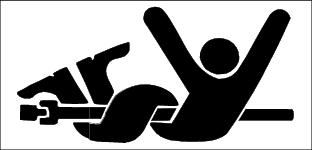
Using Rear and Mid PTO (Operator on Seat)
IMPORTANT: Avoid damage! Use rear mounted equipment rated for 540 rpm. Do not operate mid or rear PTO over 540 RPM mark on tachometer. |
NOTE: The mid-PTO is only operational with the operator on the seat.
Engaging the PTO
3. Move the transmission range shift lever to the N (neutral) position.
NOTE: The starter will not crank if the PTO switch knob is in the engaged/on position.
If the operator leaves the seat with the engine running and the mid-PTO engaged, the safety interlock system will stop the engine and all implements.
5. Set engine speed to 1500 rpm or less.
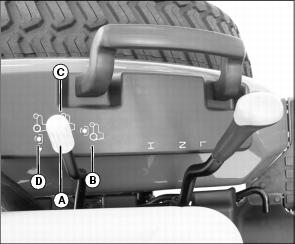
6. Move the PTO selector lever (A) to desired operating position.
• Position (B) - Mid PTO only.
• Position (C) - Mid and Rear PTO both.
• Position (D) - Rear PTO only.
7. Pull the PTO switch knob up to the engaged/on position.
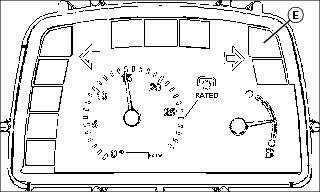
• The instrument panel PTO engaged light (E) will illuminate when the PTO is engaged.
8. Adjust the engine speed hand throttle forward to the desired speed for the implement used.
• Mid PTO speed will be 2100 rpm at the 540 PTO marker on the tachometer.
NOTE: The tachometer indicates a standard 540 PTO at an engine speed of 2600 rpm.
Disengaging the PTO
1. Adjust engine rpm to low idle.
2. Push PTO switch knob down to the disengaged/off position.
Using Rear PTO (Operator Off Seat)
IMPORTANT: Avoid damage! Use rear mounted equipment rated for 540 rpm. Do not operate mid or rear PTO over 540 RPM mark on tachometer. |
NOTE: The mid-PTO is only operational with the operator on the seat.
Engaging the PTO
3. Move the transmission range shift lever to the N (neutral) position.
NOTE: The starter will not crank if the PTO switch knob is in the engaged/on position.
If the operator leaves the seat with the engine running and the mid-PTO engaged, the safety interlock system will stop the engine and all implements.
5. Set engine speed to 1500 rpm or less.
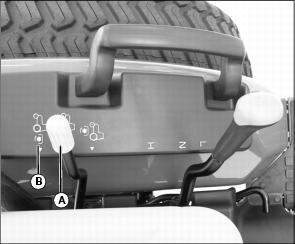
6. Move the PTO selector lever (A) to position (B) for rear PTO only.
7. Pull the PTO switch knob out to the engaged/on position. The instrument panel PTO engaged light will illuminate.
8. Adjust the engine speed hand throttle forward to the desired speed for the implement used.
NOTE: The tachometer indicates a standard 540 PTO at an engine speed of 2600 rpm.
Disengaging the PTO
1. Adjust engine rpm to low idle.
2. Push the PTO switch knob in to the disengaged/off position.
Using Drawbar Hitch
IMPORTANT: Avoid damage! Maximum static vertical load on drawbar should not exceed the maximum recommendations. Drive slowly with heavy loads. |
Maximum Drawbar Loads
Certain heavy equipment such as a loaded single-axle trailer can place excessive strain on the drawbar. Strain is greatly increased by speed and rough ground. Do not exceed the following maximum static vertical loads on drawbar:
• All Models............................................255 kg (562 lb)
Adjusting Drawbar Length
IMPORTANT: Avoid damage! For drawn PTO-driven implements, the drawbar must be in the operating position. |
The drawbar is equipped with three operating position adjusting holes (A) for changing drawbar length.
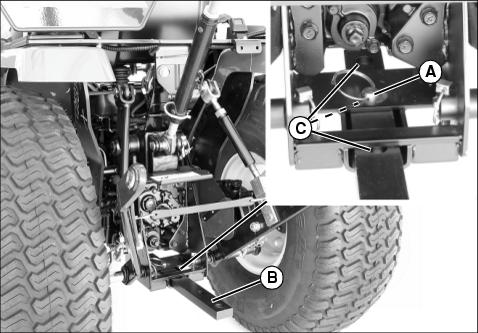
2. Adjust drawbar (B) to one of three desired operating position holes (C).
Using 3-Point Hitch
NOTE: The 3-point hitch on your machine is classified as a Category 1 hitch.
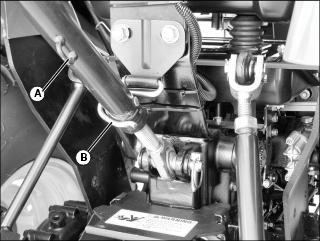
• Place center link (A) in storage hook (B) when hitch is not in use.
Using Rockshaft Control Lever
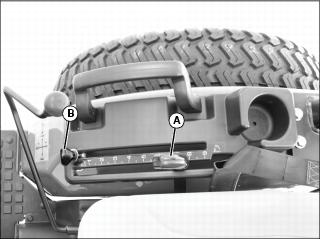
Use rockshaft control lever (A) to raise and lower equipment attached to the 3-point hitch.
The calibrated settings are for reference only and do not signify specific operating depths.
The adjustable depth stop (B) can be adjusted to maintain a particular implement operating depth. To use the depth stop knob:
1. Operate implement for a few minutes to determine the desired operating depth.
2. Loosen the depth stop knob.
3. Move knob against rockshaft control lever.
4. Tighten knob to keep the depth stop in position. Implement will operate in same position each time rockshaft control lever is pushed against the depth stop.
Using Rate of Drop/Lock Valve
The rate of drop/lock valve controls the rate of rockshaft drop when the rockshaft control lever is operated. This provides direct rate of drop control for 3-point hitch mounted implements. The valve can also be use to hydraulically lock the rockshaft (three-point hitch) in a desired position.
|
c CAUTION: Avoid injury! Excessive rate-of-drop may cause injury or damage. Fully lowering implement should take at least 2 seconds.
|
IMPORTANT: Avoid damage! To prevent overheating hydraulic oil and damaging machine, do not raise rockshaft when drop/lock valve is closed. |
Using the Draft Links
|
c CAUTION: Avoid injury! Look down and behind before and while backing. Clear area of all bystanders before backing machine.
|
1. Slowly back machine into position to align draft links with implement lift brackets.
2. Park machine safely. (See Parking Safely in the SAFETY section.)
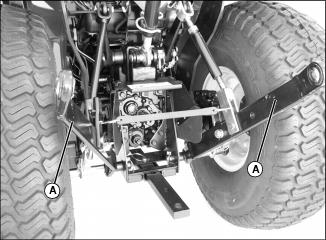
3. Connect draft links (A) to the implement.
4. Secure implement with lynch pins.
Leveling Implement Front-to-Rear
1. Park machine safely. (See Parking Safely in the SAFETY section.)
NOTE: When the 3-point hitch is not being used, return center link to storage hook (A).
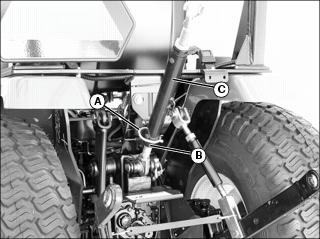
2. Lower implement to ground to relieve pressure on center link.
4. Rotate center link body (C) to lengthen or shorten the center link as needed.
Leveling Implement Side-to-Side
1. Lower any rear mount implement to the ground.
2. Park machine safely. (See Parking Safely in the SAFETY section.)
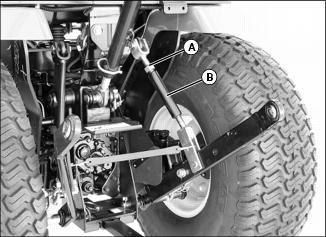
4. Rotate lift link body (B) to raise or lower draft link until 3-point hitch mounted implement is level from side-to-side.
Adjusting Implement Side-to-Side Sway
NOTE: Check implement operator’s manual procedure for adjusting sway links. When sway links have been properly adjusted, side sway of implement is controlled by position of links.
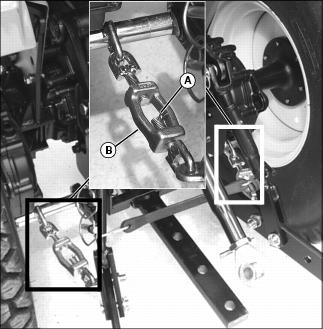
1. Lower any rear mount implement to the ground.
2. Park machine safely. (See Parking Safely in the SAFETY section.)
4. Rotate turnbuckle (B) to adjust length.
Using iMatch™ Quick-Hitch
Installing Hitch
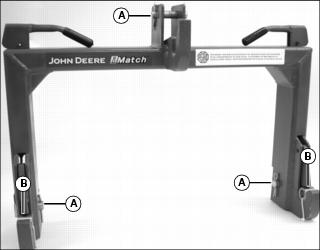
1. Remove three drilled pins (A) and two bushings (B) from hitch.
2. Use machine rockshaft control lever to fully lower 3-point hitch draft links.
3. Park machine safely. (See Parking Safely in the SAFETY section.)
4. Position hitch near draft links and adjust 3-point hitch sway links to align draft links with hitch.
5. Install hitch on draft links using drilled pins.
6. Install 3-point hitch center link on hitch using center link quick-lock pin and drilled pin.
Connecting Implement
1. Install two bushings included with hitch on drilled pins in implement draft link lift brackets.
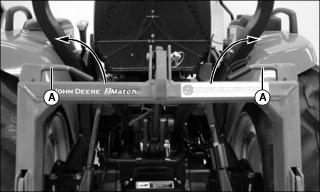
2. Move levers (A) on hitch to unlocked position.
3. Back machine into position and align hitch with implement lift brackets.
4. Use rockshaft control lever to position hitch under lift brackets and lift implement from ground.
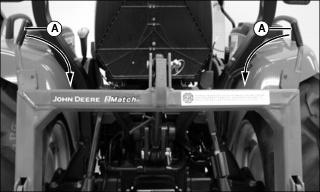
5. Fully raise implement. Move levers (A) on hitch to locked position.
Removing Implement and Hitch
1. With implement in raised position, move levers to unlocked position, then lower implement to ground.
2. Move tractor forward to disengage hitch from implement.
3. Move levers on hitch to locked position.
4. Use machine rockshaft control lever to fully lower hitch and 3-point draft links.
5. Remove drilled pins from 3-point hitch center link and draft links.
6. Place drilled pins in hitch for storage.
7. Move tractor forward to disengage from hitch.
Connecting Implement Hydraulic Hoses
1. Park machine safely. (See Parking Safely in the SAFETY section.)
2. Relieve hydraulic pressure:
• Move dual selective control valve (SCV) lever rearward-to-forward and side-to-side several times.
• Move third SCV lever rearward-to-forward several times if equipped.
3. See your implement operator’s manual for specific instructions on connecting hydraulic hoses to couplers. Install hose ends in couplers with matching colors.
• Colors for the couplers are shown on the label installed on the machine near the couplers.
4. See your implement operator’s manual for specific instructions on operating SCV controls.
IMPORTANT: Avoid damage! To prevent contamination of female quick couplers, color-coded hose ends should be installed in the couplers when not being used. |
Using Dual Selective Control Valve Lever
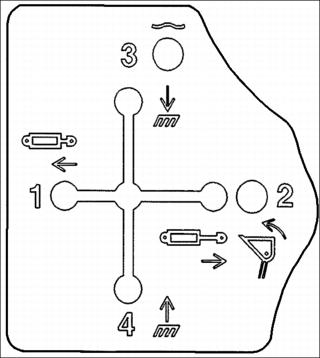
Picture Note: Standard label which may not exactly match label on your machine.
The label installed on the machine next to the dual selective control valve (SCV) lever shows the different lever positions.
Lever positions numbered 1-4 on the label match hydraulic line couplers numbered 1-4 on the label installed on the machine near the couplers. Moving the lever to position 1 will supply fluid to coupler 1 and return fluid through coupler 2 and so forth.
Move the lever to the full right or “regen” position for faster loader bucket dumping.
Move the lever to the full forward or “float” position to remove pressure in both lines 3 and 4 and allow fluid to flow back and forth between the lines. The lever may be left in the “float” position.
Using Selective Control Valve (SCV) Lock Lever
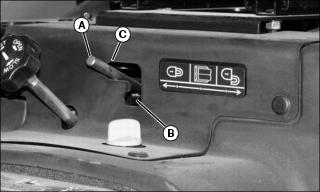
• Move lock lever (A) to the down position (B) to allow SCV lever movement in all directions. Operation of the SCV is unlocked.
• Move lock lever to upper right position (C) as shown to prohibit SCV lever movement in all directions. Operation of the SCV is locked.
Locking Out Dual SCV Regen Function
It may be necessary to prevent the dual SCV lever from moving to the full right or “regen” position when operating some implements. See your implement operator’s manual.
1. Park machine safely. (See Parking Safely in the SAFETY section.)
2. Remove right rear wheel. (See Removing and Installing Wheels in the SERVICE MISCELLANEOUS section.)
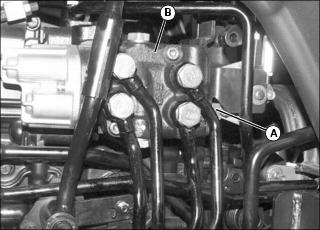
3. Move joystick back and forth to access locking pin on L-shaped bracket (A) on the front of the selective control valve (SCV) (B).
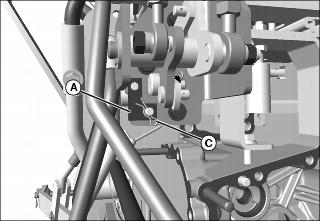
Picture Note: Shown with rear fender platform and closeout panel removed for clarity only.
4. Remove locking pin (C), and L-shaped bracket (A) from pins.
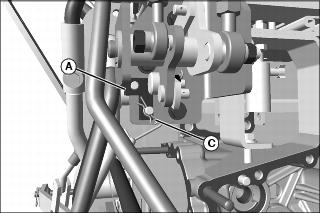
5. Flip L-shaped bracket (A) inverted, and install back onto pins, as shown.
7. Install wheel. Tighten wheel bolts to 115 N•m (85 lb-ft).
Using Accessory Electrical Outlet
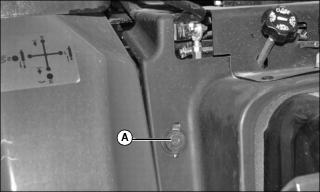
Accessory 12-volt electrical outlet (A) is used when connecting auxiliary equipment. When the circuit demand exceeds 15 amps, the fuse opens and needs to be replaced.
Ballasting Machine
|
c CAUTION: Avoid injury! Ballasted machine may become unstable when attachment is raised. Always drive slowly over uneven ground and when turning with raised attachment.
|
IMPORTANT: Avoid damage! Do not overload tires. Do not exceed tire maximum inflation pressure or maximum load capacity. |
Add weight to machine front end if needed for stability. Heavy pulling and heavy rear mounted implements tend to lift front wheels. Add enough ballast to maintain steering control and prevent tip over. Remove weight when it is no longer needed.
Tire Capacities
See tire maximum inflation pressure and maximum load capacities in the SPECIFICATIONS section.
Verify maximum tire inflation pressure and maximum load information if embossed into the tire side wall.
Using Rear Cast Iron Wheel Weights
1. Mount rear wheels in the wide position for improved stability.
|
c CAUTION: Avoid injury! Machine component or attachment is heavy. Use a safe lifting device or get an assistant to help lift, install or remove component or attachment.
|
2. Fasten weight to each rear wheel using a safe lifting device. A total of three weights per wheel may be used. See your implement operator’s manual for installation and number of weights to use.
Rear wheel weights are available from your JohnJohn nbspDeere Dealer.
Using Rear Ballast Box
|
c CAUTION: Avoid injury! To improve front loader-machine stability, use of ballast box is recommended. Use ballast as recommended in loader operator’s manual.
|
The rear ballast box is used for carrying ballast on the 3-point hitch. Approximate weight of different materials is given in the implement operator’s manual.
Using Liquid Weight in Tires
NOTE: Use of alcohol as ballast is not recommended. Calcium chloride solution is heavier and more economical.
A solution of water and calcium chloride provides safe economical ballast, and will prevent freezing. If used properly, it will not damage tires, tubes, or rims.
A mixture of 0.4 kg of calcium chloride per liter of water (3.5 lb/gal), will not freeze solid above -45? C (-50? F).
Fill tubeless tires at least to valve stem level (minimum 75% full). Less solution would expose part of rim, possibly causing corrosion.
Tube-type tires may be filled to any level below 90%.
Using Front Weights
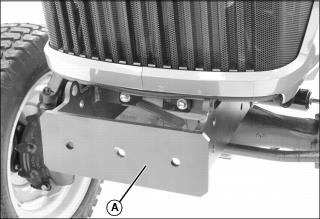
Front weight bracket (A) is an integral part of the machine frame. The bracket will hold up to three Quick-Tatch® weights.
Quick-Tatch weights and attaching hardware are available at your JohnJohn nbspDeere dealer.
See your implement operator’s manual for installation and required number of weights to use.
An optional front weight bracket extension kit to hold additional Quick-Tatch weights is available at your JohnJohn nbspDeere dealer.
Transporting Machine on Trailer
|
c CAUTION: Avoid injury! Use extra care when loading or unloading the machine into a trailer or truck.
|
NOTE: Use a heavy-duty trailer to transport your machine.
1. Drive machine forward onto trailer.
2. Lower any implements to trailer deck.
6. Close the fuel shut-off valve.
7. Fasten machine to trailer with heavy-duty straps, chains, or cables. Both front and rear straps must be directed down and outward from machine. Trailer must have signs and lights as required by law.
Transporting Machine
Driving Machine Safely on Roads
Observe the following precautions when operating the machine on a road:
• Make sure brake linkage is properly adjusted.
• Make sure Slow Moving Vehicle (SMV) emblem and warning lights are clean and visible. If towed or rear-mounted equipment obstructs these safety devices, install SMV emblem and warning lights on equipment.
• Turn on flashing warning lights and headlights, except if prohibited by law.
• Secure towed loads with locked hitch pins and safety chains.
• Drive slowly enough to maintain safe control at all times. Slow down for hillsides, rough ground, and sharp turns, especially when transporting heavy, rear-mounted implements.
• If equipped, disengage the MFWD to reduce tire wear.
• Never coast machine downhill.
Pushing or Towing Machine
|
c CAUTION: Avoid injury! Never tow machine faster than 16 km/h (10 mph). If possible, have someone operate steering and brakes of towed tractor.
|
1. Push PTO switch knob to the disengaged/off position.
2. Disengage differential lock.
4. Place the range shift lever in the N (neutral) position.
6. Be prepared to use the brake pedal to slow or stop machine.
Towing Loads
1. Hitch the towed load only to the drawbar. Lock the drawbar and pin in place.
2. Install a safety chain to the machine drawbar support and to the towed load. Provide only enough slack to permit turning.
3. Before descending a hill, shift to a gear low enough to control machine travel speed without having to use the brake pedals to brake the machine and installed implements.
Using Safety Chain
|
c CAUTION: Avoid injury! Hitch towed loads only to the drawbar to avoid rearward upset. Do not use the safety chain for towing loads.
|
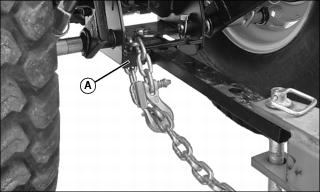
1. Route safety chain through drawbar hitch assembly (A) and attach chain hook to chain.
2. Remove the safety chain and store when not in use.
Raising and Lowering Roll-Over Protective Structure (ROPS)
Lowering ROPS Crossbar
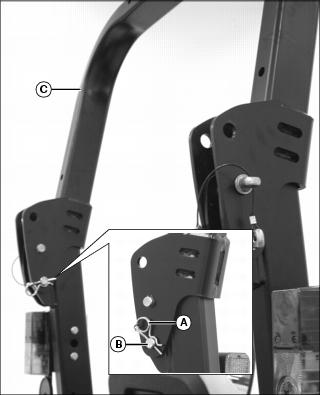
1. Remove spring locking pin (A) and drilled pin (B) on each side of the ROPS.
2. Carefully lower ROPS crossbar (C).
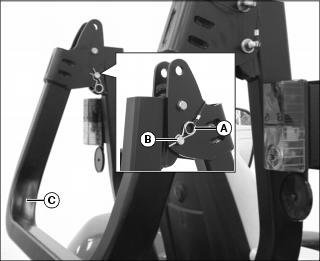
3. Align crossbar bracket holes with support bracket holes on each side of the ROPS.
4. Install drilled pins (B) and spring locking pins (A) to lock crossbar (C) in the lowered position.
Raising ROPS Crossbar
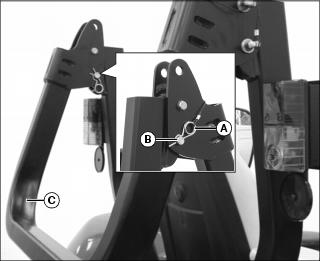
1. Remove spring locking pins (A) and drilled pins (B) on each side of the ROPS.
2. Carefully raise ROPS crossbar (C) to the operating position.
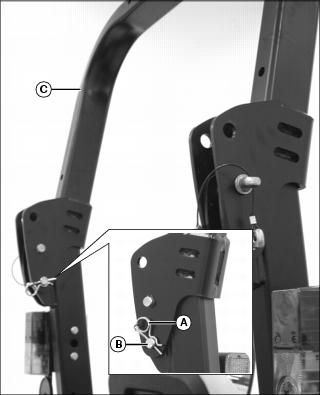
3. Align crossbar bracket holes with support bracket holes on each side of the ROPS.
4. Install drilled pins (B) and spring locking pins (A) to lock crossbar (C) in the raised position.