
Installing
Preparing Machine
Required Equipment
Machine Setup
1. Park machine safely. (See Parking Safely in SAFETY.)
2. Follow machine operator’s manual instructions to check tire pressure.
3. Follow instructions in ASSEMBLY in this manual.
Installing Mower
NOTE: Remove front weights if equipped before installing mower. Replace weights after mower is installed.
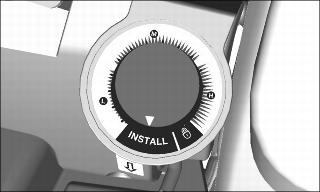
1. Set mower height control to the INSTALL position.
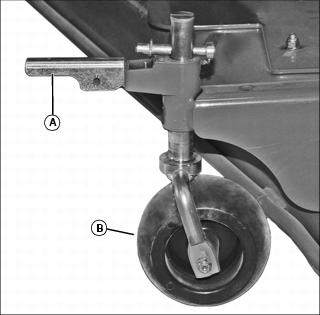
2. Raise handle (A) to release lock on each gage wheel (B). Mower should be resting fully on ground.
3. Ensure that mower is sitting on firm, level ground. An extremely smooth surface can allow mower to be pushed along by tractor. make sure rear tires are inflated to 20 PSI.


5. Ensure that the rear lock assembly (E) is in the locked (F) position. The lock assembly will automatically unlock as the machine engages the mower, and lock after full engagement.
6. Lower mower lift arms using SCV or rockshaft lever control.
7. Shift machine PTO selector to Rear PTO only to allow the mid-PTO and driveshaft to turn freely and engage the mower gearbox with minimal resistance.

8. Engage tractor MFWD, and in low range drive machine straight toward rear of mower while aligning outside of left front tire (G) to just contact the guide bar (H) on left side of mower.
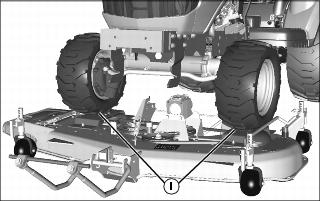
9. Drive tractor slowly, smoothly and straight over top plates (I) on mower.

10. Continue driving tractor over front edge of mower until the front draft link pivot pin (J) fully engages the notches in the front support hangers (K) and the mower just begins to move forward. Stop the machine and lock the park brake.
• If the mower pulls forward early or appears to be caught in lift system, stop tractor, reverse sightly and move forward again. If mower still does not properly attach, stop tractor, lock park brake, dismount tractor and determine cause of problem. See TROUBLESHOOTING Section for additional information.
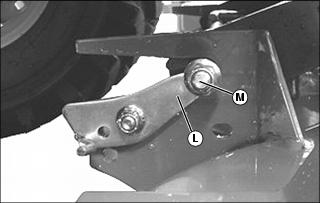
11. Dismount tractor and ensure that the rear lock tab (L) on each side of mower is raised and firmly seated against the rear lift arm rod (M).

NOTE: Uneven ground may require a larger gap (P), while level ground a smaller gap. Too much gap will effect front to rear deck leveling. Too little gap will cause lock to function improperly.
13. Start engine and lift mower to highest position.
14. Adjust gage wheels as required for desired mowing height. (See OPERATING - Adjusting Mower Wheels in this manual.)
15. Adjust height-of-cut control to the desired setting, lower mower and stop engine.
Driveshaft Connection - AutoConnect
If the machine is equipped with an AutoConnect Kit, the driveshaft is installed on the machine and will automatically connect with the mower gearbox as the mower is installed on the machine.
• Shift machine PTO selector to Mid-PTO to allow for mower operation.
Driveshaft Connection - Standard
If the machine is not equipped with an AutoConnect kit, a standard driveshaft is installed on the mower gearbox and must be directly connected to the machine Mid-PTO shaft.
1. To connect a standard driveshaft to the machine:

a. Lift the driveline from the mower hanger and position it inline with the machine PTO shaft (A).
b. Pull the driveshaft collar (B) toward the front of the machine.
c. Align the rear driveshaft yoke (C) with the PTO shaft and push the yoke onto the shaft completely. It may be necessary to rotate the driveshaft slightly to initially engage the shaft.
d. Release the collar. Slide the yoke front-to-back to ensure the yoke lock has firmly seated in the PTO shaft detent.
2. Shift the machine PTO selector to Mid-PTO to allow for mower operation.


