
Service Electrical
Battery Statement
Service the Battery Safely

Checking Battery
IMPORTANT: Avoid damage! Do not attempt to open, add fluid or service battery. Any attempt to do so will void warranty and lead to possible injury. |
· Keep battery and terminals clean.
· Charge, if necessary, at 6-10 amperes for 1 hour.
Removing and Installing the Battery
Removing:
 c CAUTION: Avoid injury! Always remove negative (-) battery cable first, and install it last, to prevent electrical short circuit to chassis.
|
1. Park machine safely. (See Parking Safely in the Safety section.)
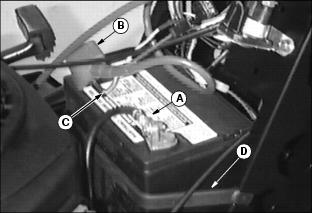
2. Disconnect negative (-) battery cable (A).
3. Push red cover (B) away from positive (+) battery cable and remove cable (C) from battery.
Installing:
1. Place battery on battery tray.
2. Connect positive (+) cable to battery first, then negative (-) cable.
3. Apply dielectric grease to terminals to prevent corrosion.
4. Slide red cover over positive battery cable.
5. Install black rubber strap.
Cleaning Battery and Terminals
1. Disconnect and remove battery.
2. Wash battery with solution of four tablespoons of baking soda to one gallon of water. Be careful not to get the soda solution into the cells.
3. Rinse the battery with plain water and dry.
4. Clean terminals and battery cable ends with wire brush until bright.
5. Apply dielectric grease to terminals to prevent corrosion.
Using Booster Battery
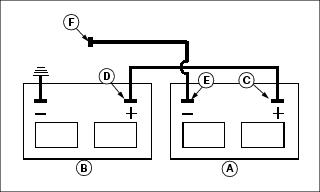
1. Connect positive (+) booster cable to booster battery (A) positive (+) post (C).
2. Connect the other end of positive (+) booster cable to the disabled vehicle battery (B) positive (+) post (D).
3. Connect negative (-) booster cable to booster battery negative (-) post (E).
4. Connect the other end (F) of negative (-) booster cable to a metal part of the disabled machine frame away from battery.
5. Start the engine of the disabled machine and run machine for several minutes.
6. Carefully disconnect the booster cables in the exact reverse order: negative cable first and then the positive cable.
Replacing Fuse
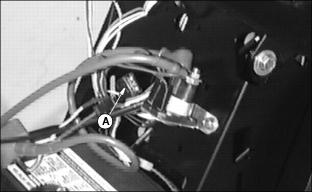
2. Pull defective fuse (A) out of socket.
3. Check metal clip in fuse window and discard fuse if clip is broken.
Replacing Headlight Bulb
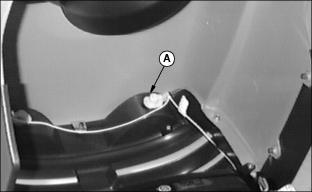
2. Push in and turn bulb socket (A) 1/4 turn counterclockwise to remove.
3. Replace defective bulb(s) with a new bulb.
4. Insert bulb socket into housing, push in and turn 1/4 turn clockwise to install.
Replacing Battery Discharge and Oil Pressure Indicator Light Bulbs
NOTE: If more than one bulb is defective, replace only one bulb at a time. Make sure light socket is installed in correct holder.
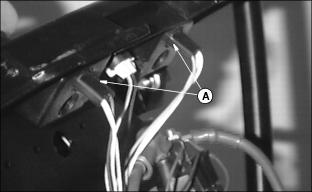
2. Turn indicator bulb socket (A) 1/8 turn counterclockwise to remove it.
4. Push new bulb into socket and install socket into holder.