
Preparing Vehicle
Remove 3-Point Hitch and Install Hitching Hardware (Tractors with 3-Point Hitch)
1. Park machine safely. (See Parking Safely in the Safety section.)
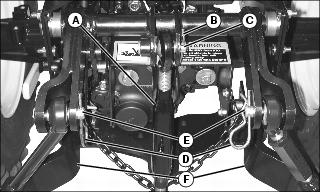
2. Remove upper lift link (A) from tractor by removing quick-pull pin (B) and drilled pin (C).
3. Remove quick-pull pins (D) and drilled pins (E) from lower lift links (F).
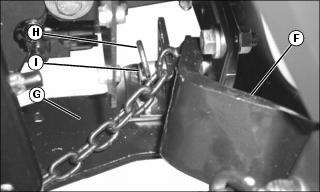
Picture Note: Right side shown
4. Remove each lower lift link (F) from tractor hitch plate (G) by removing quick-pull pin (H) and drilled pin (I).
NOTE: M145217 drilled pins are not included in kit. These pins allow operator to switch between 3-point hitch applications and MC519 Utility Cart without tools. See John Deere dealer.
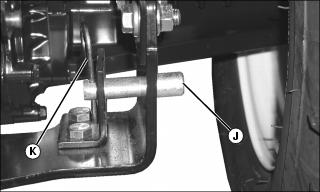
Picture Note: Right side shown
5. Install two M145217 drilled pins (J) from outside of tractor hitch plate.
6. Insert two original quick-pull pins (K).
Install Hitching Hardware (Tractors without 3-Point Hitch)
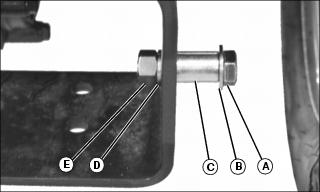
Picture Note: Right Side Shown
1. Install two 1/2x2 in. hex head bolts (A), 1/2 in. washers (B) and spacers (C) from outside of tractor hitch plate.
2. Secure with two 1/2 in. lock washers (D) and 1/2 in. nuts (E).