
Installing
Hitching Cart to Tractor
1. Park machine safely. (See Parking Safely in the Safety section.)
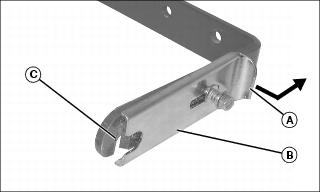
2. On both sides of Quik-Tatch hitch, grasp tab (A) and pull side plate (B) out and slide to rear to expose hook (C).
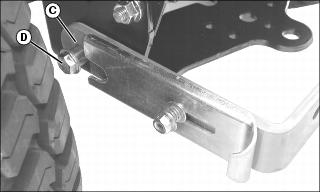
3. Place each hook (C) over hitching hardware (D) previously installed on tractor.
 c CAUTION: Avoid injury! Side plate must seat completely in Quik-Tatch bracket hole. Failure to completely seat side plate may result in cart coming unhitched from tractor.
|
IMPORTANT: Avoid damage! Tractors without 3-point hitch: Side plate (B) must be between washer (E) and Quik-Tatch bracket (F), not outside of washer. |
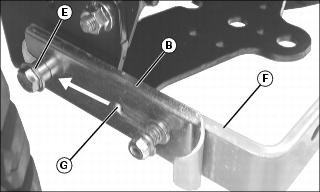
4. Slide side plate (B) forward until side plate locks into position. Tab (G) on back of plate must seat completely in Quik-Tatch bracket hole.
Adjusting Side Plate Spring
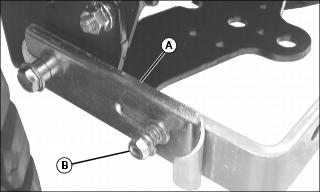
Adjust spring tension to allow ease of movement for side plate (A) by turning nut (B) counterclockwise to loosen or clockwise to tighten.
Connecting Cable Assembly to Tractor Hitch Plate
NOTE: Spring snap link must be hooked in manner shown.
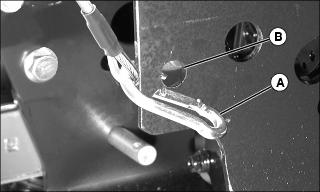
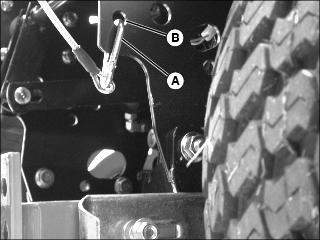
Hook spring snap link (A) at end of cable assembly to hole in tractor hitch plate (B).
Installing POWER FLOW® Chute
NOTE: The MC519 Material Collection Utility Cart requires a POWER FLOW and discharge chute for collection of grass clippings, leaves and debris. See your John Deere dealer to order correct POWER FLOW and discharge chute.
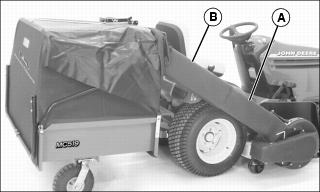
1. Insert upper end of POWER FLOW chute (A) into cover chute (B).