
Service Miscellaneous
Resetting Service Indicator Light
NOTE: Service indicator light must be reset each time service is performed.
1. Park machine safely. (See Parking Safely in the SAFETY Section.)
3. Turn ignition key to on position.
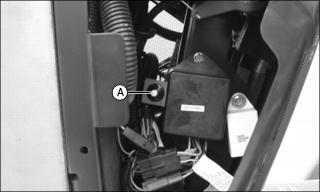
4. Press yellow button (A) and hold until service indicator light blinks twice on the instrument panel.
6. Turn ignition key to off position.
Filling Fuel Tank
Use regular grade 87 octane unleaded fuel.
Add John Deere fuel stabilizer to fuel before using it in your machine to prevent engine damage due to stale fuel. Follow directions on stabilizer container.

Fill fuel tank at the end of each day's operation to prevent condensation and freezing during cold weather.
Fuel tank capacity is 24.6L (6.5 gal).
1. Park machine safely. (See Parking Safely in the SAFETY section.)
3. Remove any trash from area around fuel tank cap.
4. Remove fuel tank cap slowly to allow any pressure built up in tank to escape.
5. Fill fuel tank only to bottom of filler neck.
Checking Wheel Bolt Tightness
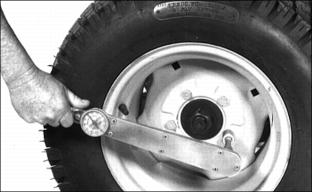
Check wheel bolts often during the first 100 hours of operation. Tighten every other bolt in sequence until all bolts are at 88 N·m (65 lb-ft).
Cleaning and Repairing Plastic Surfaces
Your authorized dealer has the professional materials needed to properly remove surface scratches from any plastic surfaces, do not attempt to paint over marks or scratches in plastic parts.
1. Rinse hood and entire machine with clean water to remove dirt and dust that may scratch the surface.
2. Wash surface with clean water and a mild liquid automotive washing soap.
3. Dry thoroughly to avoid water spots.
4. Wax the surface with a liquid automotive wax. Use products that specifically say "contains no abrasives."
5. Buff applied wax by hand using a clean, soft cloth.
Cleaning and Repairing Metal Surfaces
Cleaning:
Follow automotive practices to care for your vehicle painted metal surfaces. Use a high-quality automotive wax regularly to maintain the factory look of your vehicle's painted surfaces.
Repairing Minor Scratches (surface scratch):
1. Clean area to be repaired thoroughly.
2. Use automotive polishing compound to remove surface scratches.
3. Apply wax to entire surface.
Repairing Deep Scratches (bare metal or primer showing):
1. Clean area to be repaired with rubbing alcohol or mineral spirits.
2. Use paint stick with factory-matched colors available from your authorized dealer to fill scratches. Follow directions included on paint stick for use and for drying.
3. Smooth out surface using an automotive polishing compound. Do not use power buffer.
Raising and Lowering Hood
Raising
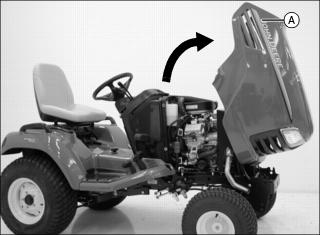
1. Lift rear of hood (A) and tilt to fully upright position.
Lowering
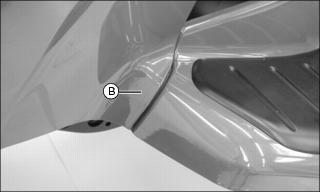
2. Check to be sure hood tabs (B) catch in frame on both sides of machine.
Removing and Installing Hood
Removing
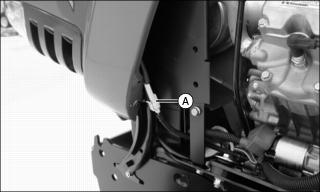
2. Disconnect headlight harness (A) on left side of machine.
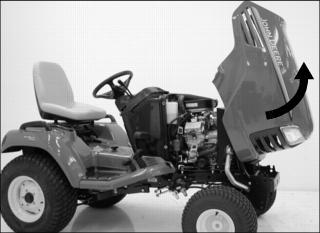
3. Pull hood forward and roll hood up and out of rail.
Installing
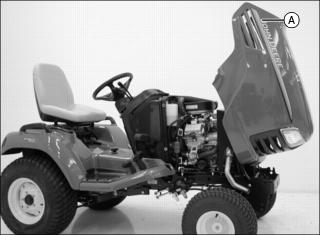
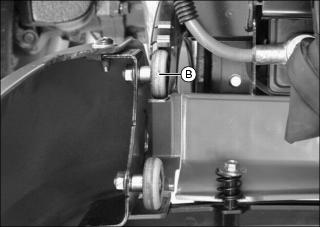
2. Install first set of rollers (B) on hood into rail.
3. Connect headlight harness on left side of machine.
4. Tilt rear of hood toward steering wheel and lift hood up and drop second set of rollers into rail.
5. Allow hood to roll downward on rail.
Removing and Installing Side Panels
Removing
1. Park machine safely. (See Parking Safely in the SAFETY Section.)
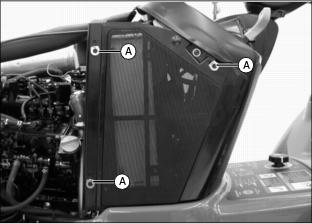
3. Flip up and turn each spring-loaded fastener (A) into slots in side panels.
4. Lift side panels off machine.
Installing
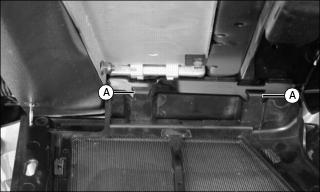
1. Install tabs (A) in bottom of side panels into grooves on machine frame.
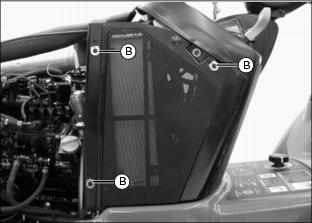
2. Install fasteners (B) through slots in side panels. Turn and flip down each fastener to secure side panels.