
Service Engine
Engine Warranty Maintenance Statement
Maintenance, repair, or replacement of the emission control devices and systems on this engine, which are being done at the customer’s expense, may be performed by any non-road engine repair establishment or individual. Warranty repairs must be performed by an authorized John Deere dealer.
Avoid Fumes
Engine Oil
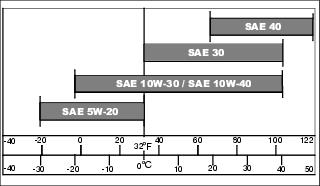
Use oil viscosity based on the expected air temperature range during the period between oil changes.
The following oils are preferred:
The following oils are also recommended, based on their specified temperature range:
Other oils may be used if above John Deere oils are not available, provided they meet one of the following specifications:
• API Service Classification SF, SG, SH or SJ
Checking Engine Oil Level
NOTE: Check oil twice a day if you run engine over 4 hours in a day.
Make sure engine is cold when checking engine oil level.
1. Park machine safely. (See Parking Safely in the SAFETY Section).
3. Clean area around dipstick prior to removing it.
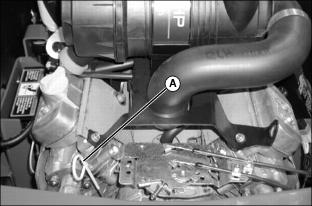
4. Remove dipstick (A). Wipe it clean.
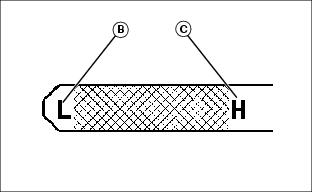
6. Remove dipstick and check oil level. Oil level should be between “low” (B) and “high” (C) marks on dipstick.
• If oil is low, add oil to bring oil level no higher than the “H” high mark on dipstick.
• If oil level is above the “H” high mark, drain to proper level.
IMPORTANT: Avoid damage! To prevent extensive engine wear or damage, always maintain the proper engine oil level. Never operate the engine with the oil level below the add mark or over the full mark. |
Changing Engine Oil and Filter
IMPORTANT: Avoid damage! Change the oil more often if the vehicle is used in extreme conditions: |
2. Park machine safely. (See Parking Safely in the SAFETY section).
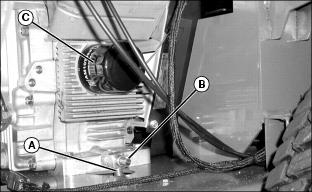
3. Connect an appropriate size hose to drain tube (A) and place container under hose.
5. Allow oil to drain into an oil drain pan.
6. After oil drains, close drain valve and remove hose.
7. Remove oil filter (C). Turn filter counterclockwise to remove.
8. Apply a film of clean engine oil on gasket of new filter.
9. Install filter. Turn filter clockwise until gasket makes contact with mounting surface. Tighten 1/2 to 3/4 turn after gasket contact.
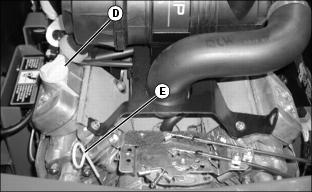
10. Clean area around the oil fill cap (D) and oil dipstick (E).
11. Unscrew and remove the oil fill cap.
12. Add approximately 1.4 L (1.5 qt) of oil.
13. Install and tighten oil fill cap.
14. Start engine and run at slow throttle for approximately two minutes. Check for leaks around filter and drain plug.
• Remove and wipe oil dipstick clean with a rag.
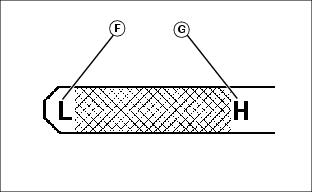
• Remove dipstick and check oil level. Oil level must be between the “low” (F) and “high” (G) marks on dipstick. Add oil if needed.
Cleaning Air Intake Screen and Pump Drive Belt Compartment
 c CAUTION: Avoid injury! Compressed air can cause debris to fly a long distance.
• Clear work area of bystanders. • Wear eye protection when using compressed air for cleaning purposes. |
1. Park machine safely. (See Parking Safely in the SAFETY section.)
2. Lift and secure operator seat in the raised position.
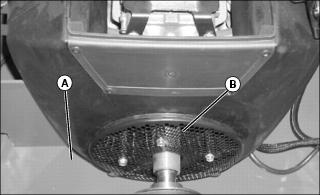
3. Remove grass and debris from pump drive belt compartment (A).
4. Clean air intake screen (B) with a rag, brush or compressed air.
Cleaning Engine Blower Fan
|
c CAUTION: Avoid injury! Compressed air can cause debris to fly a long distance.
• Clear work area of bystanders. • Wear eye protection when using compressed air for cleaning purposes. |
1. Park machine safely. (See Parking Safely in the SAFETY section.)
2. Lift and secure operator seat in the raised position.
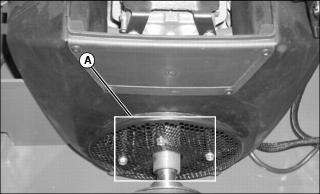
3. Remove four screws securing air intake screen (A).
4. Clean blower fan with a rag, brush or compressed air.
5. Replace air intake screen and install four screws to secure it to engine.
Checking and Cleaning Canister Style Air Cleaner Elements
IMPORTANT: Avoid damage! Dirt and debris can enter the engine when removing the air cleaner elements. Service elements only at prescribed intervals. |
Servicing Primary Air Cleaner Element
1. Park the machine safely. (See Parking Safely in the SAFETY section.)
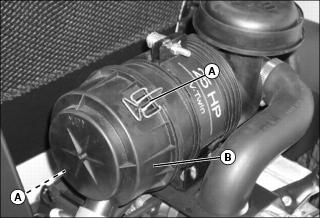
3. Release latches (A) and remove air cleaner canister cover (B).
NOTE: Inspect secondary air cleaner element. Replace if necessary.
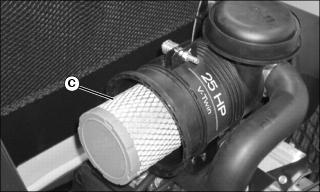
4. Remove and discard primary element (C). Replace with new primary element.
5. Install air cleaner canister cover with rubber dust unloading valve pointing downward.
Servicing Secondary Air Cleaner Element
1. Remove primary air cleaner element.
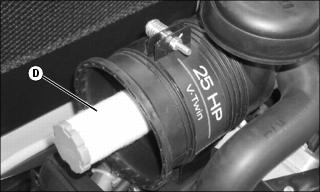
2. Remove and discard secondary air cleaner element (D). Install new secondary element.
3. Install primary air cleaner element.
4. Install air cleaner canister cover.
Checking Spark Plugs
1. Park machine safely. (See Parking Safely in the SAFETY section.)
2. Clean area around both spark plugs.
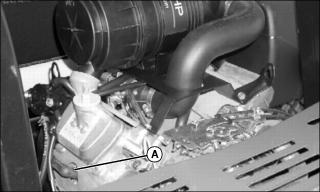
Picture Note: Spark plug on left side shown.
3. Disconnect the spark plug wire (A) from each plug.
4. Remove and inspect spark plugs:
• Clean each plug and check for damage, replace if necessary.
• If plugs are in good condition, check gap.
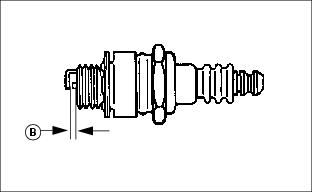
5. Check and adjust spark plug gap (B) to 0.75 mm (0.030 in.).
• Tighten to 22 N•m (16 ft-lb).
7. Install both spark plug wires.
Cleaning Engine Oil Cooling Fins (Model 757)
|
c CAUTION: Avoid injury! Compressed air can cause debris to fly a long distance.
• Clear work area of bystanders. • Wear eye protection when using compressed air for cleaning purposes. |
IMPORTANT: Avoid damage! To ensure proper cooling, keep the cooling fins clean at all times. Operating the machine with obstructed cooling fins could cause damage due to overheating. |
1. Park machine safely. (See Parking Safely in the Safety section.)
2. Locate engine oil cooler on right side of the engine.
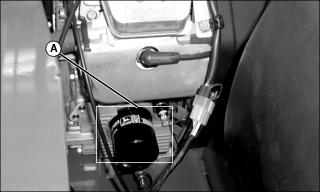
4. Clean engine oil cooling fins (A) with a rag, brush, or compressed air.
Cleaning Grass and Debris from Engine
1. Park machine safely (See Parking Safely in the Safety section).
NOTE: If all grass and debris cannot be cleaned out after removing the three covers, loosen the whole shroud and pull it away from the engine. This will allow even more access to areas needing to be cleaned.
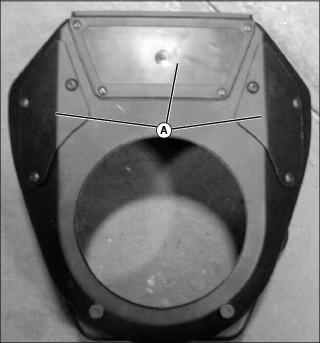
Picture Note: Shroud removed for photo purposes only.
2. Remove ten screws and three covers (A).
|
c CAUTION: Avoid injury! Compressed air can cause debris to fly a long distance.
• Clear work area of bystanders. • Wear eye protection when using compressed air for cleaning purposes. |
4. With compressed air, thoroughly clean grass buildup and debris from the following areas:
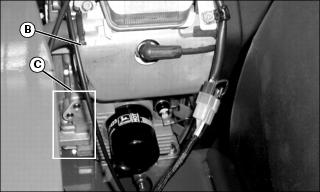
• Remove shields (B) located on left and right sides of engine to clean behind each spark plug access hole.
• Area (C) on the right side of the engine.
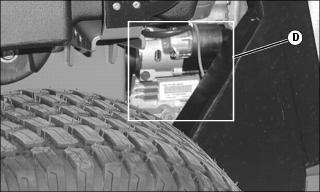
• Area (D) on the rear and left side of the engine.
7. Install three covers on shroud.
Adjusting Carburetor
NOTE: Carburetor is calibrated by the engine manufacturer and is not adjustable.
If engine is operated at altitudes above 1829 m (6,000 ft), some carburetors may require a special high altitude main jet. See your authorized dealer.
If engine is hard to start or runs rough, check the TROUBLESHOOTING section of this manual.
Possible engine surging will occur at high throttle with transmission in “N” neutral and mower engagement lever disengaged. This is a normal condition due to the emission control system.
After performing the checks in the troubleshooting section and your engine is still not performing correctly, contact your authorized dealer.
Replacing Fuel Filter
NOTE: Change filter when fuel level is low.
1. Park machine safely. (See Parking Safely in the SAFETY section).
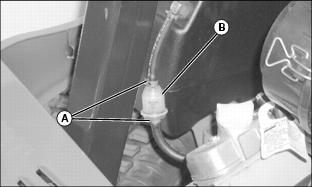
3. Slide hose clamps (A) away from fuel filter (B).
4. Place a drain pan under hoses to catch any fuel that may be left in the hoses.
5. Disconnect hoses from fuel filter.
• Make sure fuel filter is installed with arrow pointing in direction of fuel flow.