
Service Electrical
Battery Warning
Service the Battery Safely


Removing and Installing Battery
IMPORTANT: Avoid damage! The battery drain tube allows excess battery acid to flow away from the machine. Make sure the tube opening is free of obstruction. |
Removing:
1. Park the machine safely. (See Parking Safely in the SAFETY section.)
2. Secure the operator seat in the raised position.
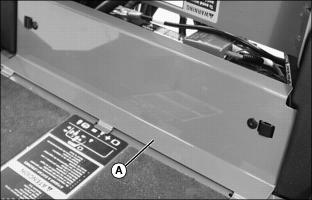
3. Remove service access panel (A) below operator seat platform.

4. Loosen wing nuts (B) to remove battery hold-down (C).
5. Disconnect negative (-) battery cable (D).
6. Push red cover away from positive (+) battery cable (E) and disconnect cable from battery.
Installing:
1. Install battery into vehicle.
2. Check cell caps to be sure vent holes are open.
3. Connect positive (+) cable to battery positive (+) terminal first, then negative (-) cable to battery negative (-) terminal.
4. Apply spray lubricant on battery terminals to help prevent corrosion.
5. Install battery hold-down. Tighten wing nuts.
6. Install service access panel.
Cleaning Battery and Terminals
1. Park machine safely. (See Parking Safely in the SAFETY section.)
2. Disconnect and remove battery.
3. Wash battery with solution of four tablespoons of baking soda to one gallon of water. Be careful not to get the soda solution into the cells.
4. Rinse the battery with plain water and dry.
5. Clean terminals and battery cable ends with wire brush until bright.
7. Attach cables to battery terminals using washers and nuts.
8. Apply spray lubricant to terminal to prevent corrosion.
Using Booster Battery

1. Connect positive (+) booster cable to booster battery (A) positive (+) post (C).
2. Connect the other end of positive (+) booster cable to the disabled vehicle battery (B) positive (+) post (D).
3. Connect negative (–) booster cable to booster battery negative (–) post (E).
4. Connect the other end (F) of negative (–) booster cable to a metal part of the disabled machine engine block away from battery.
5. Start the engine of the disabled machine and run machine for several minutes.
6. Carefully disconnect the booster cables in the exact reverse order: negative cable first and then the positive cable.
Checking Interlock Module
The interlock module is a diagnostic tool to help the operator verify correct electrical functions of the machine. For the module to function correctly, all input switches, output solenoids and relays must be connected and functioning properly.
1. Park the vehicle safely. (See Park Safely in SAFETY section.)
2. Secure operator seat in the raised position.
3. Turn the key to the RUN position.

4. Locate interlock module (A).
NOTE: The module is equipped with a diagnostic light which indicates if the module is functioning correctly. When the module is functioning correctly, the diagnostic “HEARTBEAT” light (B) will be illuminated and blinking whenever the key switch is turned to the RUN position.
5. Check to see if the diagnostic “HEARTBEAT” light is blinking.
• Check to see if battery is charged. Charge if needed.
• Blown 15-amp key switch fuse (C).
• Electrical harness connections.
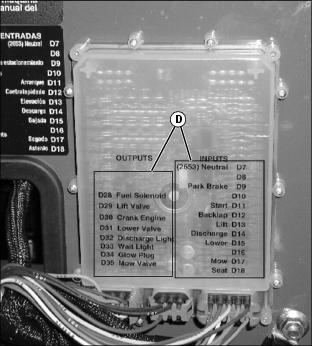
7. If starter does not engage, use the module display lights (D) and diagnostic codes to diagnose the problem. The module display lights will illuminate as each function switch is actuated.
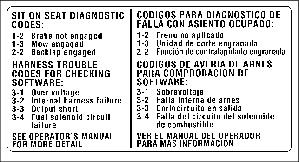
Picture Note: Diagnostic code label is located on side of console.
8. Turn and hold key to START position and note diagnostic code the “HEARTBEAT” light displays:
9. If further diagnostic assistance is needed, refer to the Technical Manual or consult your John Deere distributor.
Checking and Replacing Fuse
IMPORTANT: Avoid damage! The electrical system may be damaged if incorrect replacement fuses are used. Replace the bad fuse with a fuse of the same amp rating. |
1. Park the vehicle safely. (See Park Safely in the SAFETY section.)
2. Secure operator seat in the raised position.

3. Locate fuse holder (A) under operator seat platform.