Spreader Product Setup
-
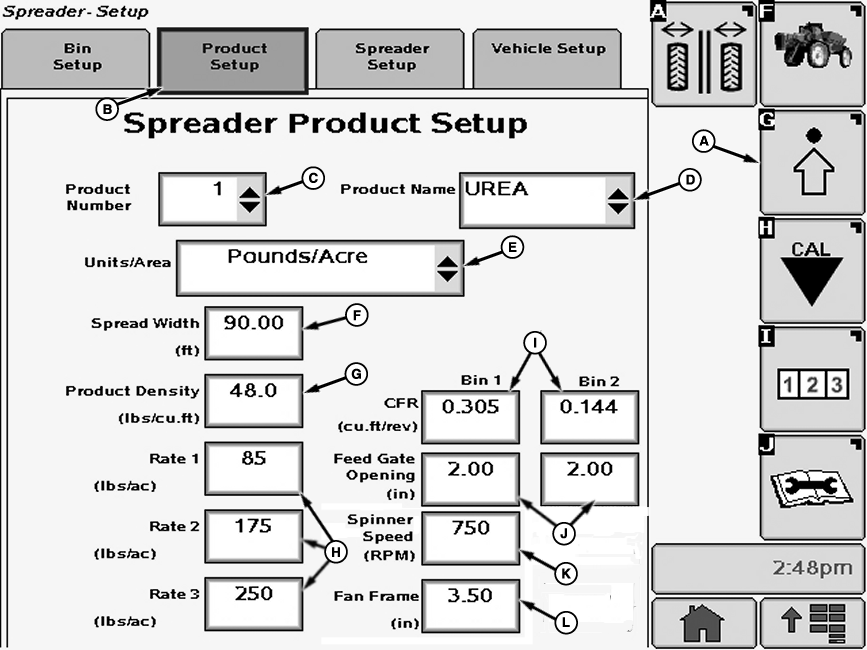
N82568-UN-08DEC08A - Setup Softkey
B - Product Setup Tab
C - Drop-down Box
D - Drop-down Box
E - Drop-down Box
F - Input Box
G - Input Box
H - Input Box
I - Input Box
J - Input Box
K - Input Box
L - Input Box
Select the Setup softkey (A). -
Select the Product Setup tab (B). Spreader Product Setup screen appears.
The following items are displayed on the Product Setup screen:
Product Number (C):—Allows operator to number products that are programmed into Spreadstar™.
Product Name (D):—Allows operator to select between products that are programmed into Spreadstar™.
Units/Area (E):—Allows operator to select either kg/ha or t/ha (lb./acre or tons/acre) as the unit of measure for the product.
Spread Width (F):—Allows operator to enter spread width in meters (feet).
Product Density (G):—Where density of selected product, in kg/m3 (lb./cu. ft.), is input into Spreadstar™.
Application Rates 1, 2, or 3 (H):—Where target application rates, in kg/ha or t/ha (lb./acre or tons/acre), are input into Spreadstar™.
CFR (I):—Conveyor Feed Rate. Volume of material in cm3 spread per revolution of the belt drive roller at a 1.0 cm feed gate opening (cu. ft. per revolution at 1.0 in. feed gate opening). CFR can be entered for material in each bin. Input box under Bin 2 will not be present if in single bin setup.
Feed Gate Opening (J):—Where opening in cm (in.) is entered for each bin.
Spinner Speed (K):—Where target spinner speed in rpm is entered.
Fan Frame (L):—Where fan frame setting in cm (in.) is entered.
NOTE: Fan Frame setting is for operator reference only and is not used in any Spreadstar™ application rate calculations. Refer to spreader preparation in the Spread Pattern section of this manual for proper fan frame settings based on product type being applied.
|
Spreadstar is a trademark of Deere & Company |
OUO6092,00009AF-19-20150519 |