Unfolding/Extending Tool Bar
-
 CAUTION: Prevent serious injury or death. Machine coming near
or contacting power lines can cause electrocution. Electrocution can
occur without contact. Fully lower wings before moving or transporting.
CAUTION: Prevent serious injury or death. Machine coming near
or contacting power lines can cause electrocution. Electrocution can
occur without contact. Fully lower wings before moving or transporting.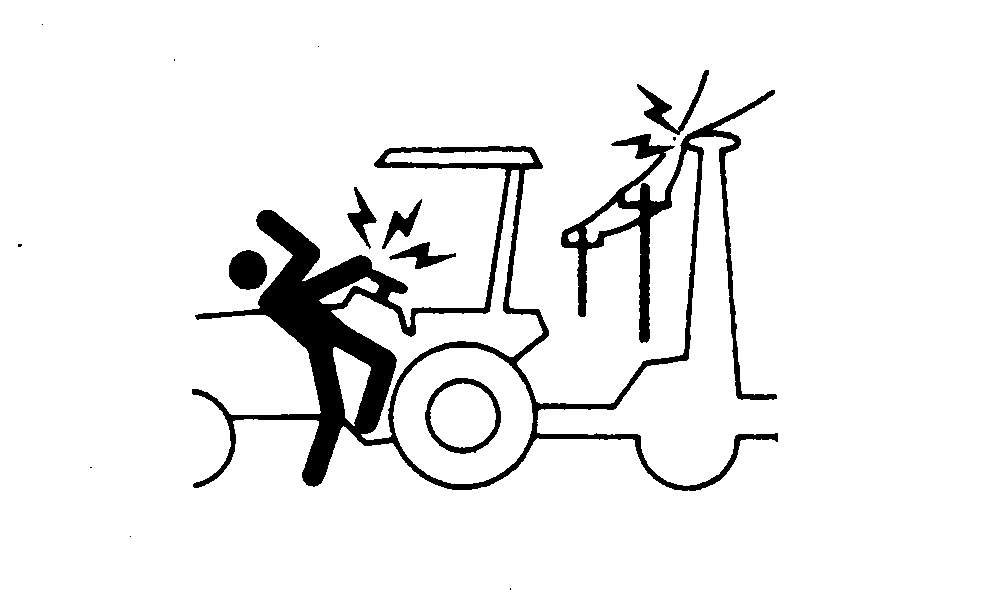
N39394-UN-06OCT88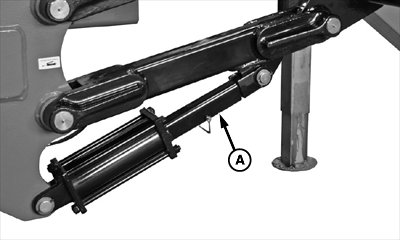
N100435-UN-09OCT12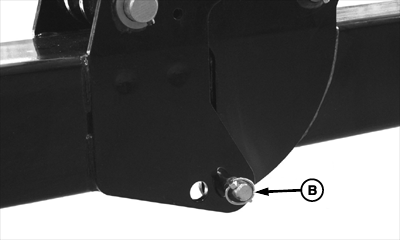
N100436-UN-09OCT12Wing Lock Pin In Field Position
N108434-UN-08NOV13A - Cylinder Transport Lock
B - Pin
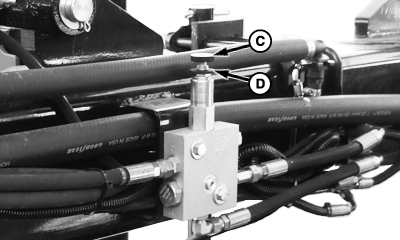
C - Adjustment Knob
D - Lock Ring
Pull SCV I backward to raise lift and wing kick cylinders to the fully raised position. -
Verify tool bar is fully raised.
-
Remove cylinder transport locks (A) from lift cylinders.
-
Remove wing lock pin (B) from hinge on both sides.
-
Push SCV II forward to unfold inner wings from the saddled transport position. When inner wings are fully unfolded, they will remain "kicked" up until center section is lowered during field operation.
-
Push SCV III forward to unfold outer wings to field position.
-
Insert wing lock pin into holes to lock outer wing in field position.
-
Push SCV I forward to lower machine to operating depth.
-
Toolbar is now in position to begin field application.
-
Check amount of down pressure applied to wings by engaging SCV II continuously and lowering coulters into the ground while remaining stationary with unit. Hydraulic down pressure gauge should read between 700 and 1000 psi. Down pressure may be adjusted by turning knob (C) on down pressure valve located on toolbar near wing fold manifold.
-
Use only as much down pressure as needed to get coulters to proper depth. Excess pressure could cause damage to toolbar. Turn knob clockwise to increase pressure and counter clockwise to decrease down pressure. To change pressure, loosen lock ring (D) and turn knob a 1/4 turn at a time. Do not exceed 1500 PSI. Pull SCV I backward to fully raise toolbar and kick wings up. Toolbar is now ready for field application.
|
KB78086,0000D46-19-20131122 |