Adjust GreenStar 2 Rate Controller™ Settings
-
NOTE: This section describes ONLY initial settings for machines equipped with GreenStar 2 Rate Controllers. See GreenStar 2 Rate Controller Operator’s Manual for all other instruction regarding setting alarms, rates, additional calibration, or troubleshooting.
PC9419-UN-12SEP06Setup Softkey
Press Setup softkey.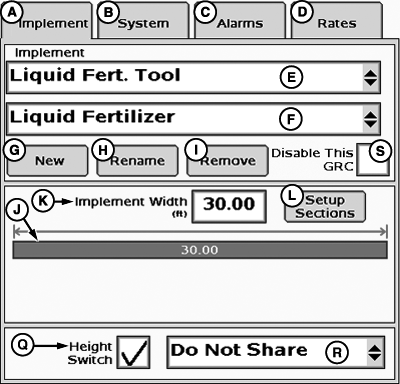
PC12971-UN-27OCT10 -
Select implement type (E).
-
Select LIQUID FERT. TOOL.
-
Select or enter new implement name (F).
-
Press Set-Up Sections (L).
-
NOTE: See RATE CONTROLLER CHART—on next page.
Enter number of sections and set section width.
-
Disable fence row nozzles.
-
Set switch box association as appropriate.
-
Select Height Switch (Q) if equipped.
-
Disable dual boom.
-
Select 3-WIRE section valve type (E).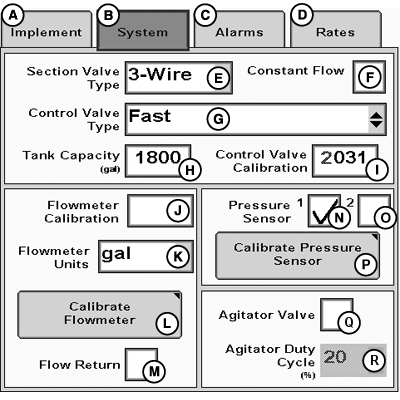
N105242-UN-08OCT13 -
Select FAST control valve type (G).
-
Enter correct tank size (H).
-
Enter 2031 for control valve calibration (I).
-
IMPORTANT: See calibration value (J) stamped on flowmeter tag.
Enter flowmeter calibration value (J).
-
Set flowmeter units to gal (K).
-
Deselect flow return (M).
-
Select pressure sensor (N).
-
IMPORTANT: To calibrate pressure sensor (P), see Section 40 in GreenStar 2 Rate Controller manual using 20 mV/psi value.
Calibrate pressure sensor (P).
-
NOTE: Agitator valve operated manually.
Deselect agitator valve (Q).
|
GreenStar 2 Rate Controller is a trademark of Deere & Company |
KB78086,0000D53-19-20140818 |