SeedStar™ XP Navigation Buttons
NOTE: This section explains the operation and features of the optional SeedStar™ XP monitoring system.
Refer to SeedStar™ 2 Main Run Screens section for basic monitor functions, Variable Rate Drive, and RowCommand™.
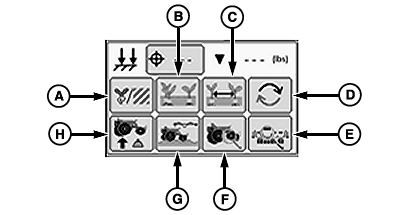
A72578-UN-16SEP11
SeedStar™ XP Navigation Buttons (Single Set-Point PDF)
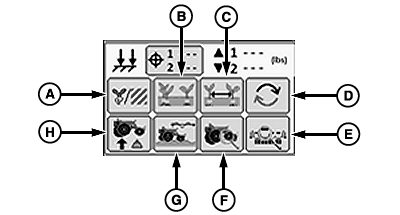
A72579-UN-16SEP11
SeedStar™ XP Navigation Buttons (Dual Set-Point PDF)
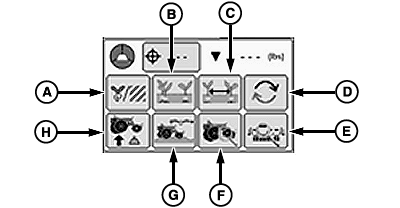
A72580-UN-16SEP11
SeedStar™ XP Navigation Buttons (Active PDF One Sensor)
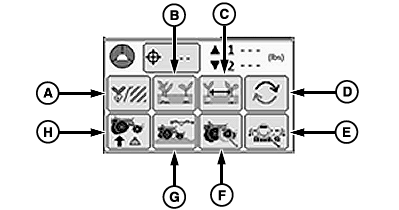
A72581-UN-16SEP11
SeedStar™ XP Navigation Buttons (Active PDF Two Sensors)
A - Seed Population Button
B - Seed Singulation Button
C - Seed Spacing CV Button
D - SeedStar™ XP Screen Scan Button
E - Planters Details Button
F - Row Details Button
G - Ride Dynamics Button
H - Row Unit Down Force Button
The SeedStar™ XP Navigation Buttons allow the operator to view detailed information for each SeedStar™ XP monitor function. Selecting each button displays graphical information in the Planter-at-a-Glance screen area and numerical information in the field to the right of the SeedStar™ XP Navigation Panel.
SeedStar™ Navigation Buttons turn orange when the monitored function nears the alarm limit and red when the monitored function goes outside of the alarm limit. This alerts the operator that a function is not performing optimally when the function is not selected for display. To adjust alarm set points, see ALARMS AND LIMITS SETUP PAGE in SeedStar™ XP SETUP Enhanced Monitor System section.
SeedStar™ XP buttons are:
(A) Seed Population button. See SEED POPULATION in this section.
(B) Seed Singulation button. See SEED SINGULATION in this section.
(C) Seed Spacing CV button. See SEED SPACING COEFFICIENT OF VARIATION in this section.
(D) SeedStar™ XP Screen Scan button. Selecting the button advances the displayed monitor page as follows.
- Seed Population
- Seed Singulation
- Seed Spacing CV
- Down Force
- Ride Dynamics
(E) Planters Details button. See PLANTER DETAILS in this section.
(F) Row Details button. See ROW DETAILS in this section.
(G) Ride Dynamics button. See RIDE DYNAMICS in this section.
(H) Row Unit Down Force button. See DOWN FORCE in this section.
|
OUO6064,00005EC-19-20111110 |