Calibrate the Meter Manually
ZX013873-UN-02DEC97
Seed Meter
ZX013874-UN-02DEC97
Blower
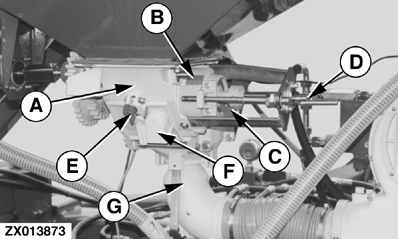
A - Housing
B - Meter Scale
C - Red Changeover Switch (N=Normal Seed; F=Fine Seed)
D - Spindle
E - Hopper Trapdoor
F - Rotary Slide Valve
G - Manifold
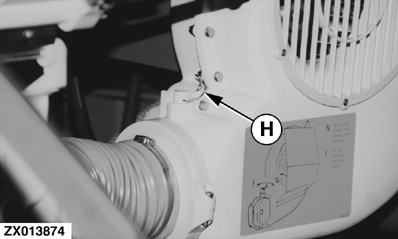
H - Spring Clip on Butterfly Valve (N=Normal Seed; F=Fine Seed)
IMPORTANT: Avoid machine damage and incorrect calibrations. If meter is controlled through an ISOBUS monitor, see Seed Calibration in the ISOBUS Seed Monitor System section to calibrate the meter.
To calibrate the meter, refer to the illustrations, the calibration procedure, and the calibration chart. Engage the micrometer system to sow fine seed or small quantities of seed (See Engage Standard Meter System or Micrometer in this section.).
IMPORTANT: Calibrate only when the drill is stationary. Switch OFF the tractor and blower before calibration.
Calibration Procedure
Calibration procedure is as follows:
-
Determine seed type (normal seed or fine seed).
-
Set meter for normal seed or fine seed.
- For normal seed, set red changeover switch (C) and butterfly valve (H) to “N” position. Engage gray gear for standard meter system.
-
IMPORTANT: Avoid seed meter damage when adjusting the seed rate to a lower setting. Adjust to a lower setting only when the seed meter is rotating or the seed hopper is empty.
For fine seed, turn spindle (D) until meter scale (B) is in position 0. Set red changeover switch (C) and butterfly valve (H) to “F” position. Engage either the normal speed gear or the red micrometer gear.
-
Refer to calibration chart for meter setting that corresponds to desired seed rate.
-
The meter scale (B) can be set to any value from 0 to 110 for normal seed and from 0 to 25 for fine seed. Turn the spindle (D) until the desired setting is visible at the edge of housing (A).
-
IMPORTANT: On 6 m version, each seed meter must be set and calibrated.
ZX013873-UN-02DEC97Seed Meter
ZX013874-UN-02DEC97Blower
ZX013876-UN-02DEC97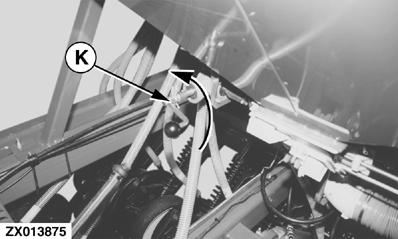
ZX013875-UN-02DEC97Manual Calibration with Handle
A - Housing
B - Metering Scale
C - Red Changeover Switch (N=Normal Seed; F=Fine Seed)
D - Spindle
E - Hopper Trapdoor
F - Rotary Slide Valve
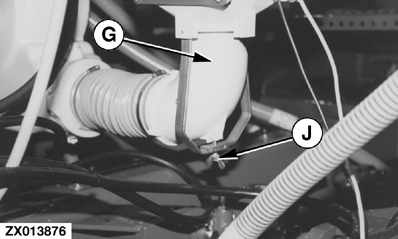
G - Manifold
H - Spring Clip on Butterfly Valve (N=Normal Seed; F=Fine Seed)
J - Wing Nut
K - Calibration Handle
Close the hopper trapdoor (E). -
Fill the seed hopper with seed.
-
Remove wing nut (J) and manifold (G) from underneath the venturi cone.
-
Place a collection bin underneath the venturi cone. This collects a seed sample during calibration.
-
Remove the spring pin and pull off the drive shaft. Attach the calibration handle (K) to the drive shaft as shown.
-
Turn the calibration handle 85 times counterclockwise at approximately 1 revolution per second. The sample of seed collected in the collection bin corresponds to 1/10 hectares.
-
Weigh the seed sample collected.
-
Multiply weight in collection bin by 10 and compare to weight shown in calibration chart for this seed and meter setting. If numbers are not equal, calculate the percentage to increase or decrease meter setting (see example from now on).
-
Repeat calibration procedure and weigh new sample until result is acceptable.
-
Replace manifold (G) and wing nut (J).
-
Remove calibration handle, reconnect the drive shaft, and secure it with the spring pin.
The meter has now been calibrated.
Example:
- Normal seed.
- Meter setting given in calibration chart = 60.
- Initial sample weight is 19 kg. 19 multiplied by 10 is 190 kg.
- This is approximately 10% less than the chart value of 210 kg.
- Increase the setting by 10% to 66.
- The second calibration results in a sample weight of 21 kg. When multiplied by 10, rate equals chart value.
The target rate for wheat is 210 kg/ha:
|
ZX,OM750A010218-19-20160505 |