Valve Test (IRHD System Only)
- Performance bars are showing red instead of black
- Valves are not meeting performance requirements
A79863-UN-29JAN14
Planter Button

A59567-UN-08MAR07
Diagnostic Button
A91232-UN-29JUN16
A91231-UN-29JUN16
A - Tests Tab
B - Drop-Down Box
C - Valve Test
D - Start Row Input Box
E - End Row Input Box
F - Start / Stop Button
Reasons for running this test:IMPORTANT: Before running the valve test, Individual Row Hydraulic Downforce (IRHD) circuit must be connected to the tractor power beyond. At least one SCV must be in continuous detent position in order to provide high pump pressure during the test.
-
Use the following test for checking the functionality of the actuator control valve.
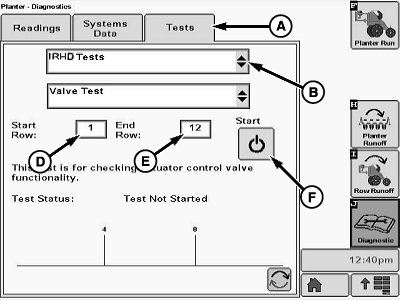
Select Menu >> Planter button >> Diagnostics button >> Tests tab (A).
-
Select IRHD Tests from the drop-down box (B).
-
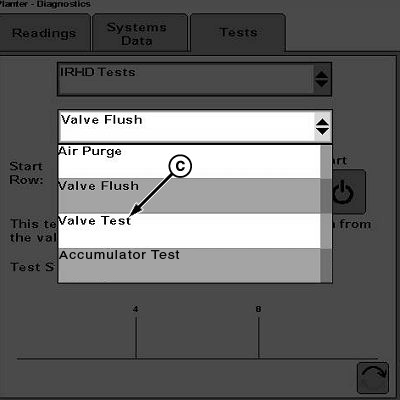
Select Valve Test (C) from the drop-down list.
-
Input selected row units for the valve test using input boxes (D and E).
-
To start the valve test, select the start/stop button (F).
NOTE: To stop valve test at any time, select button (F).
Test Complete appears on-screen when valve test is completed without failures.
If the valve test fails, perform valve flush test. (See Valve Flush Test in this section.)
|
BB83525,00002F8-19-20160817 |