Change The Meter Strip (Agitation or Smooth)
-
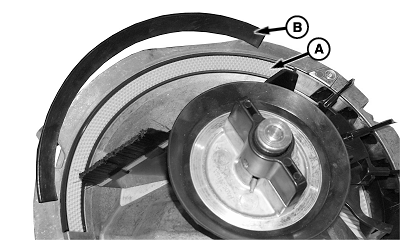
A83322-UN-19AUG14A - Agitator Strip
B - Smooth Strip
Determine which agitator strip is need for the crop being planted. The agitator strip (A) has a rough surface. The smooth strip (B) has a smooth surface. (See ExactEmerge™ Meter Settings for the recommended agitator strip by crop.) -
Remove the meter from the row unit. (See Remove and Install The ExactEmerge™ Seed Meter in the ExactEmerge™ Meter Operation section.)
-
Open the meter dome. (See Clean Out The Vacuum Meter in the ExactEmerge™ Meter Operation section.)
-
Remove the seed bowl. (See Clean Out The Vacuum Meter in the ExactEmerge™ Meter Operation section.)
-
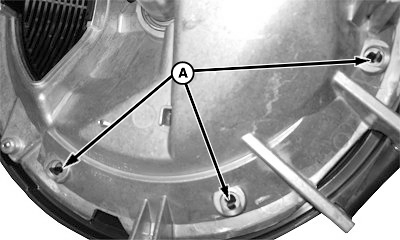
A83325-UN-19AUG14A - Tabs
To release the agitator strip, squeeze the tabs (A) on the back of the meter then pull out on the strip. -
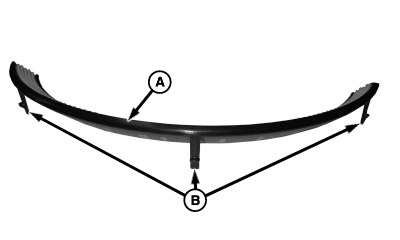
A83323-UN-19AUG14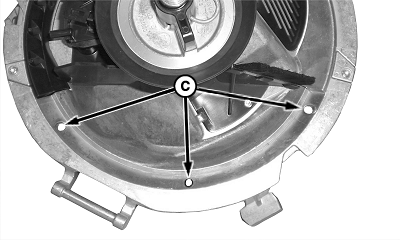
A83324-UN-19AUG14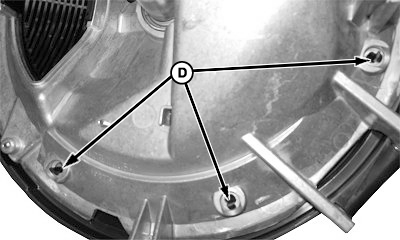
A83326-UN-19AUG14A - Agitator Strip
B - Tabs
C - Holes
D - Tabs
To install the correct agitator strip (A) in the meter, align the tabs (B) with the holes (C). Push the strip into position until the tabs (D) latch into the holes. -
Install the correct seed bowl. (See Install Seed Bowl in ExactEmerge™ Meter Operation section.)
-
NOTE: The meter hub height must be checked when the seed bowl is changed.
Adjust the meter hub height. (See Adjust The Meter Hub Height in the ExactEmerge™ Meter Operation section.)
-
Close the meter dome.
-
Install the meter on the row unit. (See Remove and Install The ExactEmerge™ Seed Meter in the ExactEmerge™ Meter Operation section.)
|
WP29706,00007E0-19-20160302 |