Set the CCS™ Tank Pressure
 CAUTION: Do not operate CCS™ blower without the tank lids
installed. Harmful chemicals are blown into face and seed lines plug.
CAUTION: Do not operate CCS™ blower without the tank lids
installed. Harmful chemicals are blown into face and seed lines plug.
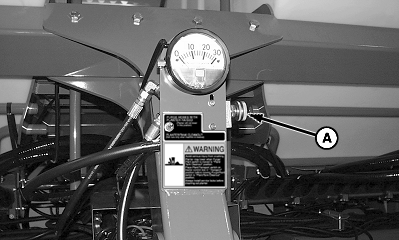
A54384-UN-28MAY04
A - Flow Control Valve Handle
To set the tank pressure proceed as follows:-
Make sure that tank lids are closed.
-
IMPORTANT: Warm oil by running vacuum blowers (if equipped) or install a hose loop in SCV per tractor operator's manual. Do not use CCS™ blower to warm oil or seed delivery hoses plug.
Warm oil for 15 minutes before setting pressure.
-
Lower machine, leave selective control valve (SCV) in constant retract detent position.
-
Open CCS™ blower flow control valve handle (A) (counterclockwise) until seed starts flowing to row hoppers.
-
IMPORTANT: Do not exceed 24 in of tank pressure or damage occurs to the hydraulic motor and seed tank lids.
NOTE: If low warnings are received while planting and row meters are empty, increase tank pressure by 2 inches until meters stay full.
When hoppers are full and machine is not moving, adjust pressure according to crop being planted. See CCS™ Tank Pressure Settings table.
|
Product |
Pressure in inches of Water |
Nozzle Insert |
Small Seed Discharge Elbow (Vacuum Only) |
|||
|---|---|---|---|---|---|---|
|
12/16 Row |
24 Row |
12/16 Row |
24 Row |
12/16 Row |
24 Row |
|
|
Soybeans |
12 |
14 |
NO |
NO |
NO |
NO |
|
Small Corn Over 4400 seeds/kg (2000 seeds/lb.) |
10 |
12 |
NO |
NO |
NO |
NO |
|
Medium Corn From 4400 through 2640 seeds/kg (2000 and 1200 seeds/lb.) |
12 |
14 |
NO |
NO |
NO |
NO |
|
Large Corn Less than 2640 seeds/kg (1200 seeds/lb.) |
14 |
16 |
NO |
NO |
NO |
NO |
|
CCS is a trademark of Deere & Company |
WP29706,00007E5-19-20160510 |