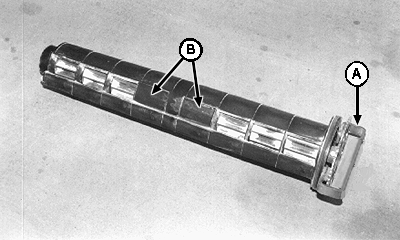
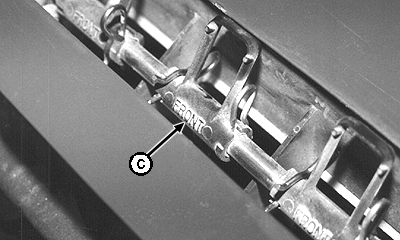
Adding Meter Segments and AgitatorsAs specified in the original customer's order, meter cartridges (A) are factory assembled with product handling segments installed only at the active runs. Snap-in doors (B) are installed to prevent product from entering empty enclosures. Should the meter cartridge be moved to a different cart, and the new application has more active runs than the original, fluted product handling segments must be installed in the empty enclosures. The same is true of activating additional runs on a cart that was originally ordered with less than eight active runs per meter. With an uneven number of runs, the odd meter segment is always installed on the left-hand end of the cartridge (opposite of the drive end). Refer to ACTIVE METER GUIDE in this section for illustration. Additional product agitators (C) will also need to be installed above the newly activated runs. Refer to INSTALLING AGITATORS in this section for detailed information. IMPORTANT: To reduce load on the agitator shaft, remove agitators from inactive runs. NOTE: When activating new runs, manifold may need to be reconfigured to agree with new product runs, or at minimum, plugs need to be removed from manifold inlets. Refer to OPENING AND CLOSING PRODUCT RUNS in this section for further information. · To add active meter segments: 1. Remove cartridge from meter housing. |
|
AG,OUO6023,1062 -19-21JUL00-1/9 |
|
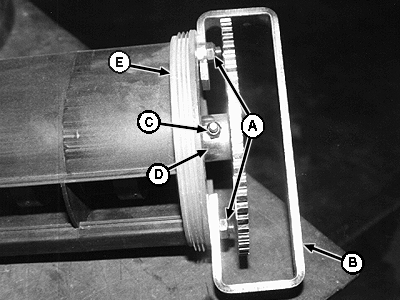
2. Remove hardware (C) and sensor sprocket (D). NOTE: Handle will need to be returned to original position at assembly to engage lock tab. Note handle position before removing. 3. Remove hardware (A) and handle (B). 4. Remove end cap (E) with seals.
|
|
AG,OUO6023,1062 -19-21JUL00-2/9 |
|
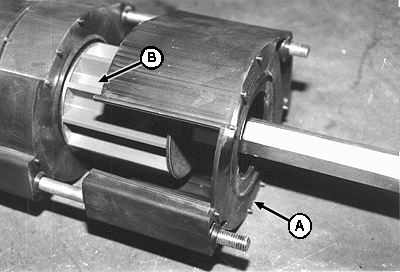
NOTE: Far end enclosure need not be removed from shaft unless fine tuning rings need to be installed. If left in place, far end enclosure can be used as an alignment guide for other segment enclosures. 5. Remove enclosures (A) and meter segments (B) from shaft. 6. Remove empty enclosure(s) from shaft. 7. Remove snap-in doors from enclosure(s).
|
|
AG,OUO6023,1062 -19-21JUL00-3/9 |
|
8. Install brush (A) and wear strip (B) inside of enclosure. Push brush and strip into slots until top edge is flush with edge of enclosure housing.
|
|
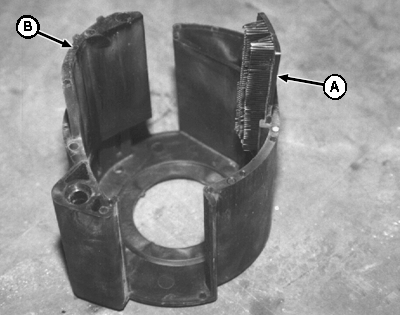
AG,OUO6023,1062 -19-21JUL00-4/9 |
|
9. · Install Tuning Rings (if needed) Remove snap ring and bearing plate from beveled end of the segment. IMPORTANT: If fine tuning rings (A) need to be installed, they should be installed now while the meter segments are off the shaft. IMPORTANT: No more than five tuning rings can be installed on any one segment. 10. Refer to CUSTOMIZING METER SEGMENTS in this section and install required number of fine tuning rings using tool A61656 (provided with the cart). To easily install, soak rings in hot water first, position on beveled end of segment and then drive on with tool. Return bearing plate and snap ring to segment after tuning rings are installed. |
|
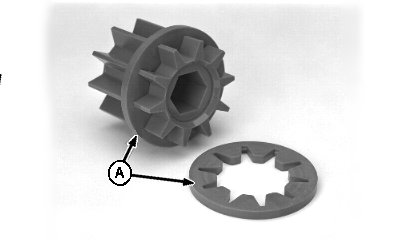
AG,OUO6023,1062 -19-21JUL00-5/9 |
|
IMPORTANT: If fine tuning rings need to be installed, they should be installed now while the meter segment is off the shaft. IMPORTANT: All meter segments MUST be the same color. 11. Refer to ACTIVE METER GUIDE in this section for illustration to ensure correct positioning on shaft; then install meter segment (A).
|
|
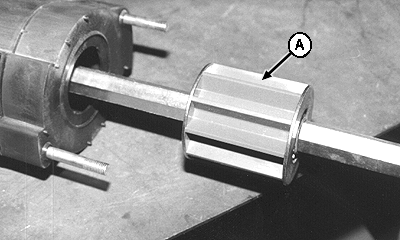
AG,OUO6023,1062 -19-21JUL00-6/9 |
|
12. Position segment enclosure (A) to agree with those still on shaft so inlet and outlet openings align; then install enclosure on tie rods. 13. Repeat installation steps until meter cartridge assembly is complete.
|
|
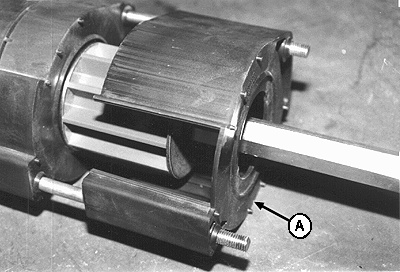
AG,OUO6023,1062 -19-21JUL00-7/9 |
|
14. Install end cap (E) (with seals). 15. Install handle (B) with nuts, making sure handle is returned to original position. IMPORTANT: Over tightening tie rod nuts (A) can distort plastic enclosures (G), preventing meter segments (I, J or K) from turning; increases wear on meter cartridge; and causes rod to interfere with sensor ring. 16. Tighten handle nuts (A) until rod end is flush with nut end or one thread is visible. 17. Install sensor sprocket (D) and hardware (C), including 9 x 12 x 13 mm (.354 x .472 x .512 in.) sprocket spacer. Spacer eliminates sprocket wobble and erratic meter speed readings. |
|
AG,OUO6023,1062 -19-21JUL00-8/9 |
|
18. To complete cartridge assembly (A), install doors (B) at product inlets of empty enclosures.
|
|
AG,OUO6023,1062 -19-21JUL00-9/9 |