Air Cart Set-Up Mode-Configure Air Cart
|
AG,OUO6023,1098 -19-21JUL00-1/3 |
|
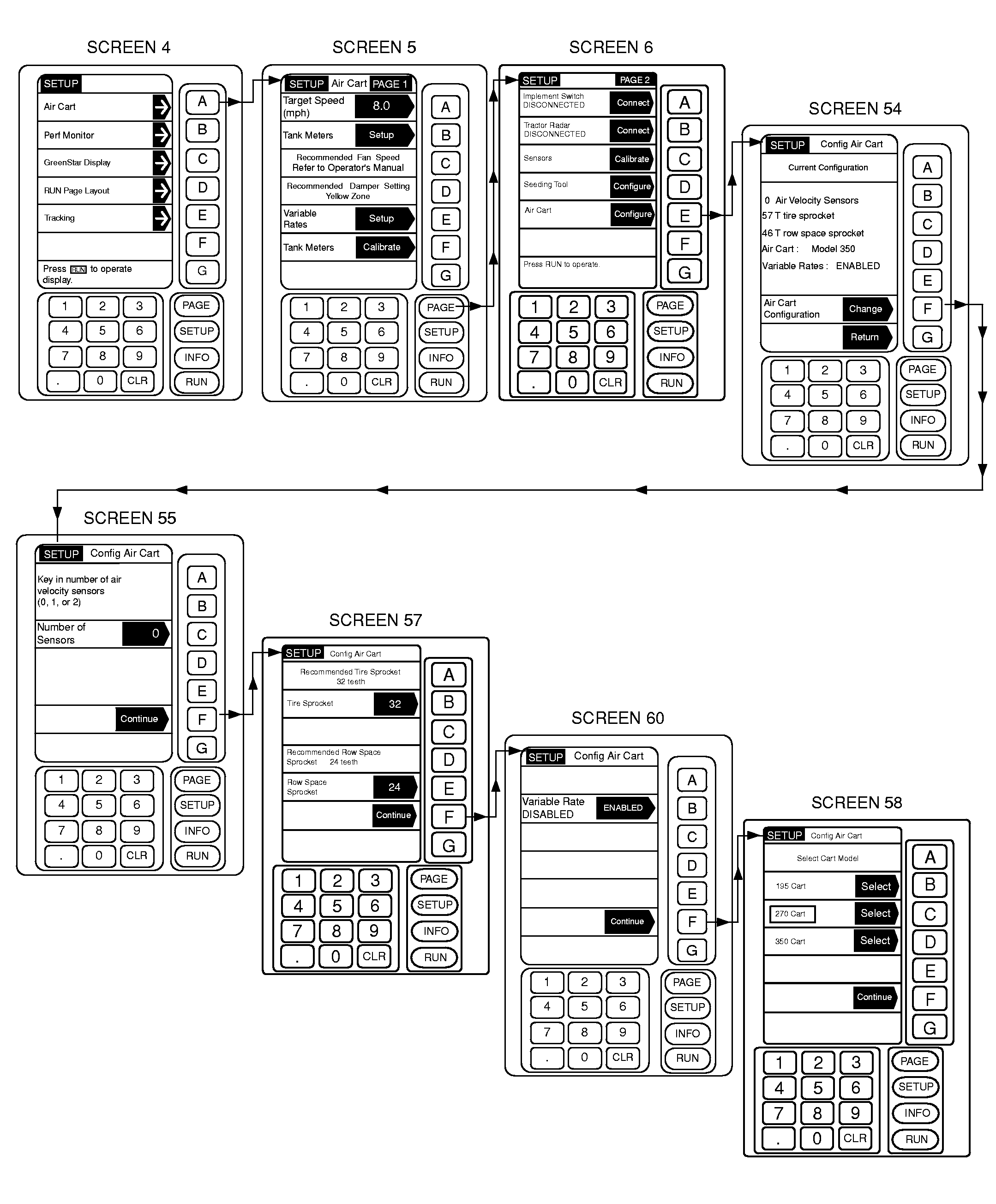
Compare current configuration to air cart and make changes accordingly. 1. From any screen press SETUP. 2. From the list given, choose Air Cart. 3. Once on the Air Cart page, press PAGE to advance to PAGE 2. Select Air Cart key E. 4. The Air Cart summary page is displayed. From this page, press Change key F to start the configuration. 5. Air Velocity Sensors will remain 0, they are not available at this time. Press key F to Continue. 6. Next, enter the number of teeth on the Row Spacing sprocket. In the SEEDING TOOL ROW SPACING/SPROCKET TEETH chart, find the seeding tool row spacing in the left-hand column. Find the corresponding sprocket size in the right-hand column. Press key E, enter the number of teeth (23, 28, 37 or 46); then press key E again to accept.
7. Next, enter the number of teeth on the Tire Sprocket. In the TIRE SIZE/TRAVEL DISTANCE/SPROCKET TEETH chart, find the cart tire size in the left-hand column and then the corresponding sprocket size in the far right-hand column. Press key B, enter the number of teeth (57, 62, 68, 72 or 80) using the number key pad. Then press key B again to accept the number. |
NOTE: Travel distance is approximate. For accuracy, calibrate by driving through 122 m (400 ft) course. 8. Press key F to continue. IMPORTANT: This is the section of SETUP in which the Middle Tank, and Variable Rate options are enabled. This must be done prior to any other configuration to ensure that the right menu options are present. 9. If the cart is equipped with a Middle Tank or Variable Rate, proceed to Step 10. If the cart is not equipped with either one of these options, proceed to Step 12. 10. Press key B to enable the Middle Tank, if equipped. Cancel Run Page Layout warning message at this time. A Run Page Layout will need to be performed after all setup is complete. |
|||||||||||||||||||||||||||||||||||||||||||||||||||||||||||
AG,OUO6023,1098 -19-21JUL00-2/3 |
|
NOTE: The option in the shaded arrow is what becomes selected if this button is pushed. The unshaded area is the current selection. 11. Press key D to enable the Variable Rate option, if equipped. Cancel Run Page Layout warning. Press key F to continue. NOTE: When cart is equipped with a middle tank, use base cart size for model selection. 430 bu Cart, use 350 340 bu Cart, use 270 |
250 bu Cart, use 195 12. Select the Cart Model. Press keys B, C, or D for 195, 270 or 350 sizes, respectively. 13. Press key F to continue. The summary page will again be displayed. 14. Review the settings, if an error is found, return to Step 4. Otherwise, press key G to Return to Page 2 of the Air Cart Setup section. |
AG,OUO6023,1098 -19-21JUL00-3/3 |