Air Cart Set-Up Mode-Calibrate Sensors
|
AG,OUO6023,1101 -19-21JUL00-1/3 |
|
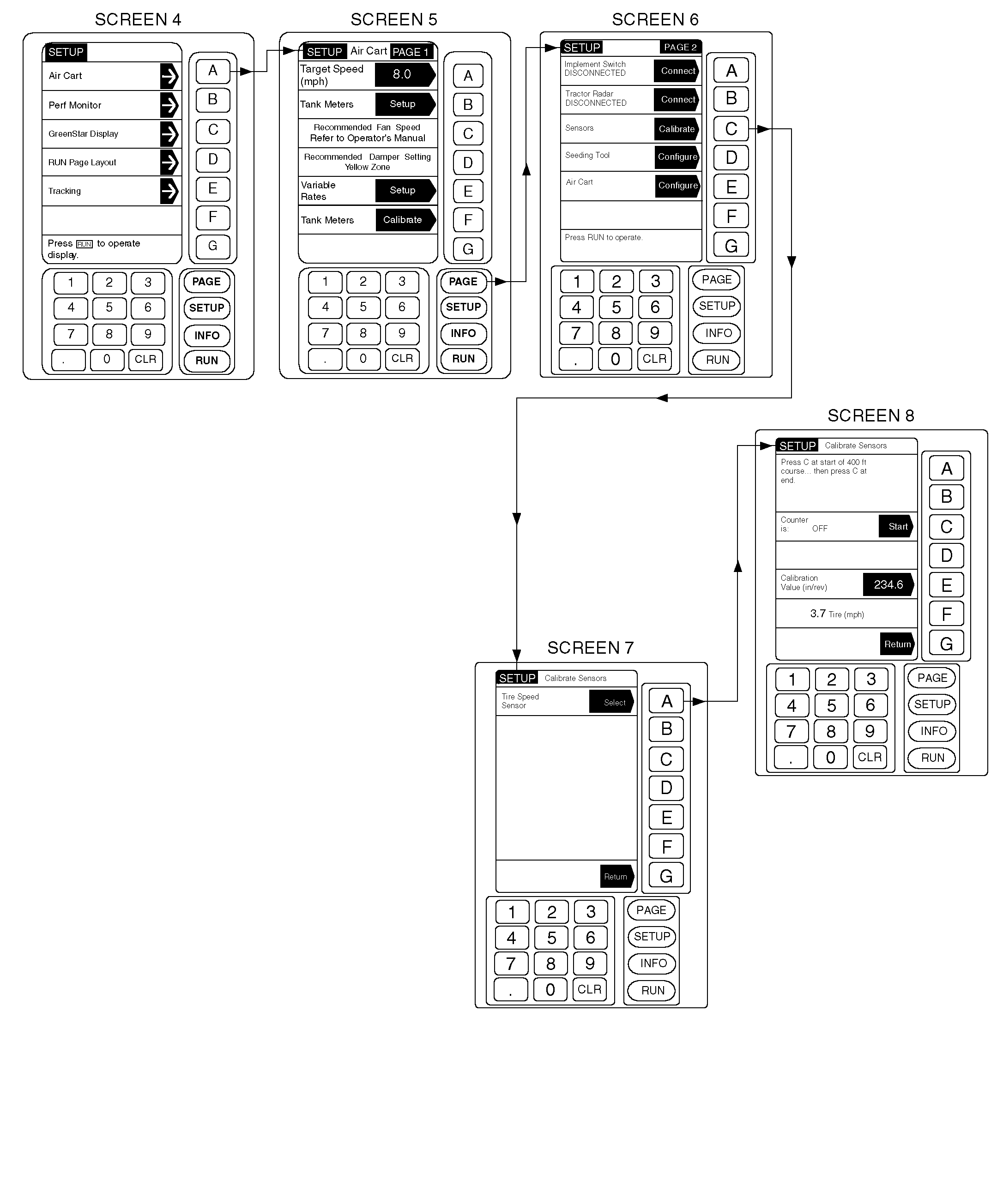
Speed Calibration default value is factory set at 0.0, resulting in 0.0 speed readout. An initial calibration value (in-per-rev) can be manually entered during set-up to override default and provide speed readout. See Tire Size/Travel Distance/Sprocket Teeth chart and use travel distance of the tires in use as initial calibration setting until final calibration procedure can be performed. IMPORTANT: Tire sensor calibration procedure is similar to procedure used to calibrate the tractor's radar sensor except that it is done at approximate seeding speed, not slower radar calibration speed (approximately 3 km/h [2 mph]). For best results and most accurate setting, final calibration of tire speed sensor should be done in the field (in the type of soil to be seeded) with tanks half full, cart tires inflated to proper pressure and traveling at seeding speed.
NOTE: Travel distance is approximate. For accuracy, calibrate by driving through 122 m (400 ft) course. |
1. From any screen press SETUP. 2. From the list given, choose Air Cart. 3. Once on the Air Cart page, press PAGE to advance to PAGE 2. Select Sensors key C. 4. Press key A to select the Tire Speed Sensor. This screen allows a known calibration value (travel distance in inches per tire revolution) to be entered. This value can be found in the Tire Size/Travel Distance/Sprocket Teeth chart. 5. Press key E. Then enter the number (150 to 250). Press key E again to accept. 6. To ensure accuracy, the Tire Speed Sensor should be calibrated by driving the tractor and cart over a 122 m (400 ft) course. Measure out the course in the field, bring the cart up to the desired planting speed, and when crossing the start point of the course, press key C to start the calibration. Press key C again when crossing the end point of the course to stop the calibration. The tire speed is shown throughout the calibration. 7. Press key G twice to return to Page 2 of the Air Cart Set-Up. NOTE: The option in the shaded arrow is what becomes selected if this button is pushed. The unshaded area is the current selection. 8. Press key A to toggle between CONNECTED and DISCONNECTED for Implement Switch. |
|||||||||||||||||||||||||||||||||||||||||||||
AG,OUO6023,1101 -19-21JUL00-2/3 |
|
IMPORTANT: Tractor Radar is not necessary to operate the 1900 Commodity Cart. Radar speed is used to determine cart tire slippage and/or seed populations if equipped with optional seed counting. If connected, see SET-UP MODE-CALIBRATE TRACTOR RADAR SENSOR in this section for calibration. |
9. Press key B to toggle between CONNECTED and DISCONNECTED for Tractor Radar. Cancel Run Page Layout warning message at this time. A Run Page Layout will need to be performed after all setup is completed. |
AG,OUO6023,1101 -19-21JUL00-3/3 |