Air Cart Run Mode With Options
|
AG,OUO6023,1108 -19-21JUL00-1/4 |
|
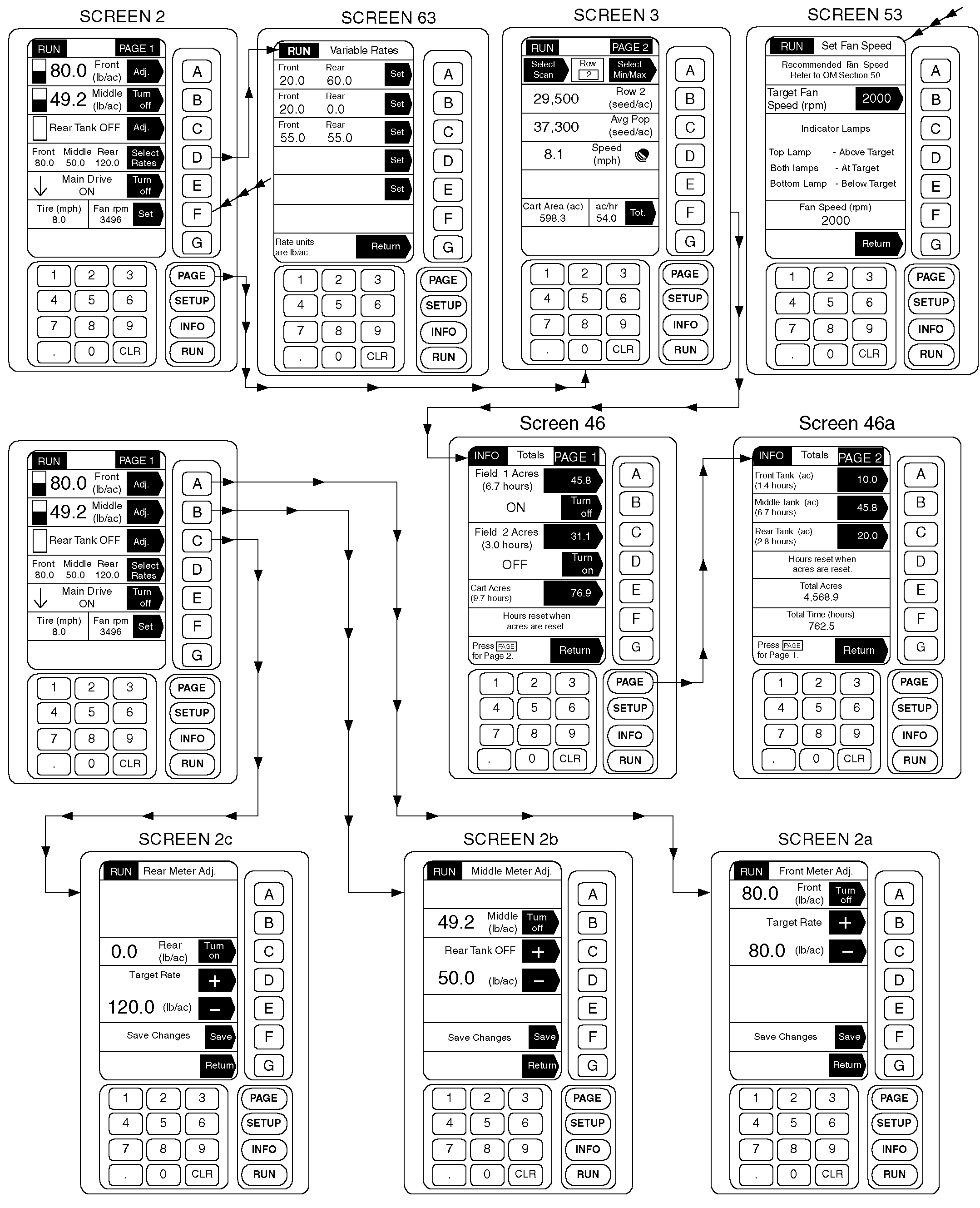
IMPORTANT: Full screen STOP WARNINGS require immediate attention and corrective action or machine damage will occur. To get the operator's attention, an audio alarm sounds when a WARNING is displayed. RUN mode informs the operator of cart activities during operations. Depress PAGE key to toggle from page one to page two while operating. Product level bar graphs are displayed regardless of tank ON/OFF selection. Because there are only three in-tank product level sensors, display changes between the sensors are not actual sensed levels but a calculated display showing how much product should have been used at current application rate. Mid-level and almost empty displays are actual sensed level readings from the middle and bottom in-tank sensors. When these switches open, product level will drop quickly from calculated display level to actual in-tank level. When bottom switch opens, bar graph will disappear and caution message "Tank Almost Empty" will appear on bottom of page one. See AIR CART INFO (INFORMATION) MODE (WITHOUT OPTIONS) in this section for tank level display adjustment information. Application rate (lb/ac) is shown when tank is turned ON, otherwise "XXXX TANK OFF" is displayed. When equipped with variable rate option, display console keys can be used to engage delivery clutches or to adjust application rates. If adjust feature is enabled, pressing adjustment key for each tank will display the adjustment screen. |
Target rate can be adjusted by pressing key D (+) or key E (-). Adjustment can be made permanent by pressing key F to save changes.
When equipped with variable rate option, display will show set rates for front, rear and middle tank meters. Rate screen area will not display if not equipped with variable rate. Console key is used to select a different combination of application rates from operator entered menu. Selecting a different rate combination from the RUN Rates menu changes the setting(s) of the meter speed transmissions. When only one rate combination is defined, it will display on the RUN page. When two rate combinations are defined, one will show on display with RATE B in selection area. Depress RATE B to toggle between different rate combinations. Chosen combination and Select Rates will display when more than two rate combinations are defined. Display console keys are used to engage product delivery clutches and to set fan speed indicator. Refer to CONTROLLING PRODUCT DELIVERY CLUTCHES and SETTING FAN SPEED in this section for detailed information. Display console key F is used for instant access to Air Cart Info Totals screens. See AIR CART INFO (INFORMATION) MODE (WITHOUT OPTIONS) in this section for specific information |
AG,OUO6023,1108 -19-21JUL00-2/4 |
|
|
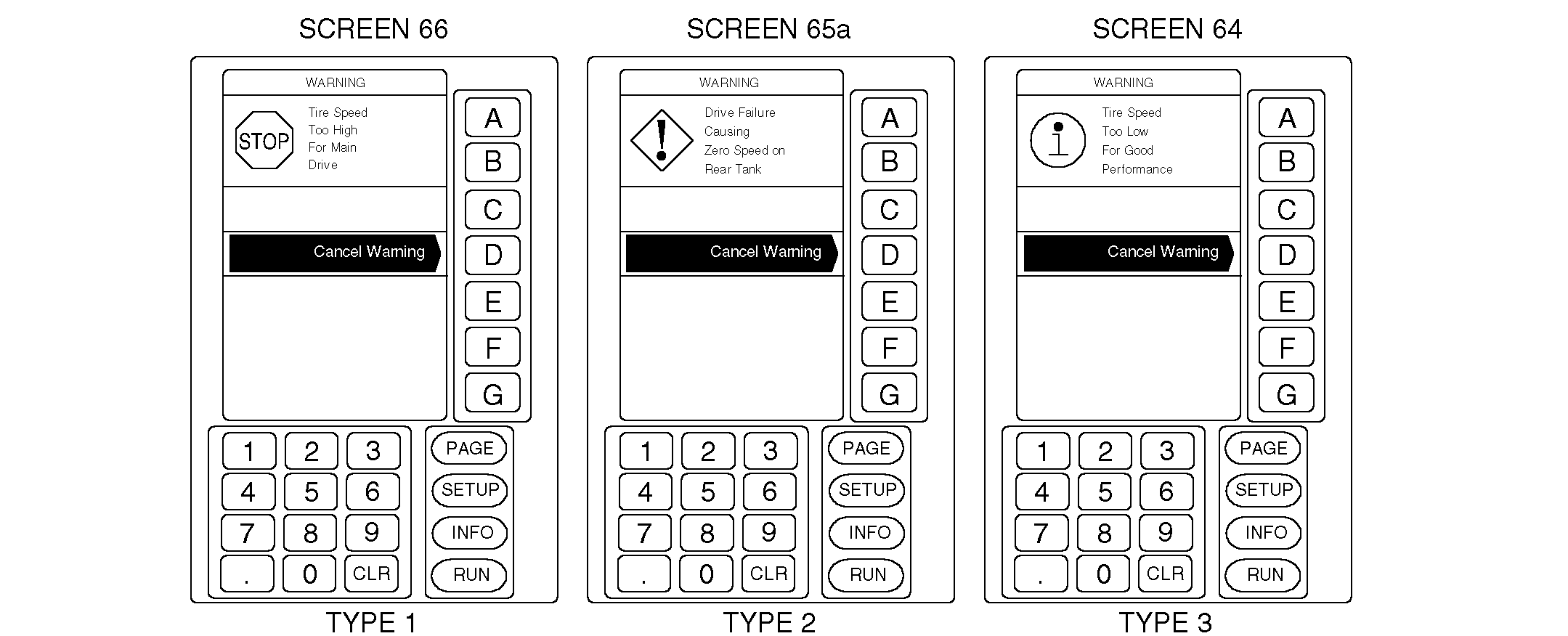
System is capable of generating four different types of messages to inform the user of changes in operating conditions. IMPORTANT: Audio alarm will sound when a full page WARNING is displayed.
|
If warning message is cancelled, audio alarm will sound again and a similar caution message will display at the bottom of RUN Page 1.
If cart is equipped with optional devices, RUN display will show activity for middle tank and seed counting system. These screen areas will not display if optional devices are not connected. |
AG,OUO6023,1108 -19-21JUL00-3/4 |
|
|
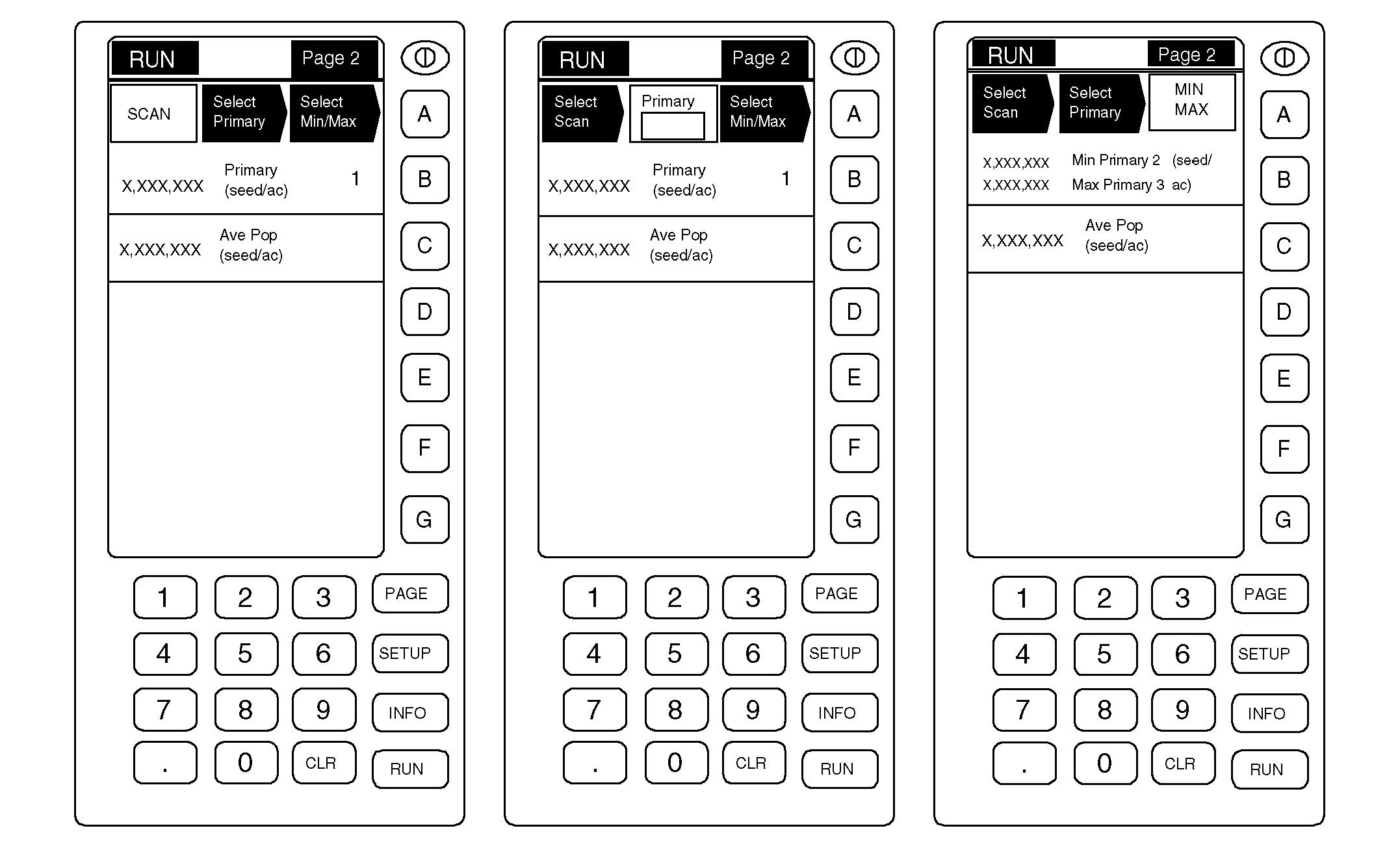
· RUN MODE-SEED COUNTER Seed count display is shown in one of three ways, as selected by the operator: SCAN: Displays population of each active primary, moving from primary-to-primary in five second intervals. PRIMARY: Displays population of only certain primaries as selected by the operator. MIN/MAX: Displays primaries with minimum (lowest) and maximum (highest) populations. Average population displays the count average for only the active sensors. Only sensors that are ON are included in the calculation. Seed count will display rate in seeds-per-area as seen by the sensors or in mass-per-area as calculated by |
the counter controller based on seeds counted. No population is displayed for fertilizer.
See SEED COUNTER READOUTS in Seed Counting System section for listing of products that display seeds-per-area and those that display mass-per-area. · RUN MODE-BLOCKAGE MONITOR Blockage monitor has no active display in RUN mode. The only indication you will receive that the system is working is when a full page Blockage WARNING is displayed, or if blockage related messages appear at the bottom of RUN Page 1. Depress SET-UP or INFO key to view Implement List; if properly connected, Air Cart Blockage will display here. |
AG,OUO6023,1108 -19-21JUL00-4/4 |