INFO (Information) Mode-Blockage Monitoring
|
AG,OUO6023,1122 -19-21JUL00-1/2 |
|
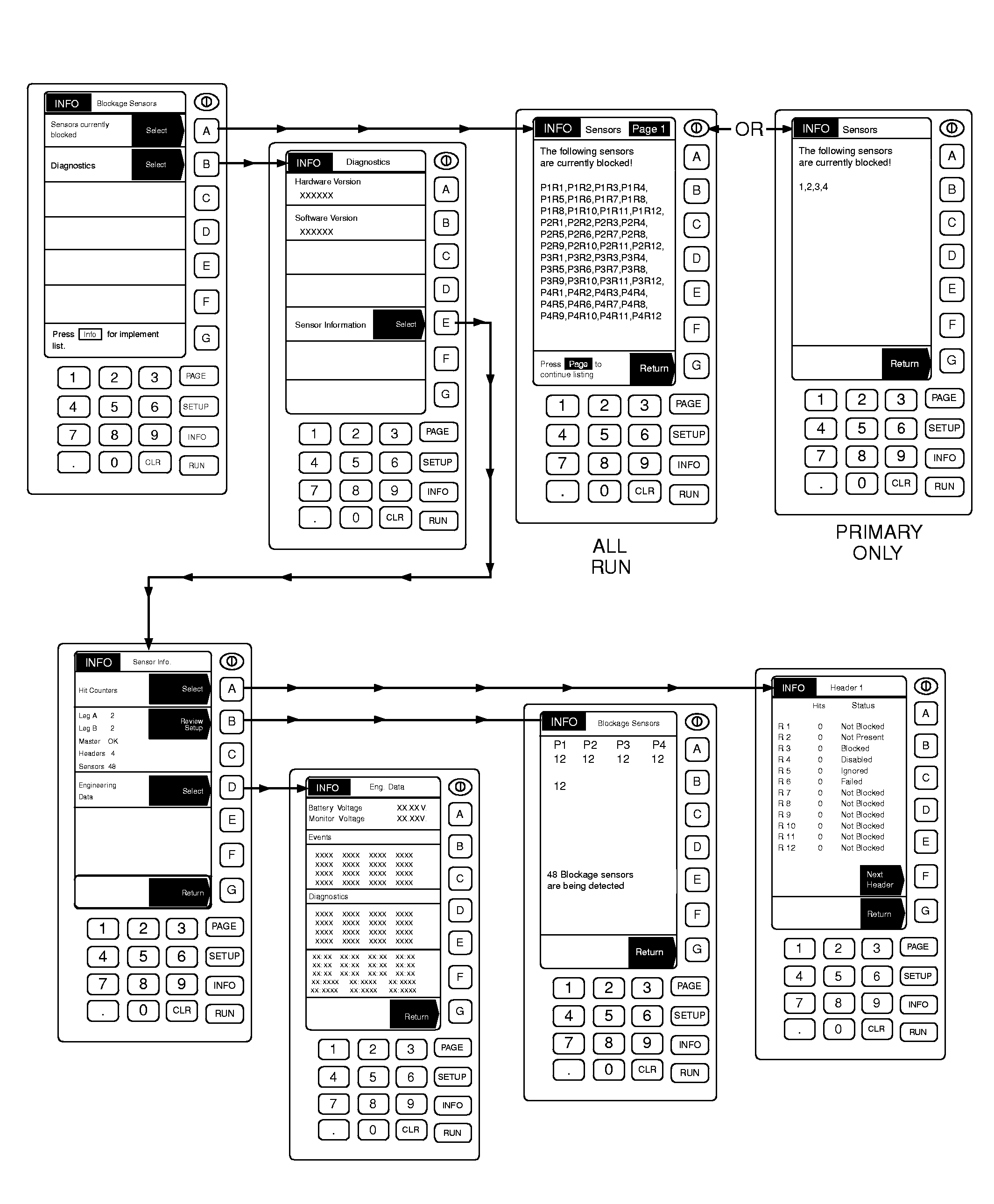
The "Sensors Currently Blocked" screen lists all blocked sensors currently identified by the system. A review of this page while machine is stopped is useful when many secondaries appear blocked. Entering Diagnostic mode reveals version number of software and hardware in use, troubleshooting information and engineering data. Software/Hardware version numbers are historical records that cannot be altered. In Sensor Information, a system summary is available for review, showing how many slave modules are on each leg of the splitter harness, the status of the |
master module, and total number of headers (modules) and sensors. "Review Setup" shows how many sensors are on each primary and the total number of sensors detected.
A review of the Hit Counter, while machine is operating, can quickly identify problem runs or sensors. A run with a low hit count may be close to blocking. In Engineering Data, battery and monitor voltage can be checked if a low power problem is suspected. Events and Diagnostic codes are recorded here for later recall when reporting or diagnosing a problem. |
AG,OUO6023,1122 -19-21JUL00-2/2 |