Verify Metering-Field MethodIMPORTANT: Ground speed sensor and tank meters must be calibrated prior to doing field check. Refer to AIR CART SET-UP MODE-CALIBRATE TIRE SENSOR in Operating Machine-Monitor Setup section and AIR CART SET-UP MODE-CALIBRATE METERS in Operating Machine-Monitor Operation section. 1. Determine target application rate for the product in use. 2. Check that existing meter segments can deliver product at desired rate. 3. Make sure there is sufficient product in tank to collect a measurable sample. Product should cover all meter inlets and not be heaped to one side. Half-width disconnect handles must be fully down for accurate rate verification. 4. Meter cartridge assembly must be full of product at the start of the procedure. IMPORTANT: With variable rate option, for the correct transmission setting and rate desired, seeding must take place for a short distance BEFORE THE CHECK in order to let the variable rate define a transmission setting. 5. Set transmissions to the recommended transmission setting given at the end of each tank calibration. |
AG,OUO6023,1155 -19-21JUL00-1/6 |
|
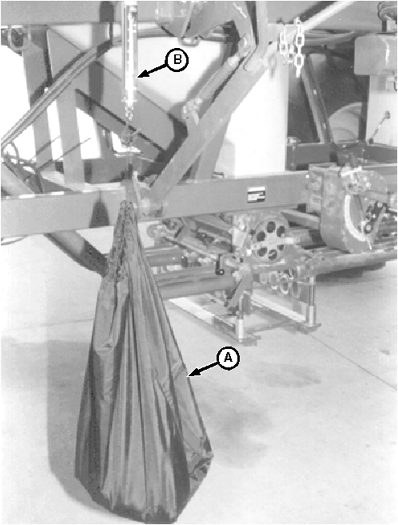
6. Hang empty bag (A) from scale (B) and reset scale to "0" (zero) by turning knob on top of scale. Setting scale to "0" (zero) will ensure that measured weight is of collected sample only, and does not include the weight of the bag. NOTE: Calibration distance is the distance a given machine width must travel to cover one hectare (acre). 7. Find "calibration distance", for your seeding tool width, by referring to Meter Verification Distances Chart or by calculating using the following formula. FORMULA: 10,000 sq m (1 hectare) ÷ Seeding Tool Width (m) = Calibration Distance 43560 sq ft (1 acre) ÷ Seeding Tool Width (ft) = Calibration Distance EXAMPLE: 10,000 sq m (1 hectare) ÷ 13.7 m tool = 730 m 43560 ÷ 45 ft tool = 968 ft If this distance is driven, one acre will be seeded. 8. Take the desired application rate and either divide or multiply by 2, 3, 4, 5, 6 or 8 to achieve between 4.5 kg to 15.8 kg (10 lb to 35 lb) in the collection pan. EXAMPLE: Milo-3.4 kg/hectare x 2 = 6.8 kg or 2 hectares worth of seeding Milo-3 lb/acre x 4 = 12 lbs. or 4 acres worth of seeding EXAMPLE: Wheat-83.9 kg/hectare ÷ 6 = 14 kg or 1/6 of a hectare worth of seeding |
|
AG,OUO6023,1155 -19-21JUL00-2/6 |
|
Wheat-75 lb/per acre ÷ 3 = 25 lb or 1/3 of an acre worth of seeding 9. Determine exact distance to drive by dividing or multiplying the distance (Step 7) by the same number that was used with the product weight (Step 8). EXAMPLE: Number of m at 3.4 kg/hectare-730 x 2 = 1460 m should achieve 6.8 kg of product in the collection pan. Number of ft at 3 lb of milo per acre-968 x 4 = 3872 ft should achieve 12 lb of product in the collection pan. EXAMPLE: Number of m at 83.9 kg/hectare-730 ÷ 6 = 121.6 m should achieve 14 kg of product in the collection pan. Number of ft at 75 lb of wheat per acre-968 ÷ 3 = 322 ft 8 in. should achieve 25 lb of product in the collection pan. NOTE: The field check accuracy improves by increasing distance driven. 10. Layout the calculated distance. If tractor radar has been previously calibrated, it may be used to measure this distance. The following field conditions are needed:
|
AG,OUO6023,1155 -19-21JUL00-3/6 |
|
|
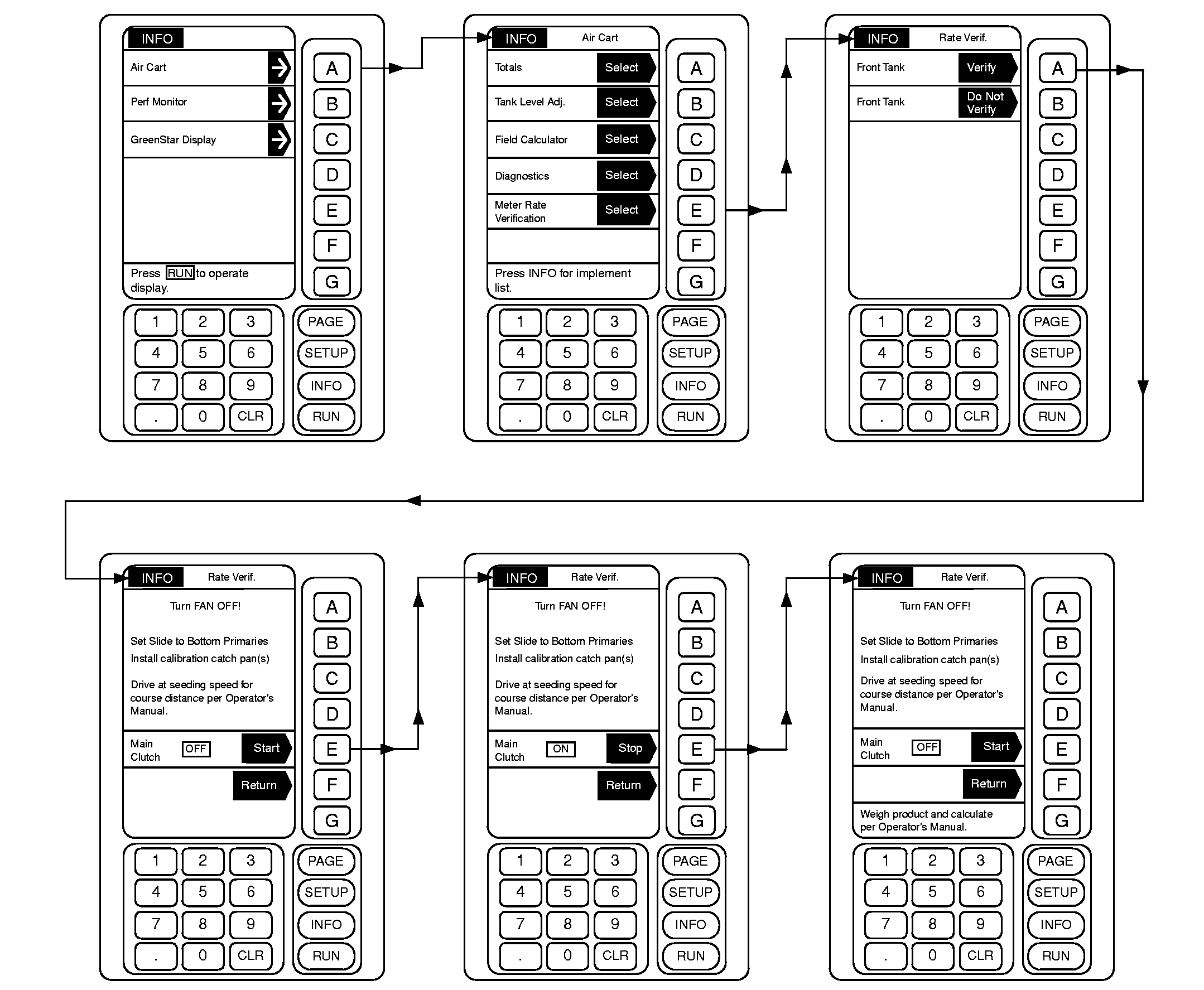
11. From any screen press [INFO]. 12. From the list given, choose Air Cart. 13. From the list given, choose Meter Rate Verification. 14. Select which tanks to verify. 15. Follow applicable instructions on screen. |
|
AG,OUO6023,1155 -19-21JUL00-4/6 |
|
|
|
AG,OUO6023,1155 -19-21JUL00-5/6 |
|
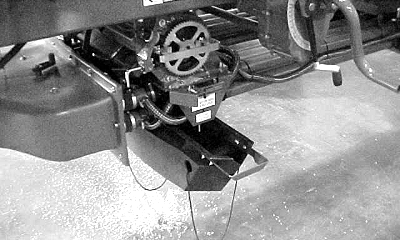
Hang filled collection bag (A) from scale (B) and weigh product. Multiply or divide the weighed amount by the same number used in Step 9. This will give the actual application rate. It should be close to the desired rate. 16. If calculated application rate is above or below target rate:NOTE: See your John Deere dealer for assistance, if desired.
17. Perform rate verification again to see that corrective action had the desired results and the application rate meets requirements. 18. Return manifolds to normal operating configuration |
|
AG,OUO6023,1155 -19-21JUL00-6/6 |