Installing GREENSTAR® Display (8010, 8010T, 8020, 8020T, 9000, 9000T, 9020, 9020T Series Tractors with GREENSTAR® Ready Option)Locate GREENSTAR ® Harness
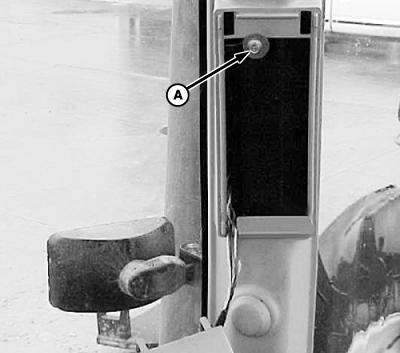
NOTE: Save all hardware for reinstallation. 1. Remove corner post display, screw (A), and screw at bottom of corner post. Remove corner post cover. 2. GREENSTAR ® factory installed harness 6-pin connectors MUST be connected between cab harness and tractor corner post display. Refer to tractor type below to determine GREENSTAR ® harness status. NOTE: For 8010 series tractors-Serial Number 015001-, 8010T series tractors-Serial Number 902607-, 9000 series tractors-Serial Number 041498-, 9000T series tractors-Serial Number 902279-steps 3 to 6 are now done in factory, go to step 7. a. For 8000, 8000T, 8010 (Serial Number -015000), 8010T (Serial Number -902606), 9000 (Serial Number -041497), and 9000T (Serial Number -902278) series tractors - locate GREENSTAR ® harness behind corner post cover, go to Step 3. b. For 8020, 8020T and 9020 series tractors - GREENSTAR ® harness is connected at factory. Verify and go to Step 7. c. For 9020T series tractors - Lower front right corner of headliner. Locate GREENSTAR ® harness, then go to Step 3. |
|
|
GREENSTAR is a trademark of Deere & Company. | AG,OUO1074,1614 -19-24APR00-1/13 |
|
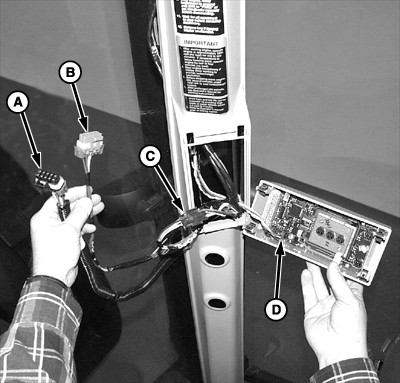
3. Locate GREENSTAR ® harness behind corner post cover. GREENSTAR ® harness consists of a black connector (A) for GREENSTAR display, a gray connector (B) for mobile processor, and a black mated pair of connectors (C) that look like the corner post display connector. 4. Disconnect black mated pair of 6-pin connectors. (On 9020T series tractors this may already be separated.) 5. Disconnect existing harness connector (D) from display. Attach corresponding end of disconnected mated connectors (C).
|
|
|
GREENSTAR is a trademark of Deere & Company. | AG,OUO1074,1614 -19-24APR00-2/13 |
|
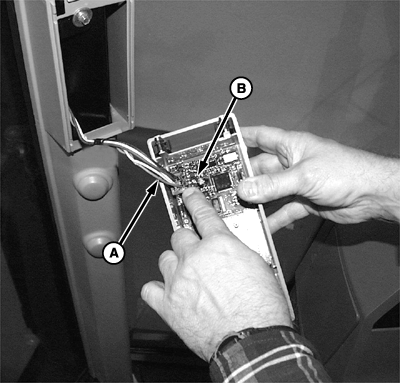
6. Attach remaining connector (A) from disconnected mated connector directly to corner post display (B).
|
|
AG,OUO1074,1614 -19-24APR00-3/13 |
|
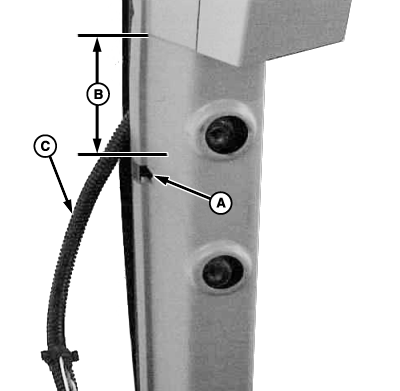
7. Cut notch (A) in corner post cover 133 mm (5-1/4 in.) (B) below display. Cut to specifications. Specification
8. Protect wires that attach to GREENSTAR ® display and mobile processor with a short length of conduit (C). 9. Route harness through notch, except for section that will connect to corner post display. Re-install corner post cover.
|
|
|
GREENSTAR is a trademark of Deere & Company. | AG,OUO1074,1614 -19-24APR00-4/13 |
|
Bracket Installation
1. Remove plastic covers from right-hand front post (A) to remove. (Already removed in illustration.)
|
|
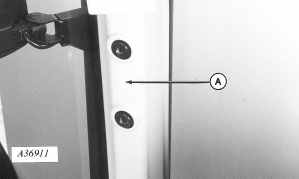
AG,OUO1074,1614 -19-24APR00-5/13 |
|
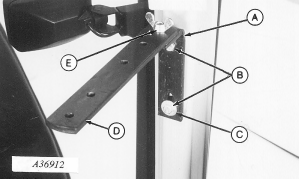
2. Install L-bracket (A) on front post with two M10 x 20 cap screws (B) with flat washer (C) on lower cap screw. 3. Install monitor strap (D) with M10 x 30 hex head bolt and wing nut (E), with strap hole spacing as shown.
|
|
AG,OUO1074,1614 -19-24APR00-6/13 |
|
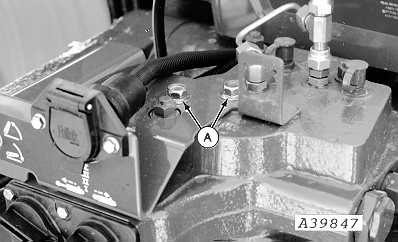
4. Remove two cap screws (A) and discard.
|
|
AG,OUO1074,1614 -19-24APR00-7/13 |
|
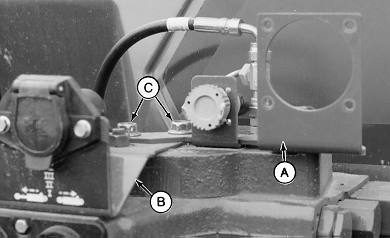
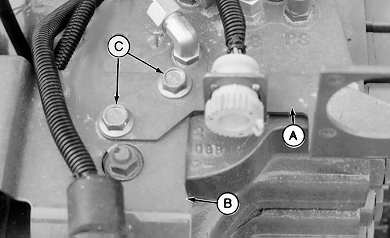
5. Install monitor bracket (A) on top of 7-pin bracket (B) and fasten with M12 x 20 cap screws (C).
|
|
AG,OUO1074,1614 -19-24APR00-8/13 |
|
Monitor Installation
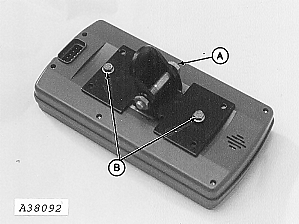
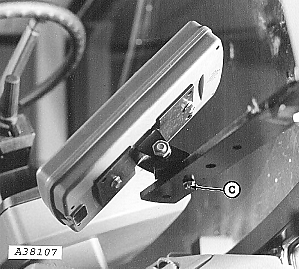
1. Attach monitor bracket to pivot with M10 x 60 cap screw and nut (A). NOTE: M6 x 12 cap screws are inside packing of display box. 2. Attach bracket to monitor with two M6 x 12 cap screws (B). 3. Install monitor to mounting bracket with M6 x 20 cap screw (C) making certain to install rubber washer on top of strap.
|
|
AG,OUO1074,1614 -19-24APR00-9/13 |
|
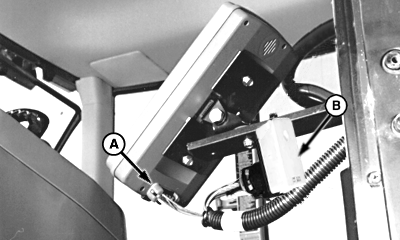
4. Install cab harness (A) into monitor. 5. Fasten terminator (B) to underside of mounting bracket with tie strap.
|
|
AG,OUO1074,1614 -19-24APR00-10/13 |
|
GREENSTAR
®
Harness Routing
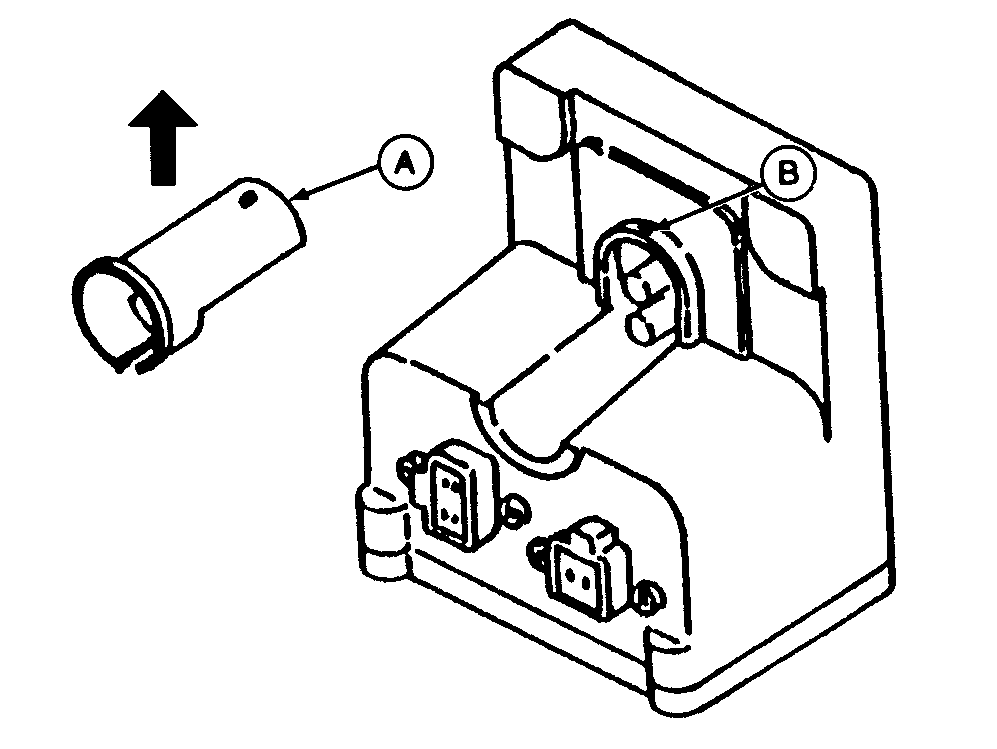
NOTE: Cover (A) for 4-pin connector can be removed to simplify connection of red and black wires to terminals. 1. To remove cover, lift rear portion to remove from pin (B), then lift straight up in direction of arrow.
|
|
|
GREENSTAR is a trademark of Deere & Company. | AG,OUO1074,1614 -19-24APR00-11/13 |
|
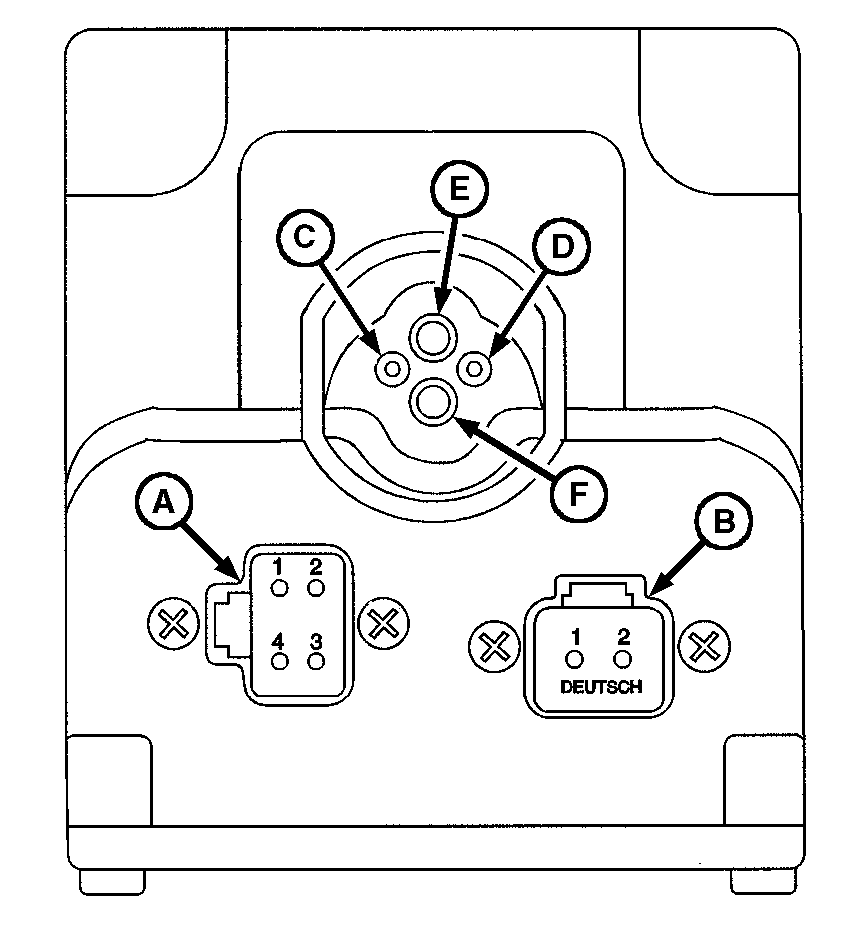
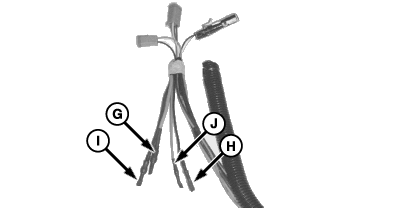
2. Connect 4-pin plug to connector (A) and 2-pin plug to connector (B). 3. The ISO Implement connector must have the 2 red and 2 black wires connected to the top four sockets. These wires come tucked behind the protective wire conduit. 4. Cut the tape wrapped around these wires and remove the shrink-wrap. NOTE: Positive and negative symbols are molded into the lip of the box as a guide showing where the insert wires. NOTE: To connect wires, insert wire end firmly into terminal. Properly connected wire will remain connected when wire is gently pulled. 5. Connect large red wire (G) to terminal (E), small black (H) to terminal (D), large black (I ) to terminal (F) and small red (J) to terminal (C).
|
|
AG,OUO1074,1614 -19-24APR00-12/13 |
|
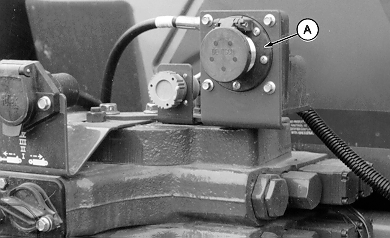
6. Attach monitor connector (A) to bracket with M6 x 16 cap screws.
|
|
AG,OUO1074,1614 -19-24APR00-13/13 |