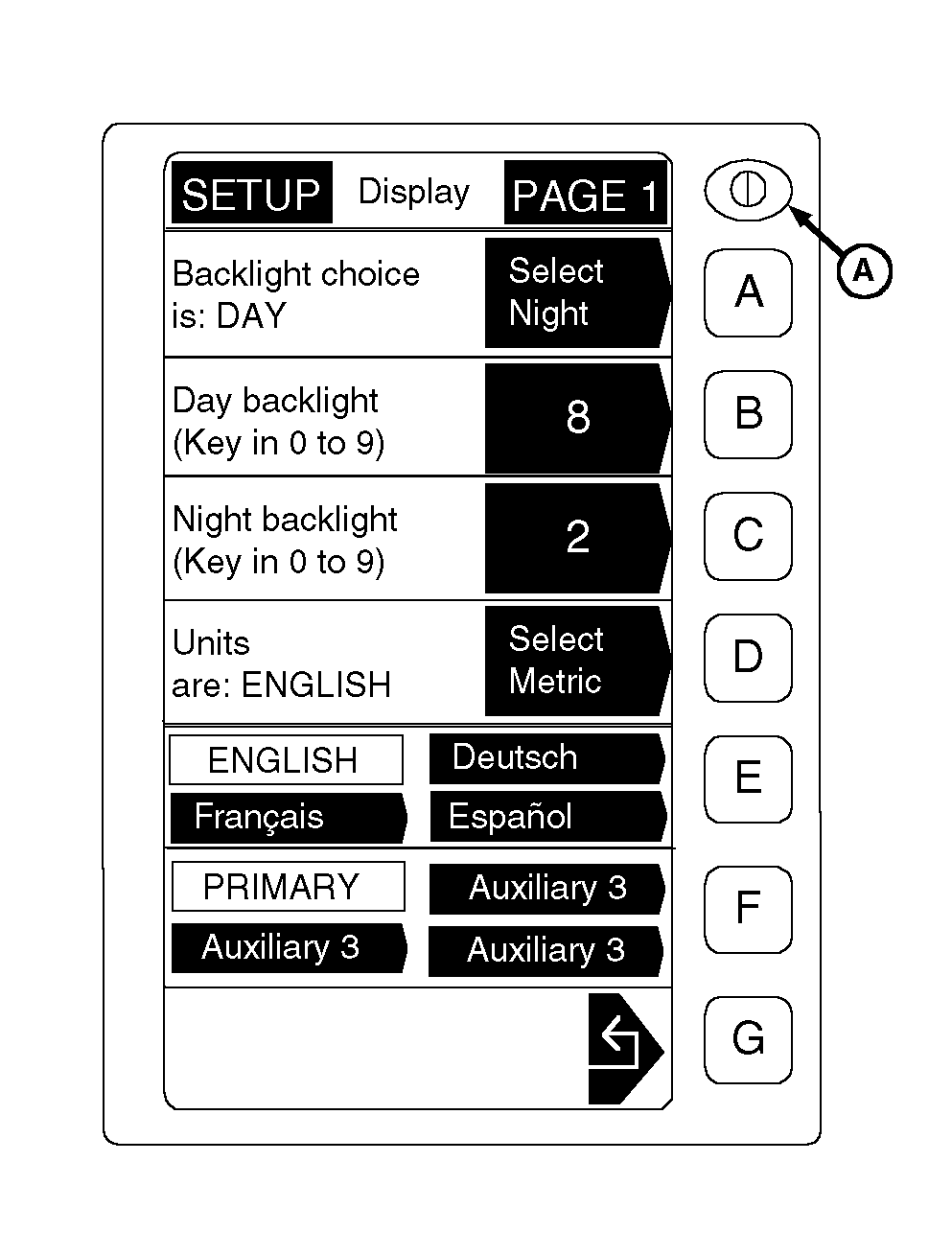
Set-Up Mode-Adjust Display Contrast and BacklightAdjust both contrast and backlight to obtain best screen readability. Contrast Adjustment: Depress contrast button (A) to sharpen screen display. Release button and depress again to dull screen image. Backlight Adjustment: 1. From any screen press SETUP. 2. Select GREENSTAR ® Display. NOTE: The option in the shaded arrow is what becomes selected if this button is pushed. The unshaded area is the current selection. 3. Press key "A" to toggle backlight between day and night settings. NOTE: · Newer displays (RE150184 or PF80162) can be set between 0 (Darkest) and 9 (Brightest). · Older displays (RE67542) can be set between 0 and 8. Full bright setting "9" should not be used on older displays as the circuit draws too much current, resulting in light circuit shutdown. 4. Enter desired day and night backlight settings using numbered keys. The higher the setting, the brighter the screen. a. Press key B, enter a number between 0 and 9, press key B again to accept the value. b. Press key C, enter a number between 0 and 9, press key C again to accept the value. 5. Press key G to return to the SETUP screen. |
|
|
GREENSTAR is a trademark of Deere & Company. | AG,OUO6023,1092 -19-21JUL00-1/1 |