Set-Up Mode-Calibrate Tractor Radar Sensor (If Equipped)
|
|
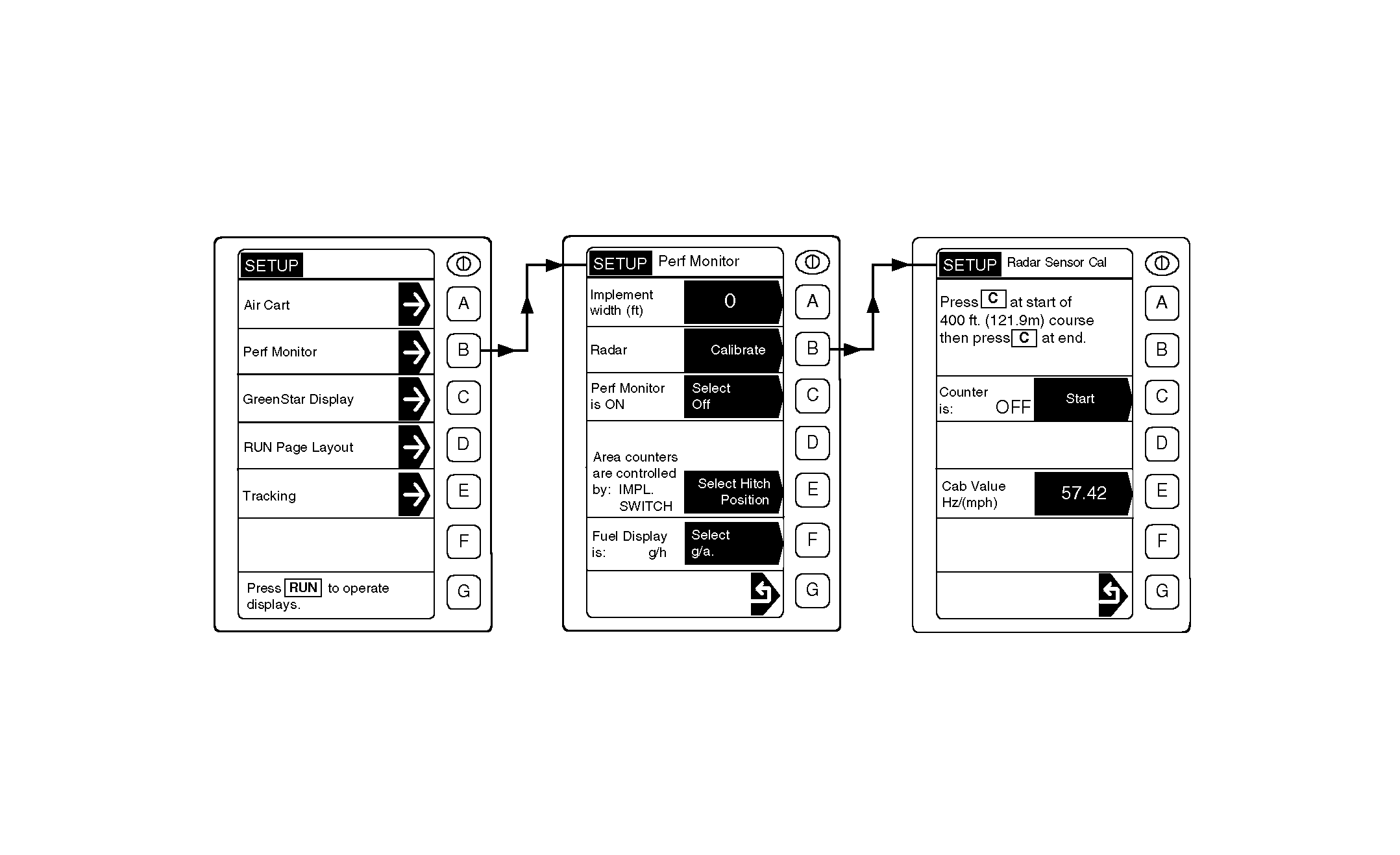
IMPORTANT: Tractor Radar is not necessary to operate the 1910 Commodity Cart. Radar speed is used to determine cart tire slippage and/or seed populations if equipped with optional seed counting. Radar calibration is used to determine the true ground speed of the tractor. Radar speed value is approximately 57 Hz per km/h (57 Hz per mph), and should be calibrated to ensure accuracy. If radar calibration value is already known, it can be manually placed into memory by entering set-up mode, pressing Cal. Value key and making entry using numbered keys. Press Cal. Value key again to store this setting in memory. IMPORTANT: For best results and most accurate setting, radar calibration should be done in the field (in the type of soil |
to be seeded) with all tires inflated to proper pressure. Hard, smooth surfaces are not acceptable for calibration and may produce a "Radar Sensor Calibration Error" message. NOTE: Radar calibration procedure is similar to final in-field procedure used to calibrate the air cart's tire speed sensor except that it is done at slower speed (approximately 3 km/h [2 mph]), not seeding speed. 1. Lay out a 122 m (400 ft) straight line course. 2. Enter SETUP mode. 3. Enter Perf (Performance) Monitor SETUP mode, Radar Calibrate function. |
AG,OUO6023,1094 -19-21JUL00-1/2 |
|
4. Driving at approximately 3.2 km/h (2 mph), press Counter Start key as tractor front tires pass the opening marker of the course. 5. Press Stop key as tractor front tires pass the closing marker of the course to end calibration; "Radar Sensor Calibration Finished" should display along with radar calibration value. This value is automatically entered into the monitor's memory. Pressing the Stop key before the closing marker may produce a "Radar Sensor Calibration Error" |
message if more feedback signals are needed for calibration.
An error message can also display when feedback signal is outside the normal range of 1-150 Hz. 6. If "Radar Sensor Calibration Error" interrupts the active procedure, check that sensor lens is clean and cable connections tight; then re-run test. |
AG,OUO6023,1094 -19-21JUL00-2/2 |