Set-Up Mode-Air Cart Blockage
|
AG,OUO6023,1103 -19-21JUL00-1/3 |
|
|
AG,OUO6023,1103 -19-21JUL00-2/3 |
|
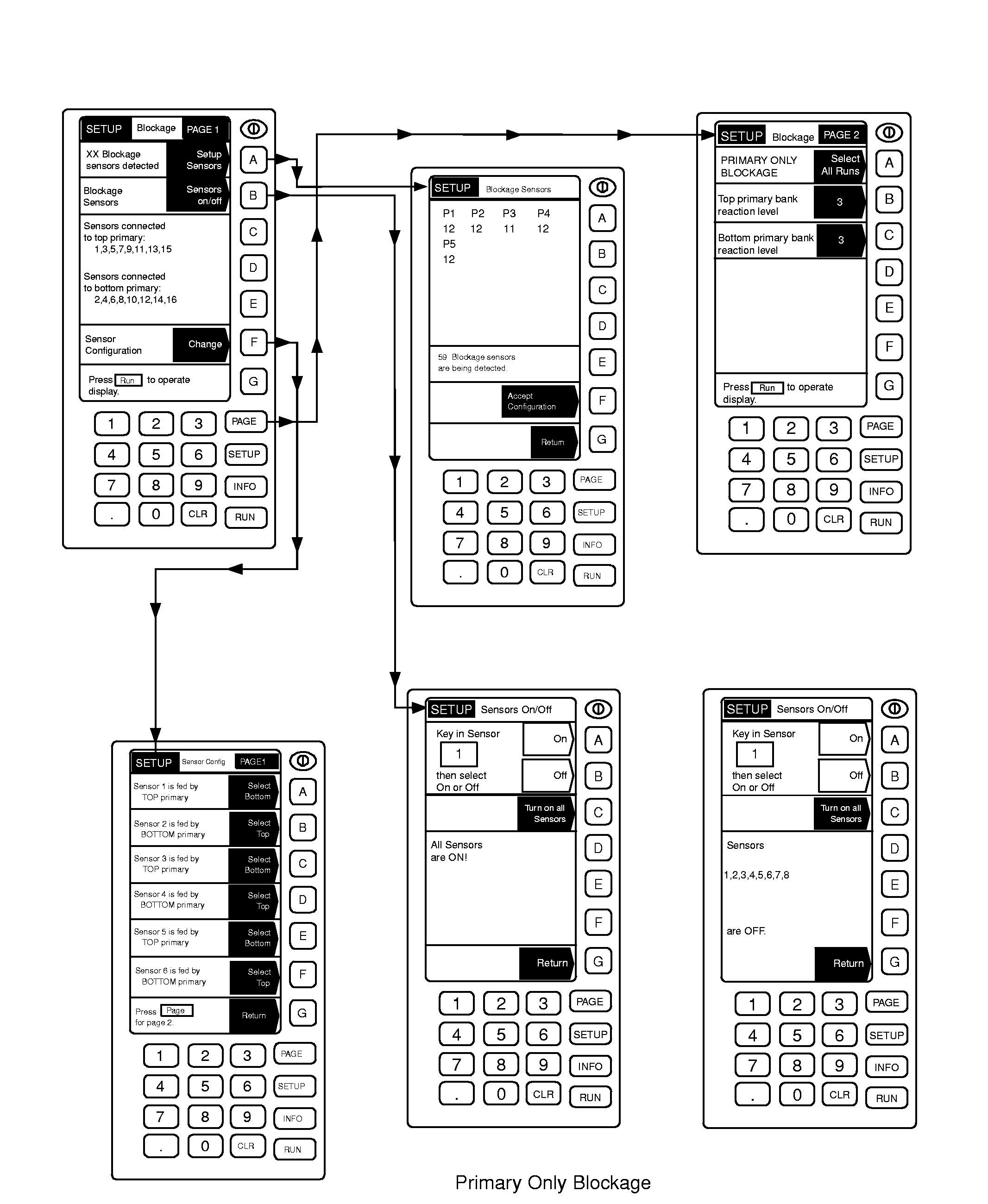
NOTE: Primary Only blockage system makes reference to sensors while ALL RUN system references headers.
IMPORTANT: During monitor set-up, machines must be stationary (not seeding) with the fan off. 1. Be sure tractor is NOT MOVING and the fan on the 1910 cart is NOT RUNNING. 2. From any page press SETUP. 3. Select Air Cart Blockage. 4. Select key A to Setup Sensors. IMPORTANT: The number of sensors detected should equal the number of sensors on the tool. If one processor displays less sensors than is on the machine, check the next numbered sensor after the number displayed. EXAMPLE: If P1 displays "6" and there are 11 sensors on this processor, check the pins in the #7 connection on the slave box. 5. Press key F to accept the configuration after all sensors are detected. 6. Press PAGE to go to PAGE 2. 7. If the system detects 16 sensors or less, select key A to toggle between ALL RUN BLOCKAGE and PRIMARY ONLY BLOCKAGE. 8. Press PAGE to return to PAGE 1. NOTE: The option in the shaded arrow is what becomes selected if this button is pushed. The unshaded area is the current selection. 9. Press key F to define the configuration. This section will refer to Sensor configuration for Primary Only |
blockage and Header configuration for All Run blockage.
10. Press the button next to each Header (or Sensor for Primary Only blockage) to toggle between the top and bottom bank of primaries. Make sure each Header (or Sensor) is correctly defined as being fed by the top or bottom bank of primaries. If single-shooting, all Headers (or Sensors) should be fed by the top bank of primaries. If double-shooting, typically the odd numbered Headers (or Sensors) will be fed by the top primaries and the even numbered Headers (or Sensors) will be fed by the bottom primaries. 11. Press key G to return. 12. Press key B to turn sensors ON or OFF. If all sensors are to be used, the message "All blockage sensors are ON" should be displayed. If some sensors are to be turned Off, select the Header (light box under "Header"); then enter the header number and press key C to select row. After the light box is under "Row", enter the desired row number on the keyboard and press key B to turn this row off. 13. Press key G to return. 14. Press PAGE to go to Page 2. 15. Select key B to enter the Reaction Level for sensors connected to the Top Bank of Primaries. Enter the desired Reaction Level. Valid entries range from 1 to 5 with 1 providing the quickest warning response times and 5 providing longer response times. Press key B again to accept the value. 16. Repeat Step 15 for the Bottom Bank of Primaries by pressing key C instead of key B. 17. Press SETUP to return to the setup page. |
AG,OUO6023,1103 -19-21JUL00-3/3 |