Air Cart Run Mode
|
AG,OUO6023,1107 -19-21JUL00-1/2 |
|
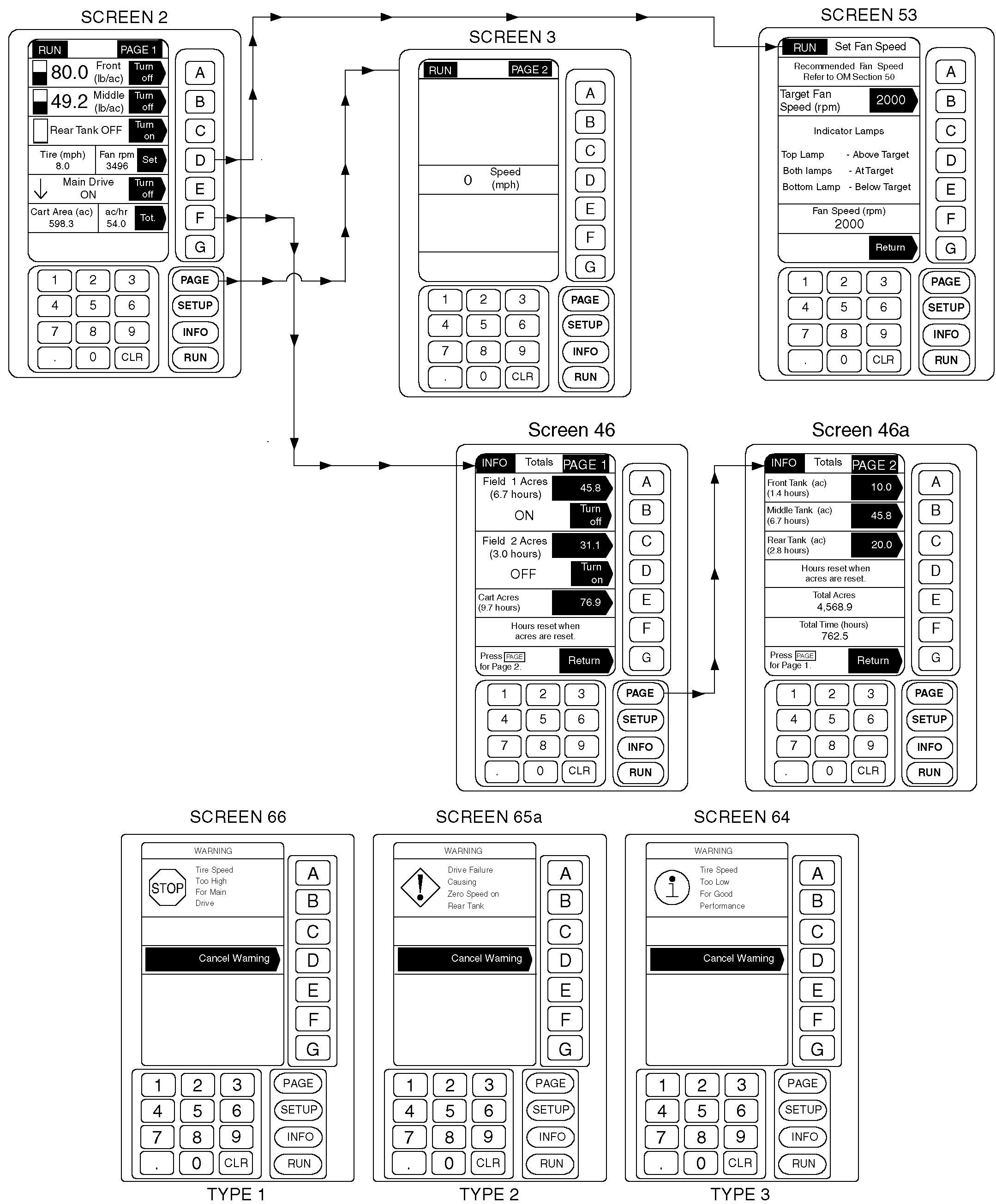
IMPORTANT: Full screen STOP WARNINGS require immediate attention and corrective action or machine damage will occur. To get the operator's attention, an audio alarm sounds when a WARNING is displayed. RUN mode informs the operator of cart activities during operations. Depress PAGE key to toggle from page one to page two while operating. Product level bar graphs are displayed regardless of tank ON/OFF selection. Because there are only three in-tank product level sensors, display changes between the sensors are not actual sensed levels, but a calculated display showing how much product should have been used at current application rate. Mid-level and almost empty displays are actual sensed level readings from the middle and bottom in-tank sensors. When these switches open, product level will drop quickly from calculated display level to actual in-tank level. When bottom switch opens, bar graph will disappear and caution message "Tank Almost Empty" will appear on bottom of page one. See AIR CART INFO (INFORMATION) MODE (WITHOUT OPTIONS) in this section for tank level display adjustment information. Application rate (lb/ac) is shown when tank is turned ON, otherwise OFF is displayed. Display console keys are used to engage product delivery clutches and to set fan speed indicator. Refer to CONTROLLING PRODUCT DELIVERY CLUTCHES |
and SETTING FAN SPEED in this section for detailed information.
Display console key F is used for instant access to Air Cart Info Totals screens. See AIR CART INFO (INFORMATION) MODE (WITHOUT OPTIONS) in this section for specific information. System is capable of generating four different types of messages to inform the user of changes in operating conditions. IMPORTANT: Audio alarm will sound when a full page WARNING is displayed.
If warning message is cancelled, audio alarm will sound again and a similar caution message will display at the bottom of RUN Page 1.
|
AG,OUO6023,1107 -19-21JUL00-2/2 |