Air Cart Set-Up Mode-Tank Meter Set-Up
|
AG,OUO6023,1114 -19-21JUL00-1/3 |
|
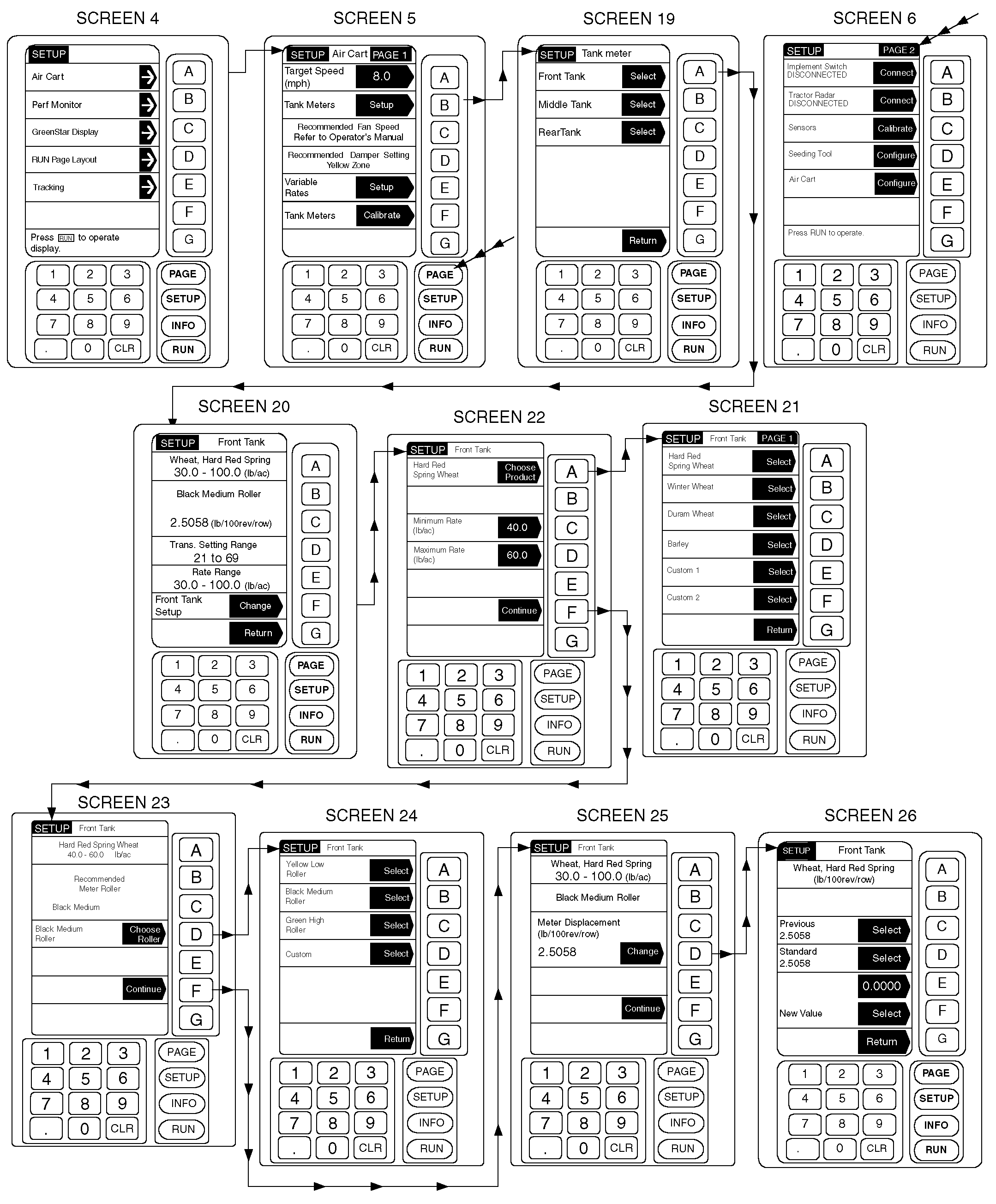
1. From any screen press SETUP. 2. From the list given, choose Air Cart. 3. From Tank Meter Setup screen, press key A, B, or C if the cart is equipped with a Middle Tank to choose which tank to setup. 4. A summary page for this tank is presented. The summary page includes product, application rate, roller type, and meter displacement value. Press key F to change the setup. 5. Press key A to choose a new product. 6. From the menu presented, choose a product (A-F), or press PAGE to advance to the next set of product choices (a total of eight pages), or press key G to return without selecting a product. When product selection is entered, the following values are made available.
NOTE: If rates are mis-keyed, a message will inform user that Max must be larger than Min value entered. 7. If variable rate is enabled, Min and Max rates are set up by pressing key C or D, entering the Min or Max application rate in kilograms-per-hectare or pounds-per-acre, and then pressing key C or D again to accept. If the cart is not equipped with the Variable Rate option, only the desired application rate, or target rate, can be entered. 8. Press key F to continue. 9. Press key D to choose the meter roller. A recommended roller for the target rate is presented on the previous screen. If no roller can be recommended, a message will indicate so. |
NOTE: Be sure the selected roller is the actual roller metering product from this tank. 10. Select the correct roller from the menu presented (A-D). Use custom rollers (D) for blue metering sections. Proper calibration is critical when using custom rollers. 11. Press key F to continue. IMPORTANT: Some product choices may not yet be loaded in the Standard value table, and MUST be determined by Calibration of the Tank Meter. In every situation, for the most accurate Meter Displacement Value (weight per 100 meter revolutions per row) the Tank Meter Calibration must be performed. 12. Press key D to select a meter displacement value. There are three different values that can be used. "Previous" , a value that had previously been used for this tank, "Standard" , a value for this particular meter and product combination from a table saved in the controller's memory, or "New Value" , obtained by other means such as a previous calibration. "New Value" is manually entered, if so desired, but must first be calculated using the sample weight obtained from meter calibration and the following formula. Note that meter turns, not crank turns, are used in this calculation. (Weighed Sample kg ÷ meter turns) x (100 ÷ rows) = Displacement Value EXAMPLE: (5.74 kg ÷ 15) x (100 ÷ 41) = .93 (Weighed Sample lb ÷ meter turns) x (100 ÷ rows) = Displacement Value EXAMPLE: (12.65 lb ÷ 15) x (100 ÷ 41) = 2.06 |
AG,OUO6023,1114 -19-21JUL00-2/3 |
|
IMPORTANT: If Previous and Standard are both zero and a New Value is not known, select Standard even if it is zero. 13. Press key C to select Previous, press key D to select Standard, or press key E, enter a value, press key E again to accept the value, and then press key F to select New Value. 14. Press key F to continue. 15. The tank summary screen is then displayed. If everything is set to the conditions desired, press |
key G to return to the Tank Meter Setup Screen and choose the next Tank. If not, start at Step 4 again.
16. Repeat Steps 3 thru 15 until all tank meters are configured to the desired conditions. 17. Press key G to return to the Air Cart Setup Page 1. |
AG,OUO6023,1114 -19-21JUL00-3/3 |