Air Cart INFO (Information) Mode (Without Options)
|
AG,OUO6023,1119 -19-21JUL00-1/3 |
|
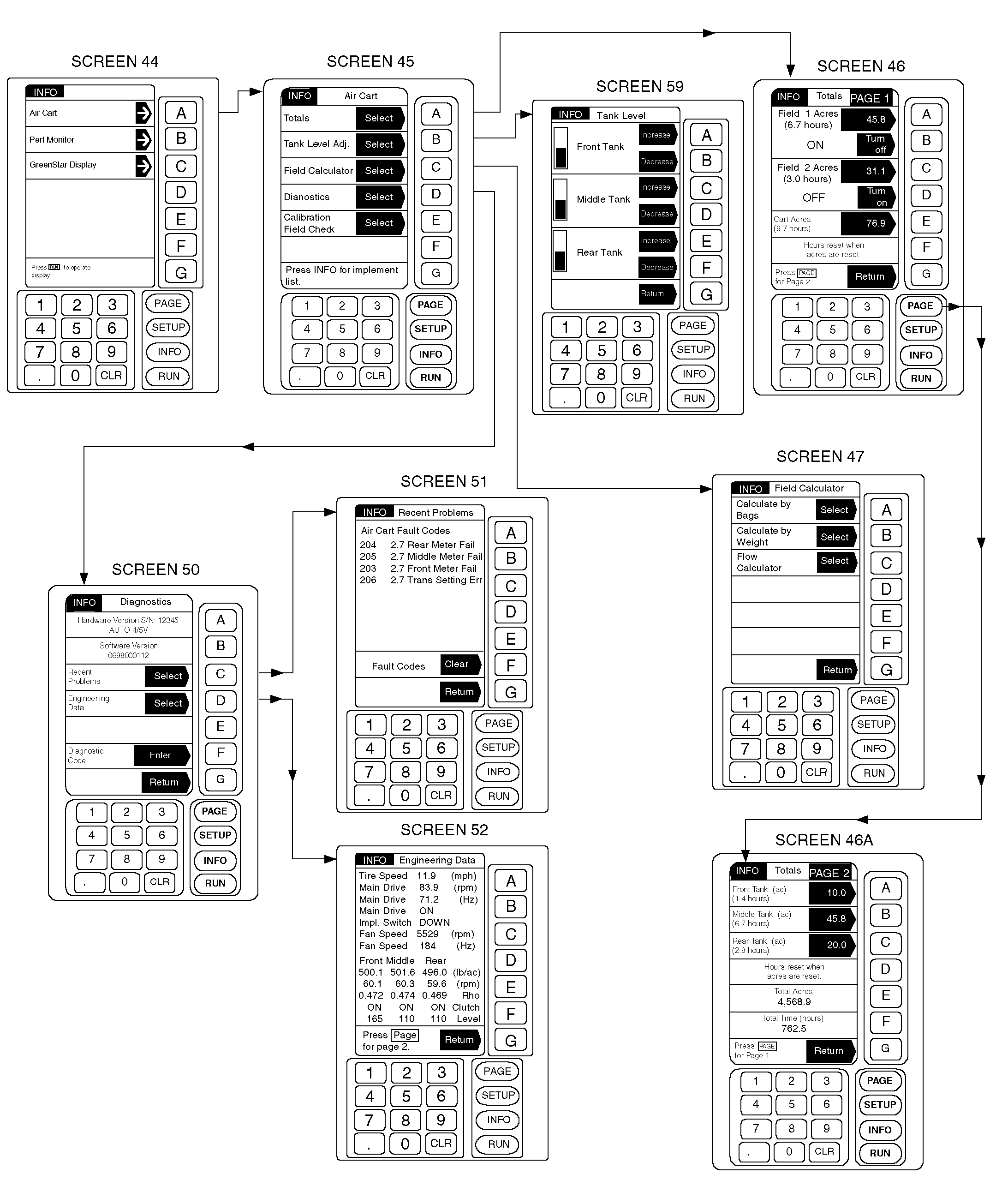
Display language is selected and readout units (English or Metric) are reset in GREENSTAR ® Display function. See CHANGING DISPLAY LANGUAGE AND UNITS-STANDARD GREENSTAR ® DISPLAY in Operating Machine Setup section for further information. "Implement List" is the opening screen of INFO mode. The list shows all software in use, including optional devices connected to and recognized by the system controller. Air Cart INFO (information) mode displays accumulated data recorded during operations. Hectares (Acres) are accumulated when clutches are energized with ground speed and meter rpm sensed. Total hectares (acres) are calculated using distance traveled and total tool width. TotalsPage 1 shows accumulated hectares (acres)/time per field and cart. Page 2 shows accumulated hectares (acres)/time by tank. It also shows total accumulated hectares (acres) and total time. Field, Cart and Tank Hectares (acres) can be cleared from memory by performing the following steps. 1. From any page press INFO. 2. Press key A to select Air Cart. 3. Press key A to select Totals. IMPORTANT: The value displayed within the Cart Hectares (Acres) arrow is the value that is displayed on RUN Page 1 under "Cart Area". Resetting this |
number will reset "Cart Area" on RUN PAGE.
4. All values in the dark arrows on pages 1 and 2 can be reset to zero. Press console key; then press CLR to reset to zero. Press key A again to accept. All other hectare (acre) totals are reset by the same method. 5. Press key G to return. 6. Press RUN to return to RUN Page 1. Tank Level AdjustmentTank Level function is used to adjust display when actual in-tank product level is between sensors. Adjustment range is limited so display cannot be over-adjusted above actual sensor state. 1. From any page press INFO. 2. Press key A to select Air Cart. 3. Press key B to select Tank Level Adjust. IMPORTANT: Product must be above the bottom tank level sensor in order to make adjustments. 4. The darkened arrows labeled Increase and Decrease allow the displayed Tank Level to be adjusted to correspond with the tanks actual level. One press of the button equals one bar. 5. Adjust all tanks to correspond with actual product level. 6. Press key G to return. 7. Press RUN to return to RUN Page 1. |
|
GREENSTAR is a trademark of Deere & Company. | AG,OUO6023,1119 -19-21JUL00-2/3 |
|
Field Calculator
Field calculator features two methods of determining how much product is needed. See USING FIELD/FLOW CALCULATOR-GREENSTAR ® DISPLAY in this section. DiagnosticsEntering Diagnostic mode reveals version numbers of software and hardware in use, and engineering data. |
Software and hardware version numbers are historical records and should not be altered.
Recent Problems list shows the last eight air cart problems that produced a caution or warning message, the problems code, and a time stamp (hours) of when it occurred. Only the three most recent occurrences of any one problem are recorded. Depress key F to clear fault codes from problem list. |
|
GREENSTAR is a trademark of Deere & Company. | AG,OUO6023,1119 -19-21JUL00-3/3 |