Setting Selective Control Valve for VACUMETER™-8000 Series TractorsPress appropriate touch control switch (A) I through V to set up each SCV for the function attached to it. MACHINE RAISE AND LOWER: Press touch control switch I to adjust raise and lower function. Use flow control knob (B) to adjust flow rate. Use knob (C) to set time detent at 10 seconds. Adjust in the field as required. INDEPENDENT MARKERS (if equipped): Press appropriate touch control switch to adjust marker raise and lower function. Use flow control knob (B) to adjust flow rate (cylinders are orificed). Use knob (C) to set time detent at 10 seconds. Adjust in the field for proper time to extend and retract. NOTE: Vacuum flow control valves supplied with the machine should remain in the hydraulic circuit for each motor and be adjusted to the full open position to act as a flow limiter. VACUUM METER (if equipped): Press appropriate touch control switch to adjust hydraulic vacuum motor function. Use flow control knob (B) to set desired vacuum level (the flow control valve on the planter must be set to full open). Start with a low flow setting of 2.0 on display and adjust for correct vacuum level after seeds are on the disk. Use knob (C) to set detent time to CONSTANT. Push tractor SCV lever into detent and release to operate vacuum motor. Place SCV in FLOAT to turn off vacuum motor. |
|
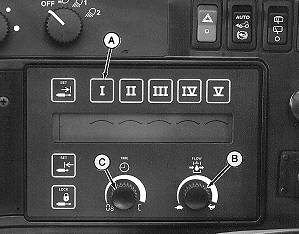
| FUNCTION | FLOW (RATE) | DETENT (TIME) |
|---|---|---|
| Machine Raise and Lower | Start at 5. Adjust for lift rate. | 10 seconds or as required for full cylinder extend/retract. |
| Independent Markers | Start at 5. Adjust for lift/lower rate. | 10 seconds or as required for full cylinder extend/retract. |
| Vacuum Motor | Start at 2 and adjust as required to obtain desired vacuum pressure. | Constant-C |
|
VACUMETER is a trademark of Deere & Company | OUO6074,0000343 -19-12APR01-1/1 |