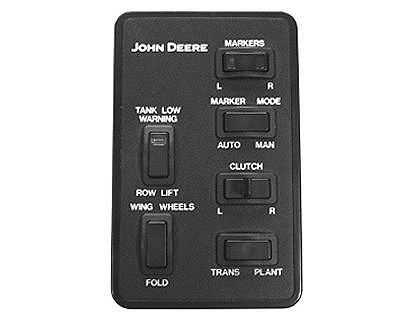
Raising and Lowering Markers with Independent SCVNOTE: The Marker switch has two lights in it. The indicator light will indicate which marker will lower next. The Manual Marker Mode is selected by pressing the AUTO-MAN marker mode switch to the MAN position, the selected marker on the Right/Left Marker Switch of the Frame Control Console will raise and lower each time the designated SCV for extending and retracting the markers is activated. In order for the MAN Marker Mode to function, the TRANS-PLANT mode switch must be in PLANT position. The Auto Marker Mode is selected by pressing the AUTO-MAN marker mode switch to the AUTO position, the markers will alternately raise and lower each time the frame is raised and lowered and the designated SCV for extending and retracting the markers is activated. In order for the AUTO Marker Mode to function, the TRANS-PLANT mode switch must be in PLANT position. While frame is down in planting position, a single marker can be raised and lowered independently. To raise marker over an obstruction in the field while planting, activate appropriate SCV and raise marker to avoid obstruction. To lower same marker, activate appropriate SCV again. To lower both markers, lower machine and activate marker SCV. The first marker will lower. Select MAN on the Marker Mode switch and the marker still raised on the Marker switch. Activate marker SCV to lower marker selected. Both markers will retract when SCV is activated to raise markers. |
|
720016ROM,OI,J -19-24SEP92-1/1 |