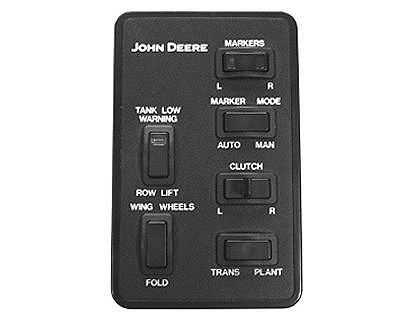
Raising and Lowering Markers Connected to Lift CircuitNOTE: If the AUTO-MAN switch is in the neutral position (middle), the markers will not operate. The Manual Marker Mode is selected by pressing the AUTO-MAN marker mode switch to the MAN position. When the marker hydraulics are integrated into the frame raise/lower hydraulics, the selected marker on the Right/Left Marker Switch of the FRAME Control Console will raise and lower each time the frame is raised and lowered. When the AUTO-MAN marker mode switch is in the AUTO position and the marker hydraulics are integrated into the frame raise/lower hydraulics, the markers will alternately raise and lower each time the frame is raised and lowered. NOTE: CCS fan will shut off until SCV I is engaged into detent position. To raise marker over an obstruction in the field while planting, press PLANT-TRANS switch to TRANS and pull SCV I lever rearward. To lower same marker, press the PLANT-TRANS switch to PLANT. Push SCV I lever forward. After desired marker is lowered, switch the AUTO-MAN marker mode switch back to AUTO position. |
|
OUO1074,00013B3 -19-05NOV01-1/1 |