30—60 Series Open Station Tractors—Console Installation
-
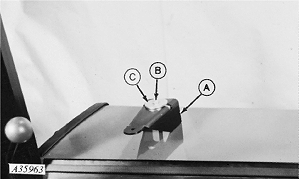
A35963-UN-17JUL93A - Bracket
B - Cap Screw
C - Washer
Drill hole in right fender and attach bracket (A) with 3/8 x 3-1/2 in. cap screw (B) and 0.391 x 2 x 0.22 in. washer (C) and 3/8 in. nut.Order from Parts:
A40983
Mount
19H1912
Cap Screw, 3/8 x 3-1/2
24H1300
Washer, 0.391 x 2 x 0.22
14H1076
Nut, 3/8
-
Attach monitor to bracket.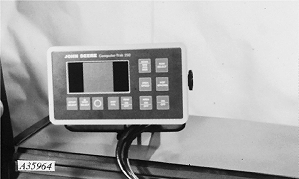
A35964-UN-17JUL93 -
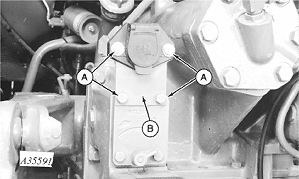
A35591-UN-12APR93A - Cap Screws
B - Mounting Plate
Remove four cap screws (A), two nuts and SAVE for reuse. -
Remove connector mounting plate (B) and DISCARD.
-
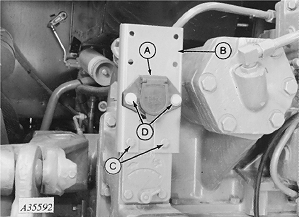
A35592-UN-19APR93A - Connector, Harness
B - Bracket
C - Cap Screws
D - Cap Screws
Install harness connector (A) through slot in bracket (B). -
Mount bracket (B) (legs to front) to tractor SCV with two cap screws (C) previously removed.
-
Install two cap screws (D) and nuts previously removed through connector (A) to bracket (B).
-
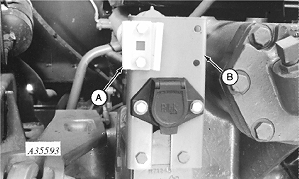
A35593-UN-12APR93A - Socket
B - Connector Bracket
Install socket (A) to connector bracket (B) with two M8 x 16 cap screws and M8 nuts. -
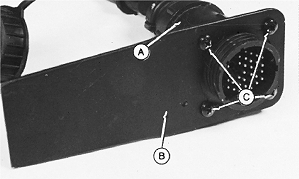
H45416-UN-02DEC92A - Harness Connector
B - Mounting Spade
C - Self-tapping Screws
Attach monitor harness connector (A) to mounting spade (B) using four self tapping screws (C) provided with monitor. -
Insert mounting spade into socket.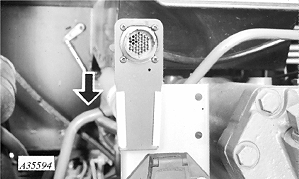
A35594-UN-12APR93 -
Connect monitor power harness to 3-pin convenience outlet. If tractor is equipped with a 2-pin outlet, order AA37254 to convert 2-pin outlet to a 3-pin outlet. If tractor is not equipped with a convenience outlet, order AA37247.
|
AG,OUO1074,854-19-20000301 |