30-60 Series Row Crop Tractors—Radar and Bracket Installation
-
Remove toolbox and mounting bracket from right-hand side of tractor.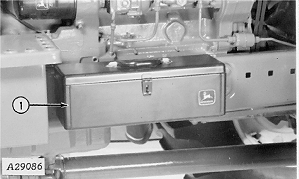
A29086-UN-14OCT88 -
Insert 5/8 x 1-1/2 in. cap screws in holes as shown.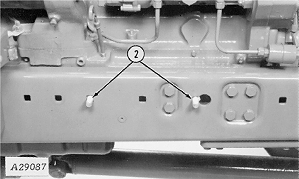
A29087-UN-14OCT88 -
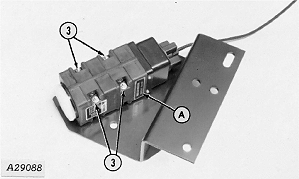
A29088-UN-14OCT88A - Serial Number Plate
Attach radar unit to mounting plate with 1/4 in. cap screws, washers and lock nuts (do not overtighten). Be certain radar unit is mounted on plate so serial number plate (A) is facing up when plate is attached to tractor. -
NOTE: 55 and 60 Series Tractors have spacers on toolbox mounting hardware. Install radar bracket against side frame, then spacers and toolbox mounting bracket (in this order).
Install radar plate and toolbox mounting bracket on cap screws and secure with lock washers and nuts.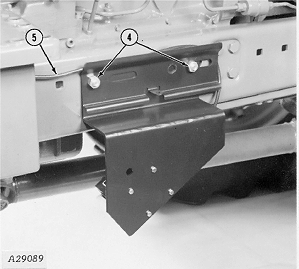
A29089-UN-14OCT88 -
Route cable back toward rear axle and connect to console radar lead.
-
 CAUTION: Avoid looking directly into the sensor face to prevent
possible eye damage from microwave signal emitted from radar sensor.
CAUTION: Avoid looking directly into the sensor face to prevent
possible eye damage from microwave signal emitted from radar sensor.Fasten lead away from moving parts with tie straps.
-
Install toolbox on mounting bracket.
|
AG,OUO1074,855-19-20000301 |