Setting Low Population Limit
NOTE: Rows must be turned ON for a warning to occur. See TURNING ROWS ON/OFF in this section.
When the monitor detects any row sensor with seed population counts less than the lower limit, the monitor displays LO WARN, sounds an alarm and locks onto the row number giving the reading. The alarm will sound every 1/200th of an acre (which that row travels) as long as the limit is being exceeded. When setting low population limits, subtract 50 percent from desired population as a starting value. When actual planting population is displayed, LO WARN limit may be changed to a closer tolerance. The closer the tolerance is set to actual population, the more frequently alarms may sound.
When planting volume metered or small seeds, pounds-per-acre values will have to be converted into seeds-per-acre values for monitor entry. Refer to planting rate chart information in operator's manual for average number of seeds per pound. Multiply average seeds per pound BY pounds-per-acre rate to roughly determine average seeds-per-acre.
-
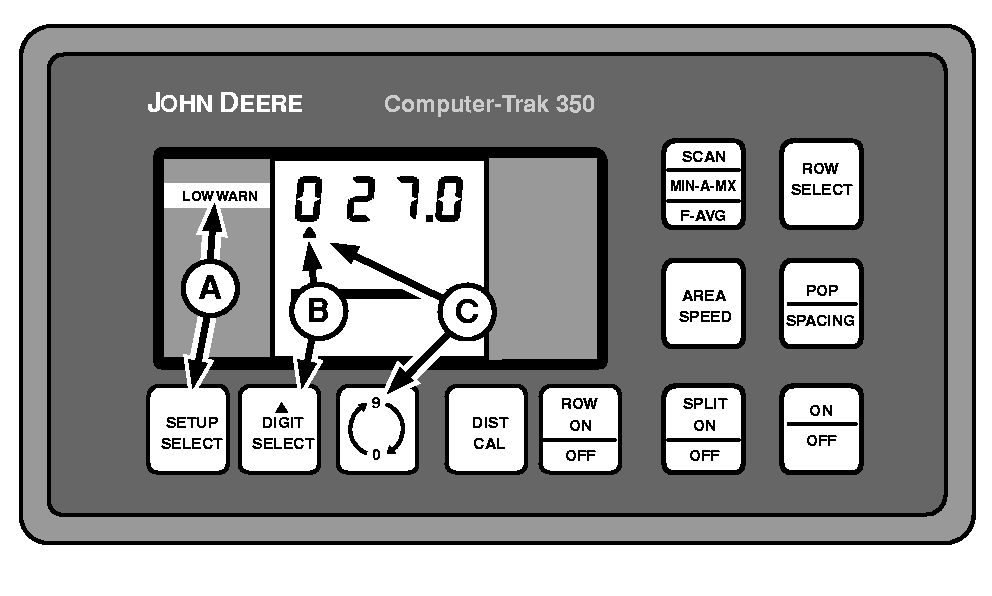
A49587-UN-26JUL02A - SETUP SELECT Switch
B - DIGIT SELECT Switch
C - 0-9 Switch
Repeatedly press SETUP SELECT switch (A) until display shows LO WARN in left-hand column. -
NOTE: Each whole number represents 1000 seeds per acre. In example shown, 027.0 represents a 27 000 population limit.
Repeatedly press DIGIT SELECT switch (B) until triangle is below the number to be changed.
-
Touch 0-9 switch (C) until desired number is displayed.
|
COMPUTER TRAK is a trademark of Deere & Company |
OUO6074,00006F9-19-20050330 |