Number of Rows
NOTE: Display shows 16 rows as an example.
-
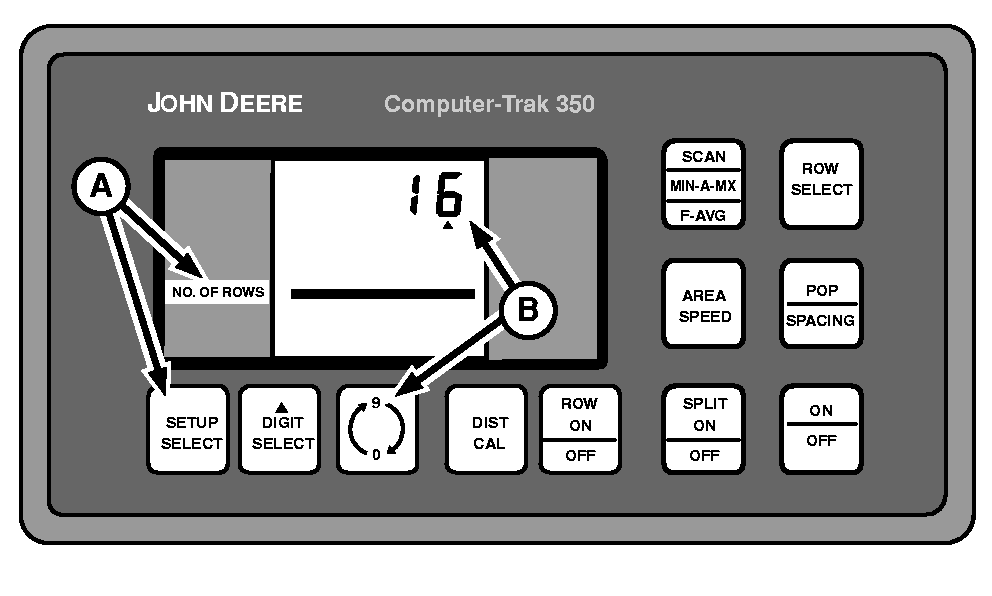
A49592-UN-26JUL02A - SETUP SELECT Switch
B - 0-9 Switch
Repeatedly press SETUP SELECT switch (A) until NO. OF ROWS is displayed in left-hand column. -
NOTE: Changing the number of rows will automatically turn on all rows turned off in the row ON/OFF procedure.
NOTE: No digit selection is required for row number selection.
Repeatedly press 0-9 switch (B) until the total number of rows are displayed.
1890 Machines Only: Each meter supplies seed to two rows. Number of rows entered into monitor must be one half the total number of rows on machine.
Changing the number of rows will automatically recalculate IMPLEMENT WIDTH.
|
COMPUTER TRAK is a trademark of Deere & Company |
OUO6074,00006FB-19-20030318 |