Distance Calibration
IMPORTANT: Distance calibration is very important. Population readings, area calculations and ground speeds are just some factors dependent upon distance calibration value. Calibration procedure should be performed under actual field/planting conditions to account for wheel slippage and other factors. If calibration procedure is performed on a hard flat surface instead of under field conditions, every reading using the calibration number for calculation purposes may be erroneous.

A49593-UN-26JUL02
A49594-UN-03SEP02
A - SETUP SELECT Switch
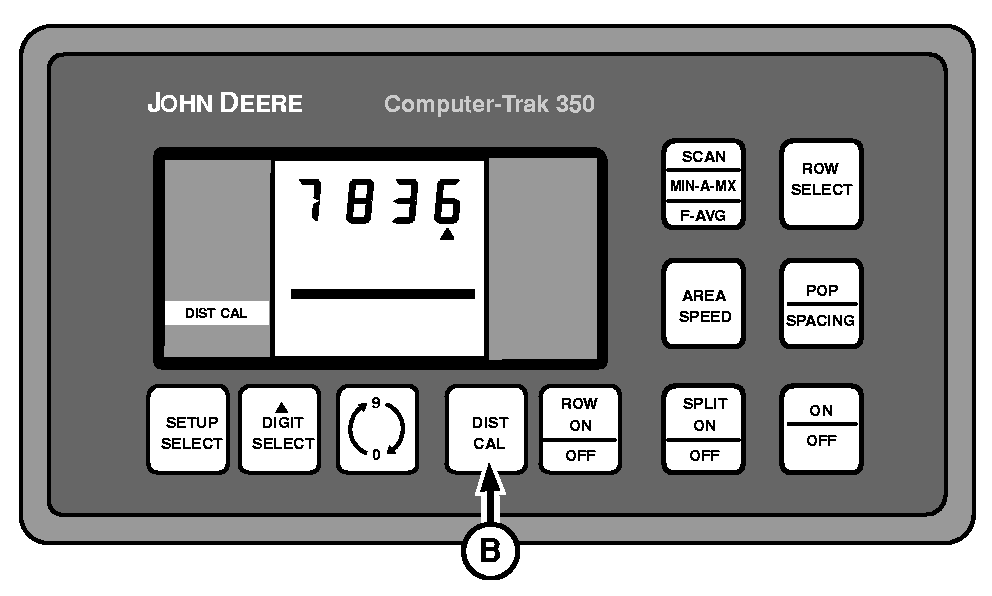
B - DIST CAL Switch
A distance calibration can only be performed with an operational radar unit installed. If the radar fails, seed flow can still be monitored by entering a fixed speed into monitor. See SPEED SET MODE in this section.-
Repeatedly press SETUP SELECT switch (A) until DIST CAL is displayed in left-hand column.
-
Mark a straight 121.9 m (400 ft) course in the field.
-
While driving at expected planting speed, press the DIST CAL switch (B) exactly when passing start marker on the course. This will set the display to zero and begin counting pulses. Press DIST CAL switch again, exactly when passing the end of course.
The display will show approximately 7836.
NOTE: The calibration value must be between 300 and 9999 or the monitor will be forced into a FORCED SETUP STATE. The monitor will not acknowledge other selections until a proper value has been entered.
7836 is a theoretical number and different field conditions will produce a slightly different result. A calculation number can be manually input into the console by using the DIGIT SELECT and 0-9 switches, but the most accurate population, area and speed data will be obtained using the 121.9 m (400 ft) course method.
Tractors Equipped with a Performance Monitor Only
The radar for the tractor performance monitor and the radar for the 350/450 monitor produce the same output pulses. If each radar is connected independently to each monitor, both will have to be calibrated independently. If one radar is connected to both monitors at the same time using a “Y” harness (see your John Deere dealer for part number), only one monitor has to be calibrated using the course. The other monitor's calibration value can be determined using a calculation and entered manually.
NOTE: The calibration value for the tractor performance monitor will NOT be the same as the planter monitor's value.
When both monitors are connected to a single radar, it is not necessary to calibrate both monitors over a 121.9 m (400 ft) course. If the tractor monitor is calibrated in the field on a 121.9 m (400 ft) course, multiply calibration number by 1.365 and enter the result into the planter monitor (see tractor OM for calibration procedure). If the planter monitor is calibrated in the field on the 121.9 m (400 ft) course, multiply calibration number by 0.733 and enter the result into the tractor monitor (see tractor OM for procedure). This should yield nearly identical speed readings from both tractor display and 350/450 monitor display.
|
Example: When using one radar unit with two monitors |
|
|---|---|
|
Tractor Monitor used for calibration on 121.9 m (400 ft) course |
A calibrated tractor value of 5800 x 1.365 = 7917 to be manually entered into 350/450 monitor |
|
350/450 Monitor used for calibration on 121.9 m (400 ft) course |
A calibrated 350/450 value of 7900 x 0.733 = 5790 to be manually entered into tractor monitor |
|
COMPUTER TRAK is a trademark of Deere & Company |
OUO6074,00006FD-19-20030319 |