Area Counters 1 and 2
Use this feature to clear accumulated area or to preset an area from which to begin counting.
Enter all zero's to clear display and cause display to show values in tenths (with decimal point).
Enter all nine's to eliminate decimal point and allow values larger than 999.9 to be entered.
-
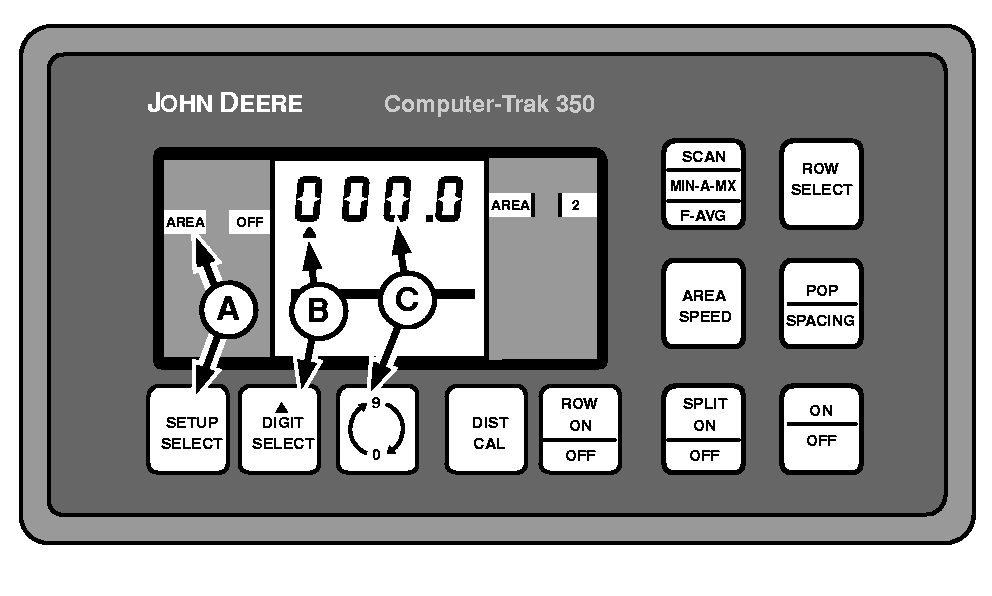
A49588-UN-03SEP02A - SETUP SELECT Switch
B - DIGIT SELECT Switch
C - 0-9 Switch
Repeatedly press SETUP SELECT switch (A) until display shows AREA 1 in left-hand column. Press SETUP SELECT switch (A) again to display AREA 2, if desired. -
Press DIGIT SELECT switch (B) until the triangle is below the number to be changed.
-
NOTE: The monitor displays numbers in tenths up to 999.9. Further area readings will be displayed in whole numbers only, such as 1000, 1001, 1002. If the decimal point is desired, it will be necessary to start over at 000.0.
Press 0-9 switch (C) until desired number is displayed.
-
Press ROW ON/OFF switch to activate and deactivate area counters.
|
COMPUTER TRAK is a trademark of Deere & Company |
OUO6074,00006FE-19-20030319 |