Implement Width
A49595-UN-26JUL02
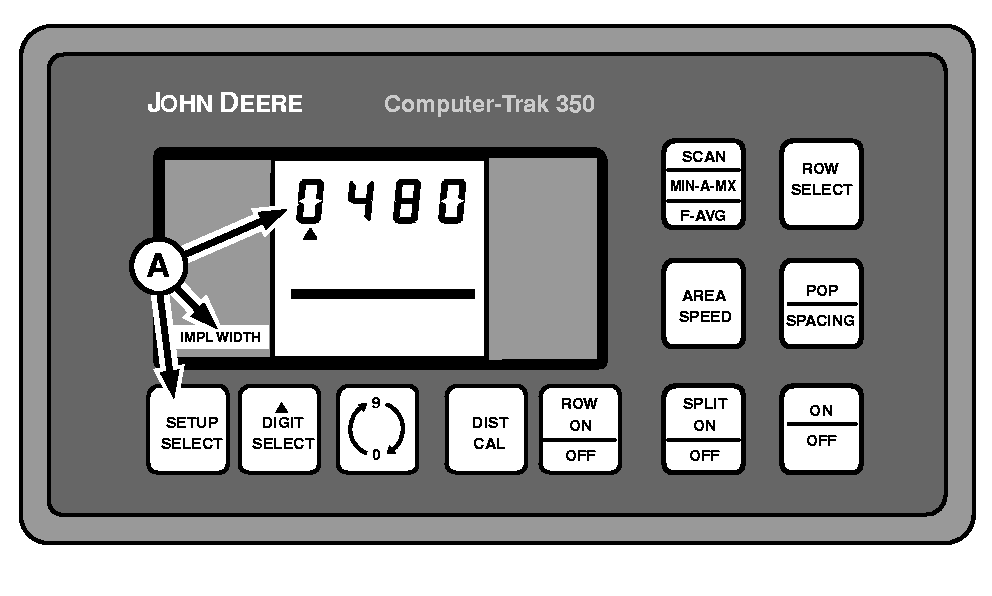
A - SETUP SELECT Switch
Repeatedly press SETUP SELECT switch (A) until display shows IMPL WIDTH in left-hand column. Any changes made to the number of rows or row spacing will automatically change the IMPLEMENT WIDTH. The value can be manually changed with the DIGIT SELECT and 0-9 switches to enter a specific IMPLEMENT WIDTH for special planting, such as skip row planting. This should be done after row width and row spacing have been entered to prevent it from being automatically changed.|
COMPUTER TRAK is a trademark of Deere & Company |
OUO6074,00006FF-19-20030319 |