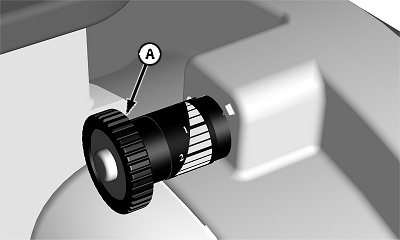
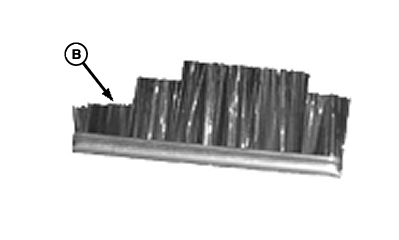
Using Double EliminatorNOTE: When using the Double Eliminator, set vacuum level to approximately 15 and install double notch brush (B). See CHANGING VACUUM METER BRUSH in this section. The double eliminator "saw-tooth design" gradually covers part of hole and removes any extra seeds (doubles) on the seed disk. Double eliminator should be used with flat-type seed disks. There are two classifications of flat type seed disks, Sweet Corn and Edible Bean disks. Use the following table for initial dial (A) setting.
|
|
||||||||||
OUO6074,0000C92 -19-03JUN05-1/2 |
|
1.
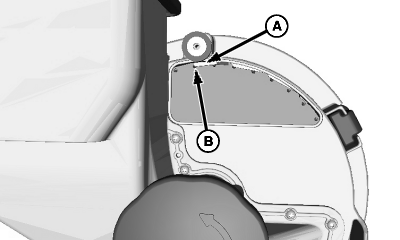
Verify that double eliminator (A) is covering 50 percent of seed disk hole (B).
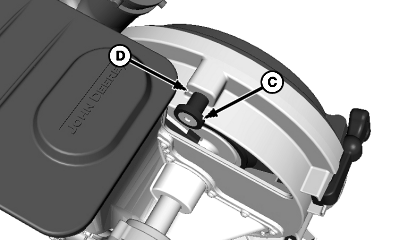
NOTE: Make initial adjustments to one row and adjust all other rows the same. 2. To adjust double eliminator, apply outward pressure and turn double eliminator adjusting knob (C) until double eliminator is covering 50 percent of seed disk hole. 3. With vacuum running, disconnect the pro shaft drive cable and rotate the meter by hand. Verify only one seed remains on each hole of the seed disk after passing the double eliminator. Adjust accordingly. 4. Note decal setting (D) and adjust other rows accordingly. 5. Using a seed monitor, plant a distance long enough to get an average row population for every row. 6. If there is a row with a high population, adjust double eliminator to cover a little more of seed disk hole. If there is a row with a low population, adjust double eliminator to cover a little less of seed disk hole. 7. Repeat process until row population is relatively even across rows. |
|
OUO6074,0000C92 -19-03JUN05-2/2 |