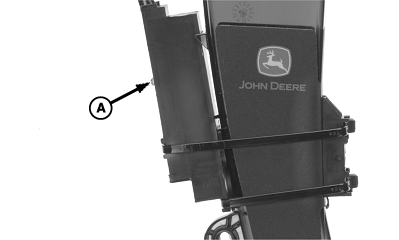
Population Adjust (PA)PA (POPULATION ADJUST) is beneficial when planting high population rates or planting small seeds. Under these two conditions, some sensors detect fewer seeds than are actually delivered. To adjust for the undetected seeds, a correction factor must be calculated and entered into the monitor to adjust the displayed population. PA is the correction factor the operator calculates and enters into the monitor. Sensor detections are multiplied by the correction factor prior to display. A PA number of 1.00 displays actual sensor detections. A PA number of 2.00 displays twice the number of actual sensor detections. A field population check MUST be performed to determine the correct PA correction factor. Example: If 160 000 seeds are detected and displayed when 180 000 are actually planted, divide 180 000 by 160 000 to obtain a PA value (180 000 ÷ 160 000 = 1.13). Enter a PA value of 1.13 into monitor. The monitor multiplies each detected seed by 1.13 and displays an adjusted population of 180 000. Always calculate a new value when seed types or populations are changed. 1. Select Menu >> Planter button >> Rates softkey.NOTE: Initial PA setting is always 1.0. PA value other than 1.0 is not needed for soybeans when AccuCount ™ seed tube sensors are used. AccuCount™ sensors are identified by a red LED (A) on the outside of sensor housing. 2. Select Population Adjust input box. 3. Enter the calculated value. Acceptable range is between 0.1 and 2.5. 4. Perform a population check and adjust PA value until monitor displays the same value as actual population. |
|


|
AccuCount is a trademark of Deere & Company | OUO6074,0000F82 -19-30OCT07-1/2 |
|
|
OUO6074,0000F82 -19-30OCT07-2/2 |