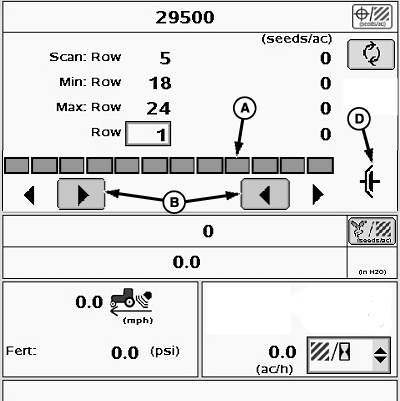
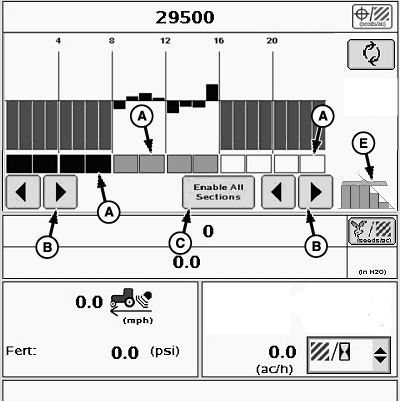
Machines with RowCommand™Indicators (A) show activity of individual RowCommand™ sections. Select buttons (B) to turn sections on and off manually, starting from the outside of the planter. Select button (C) to turn on all sections. The clutch icon (D) indicates sections are controlled manually. Swath icon (E) indicates sections controlled by SwathControl™. The planter main run screen monitors all critical functions on the planter and is always visible on the display while planting. The main run screen is viewable in Scan mode or Planter At A Glance mode. See following descriptions in this section for detailed information.
|
|
OUO6074,0000056 -19-07NOV08-1/2 |
|
NOTE: If numerous RowCommand™ clutches are simultaneously energized (meters disengaged), a tractor "Low Voltage" warning can occur due to limited alternator output. Reduce electrical load or increase engine RPM. |
| RowCommand™ Indicators (A) | |
|---|---|
| Indicator Color | RowCommand™ Activity |
| Green | Section is active and detected by system. |
| Black | Section deactivated manually by operator. |
| Blank With Black Border | Section deactivated by SwathControl™ prescription. |
| Not Visible | Section is not responsive. Row continues to plant, but section cannot be controlled with RowCommand™. A warning alerts operator to failure. |
OUO6074,0000056 -19-07NOV08-2/2 |