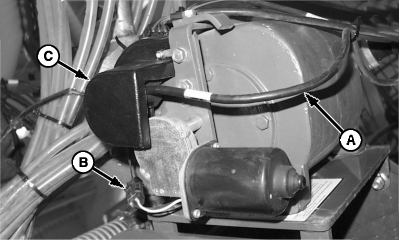
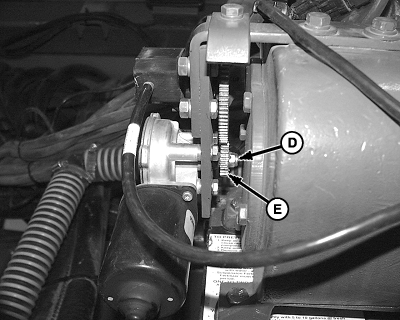
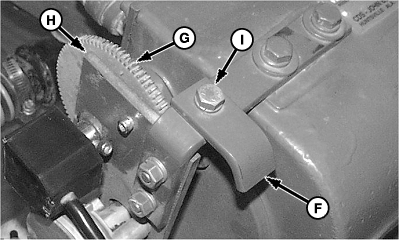
Manual OverrideIn the event of an electronic system failure, the pump may be manually set and locked to provide a fixed application rate. This feature allows the operator to continue applying product at a fixed rate. 1. Determine pump setting from fertilizer rate chart in implement operator's manual.2. Disconnect position sensor harness (A) and motor harness (B). 3. Remove cover (C). 4. Remove lock nut (D) and small sprocket (E). 5. Store cover, lock nut and small sprocket in a safe place until repairs can be made and parts reinstalled. NOTE: If pump is already in lock down mode, lock down bracket (F) will have to be loosened. 6. Rotate large gear (G) fully counter clockwise. Full counter clockwise position is pump setting "2". 7. Sight along bracket corner (H) and mark the tooth in closest alignment with a "2". 8. Count the number of teeth that pass bracket corner (H) as sprocket is rotated clockwise. See table for the number of teeth which represent pump setting numbers. The numbers may be marked on the sprocket, if desired. 9. Once setting is achieved, loosen cap screw (I) on lock down bracket (F) and rotate bracket into position so it engages sprocket teeth and locks sprocket into position. Tighten lock down bracket. |
|
OUO6074,0000608 -19-16SEP02-1/2 |
10. Verify rate after first ten minutes of use after lock down to assure lock down held and rate is as desired. |
|||||||||||||||||||||||
OUO6074,0000608 -19-16SEP02-2/2 |