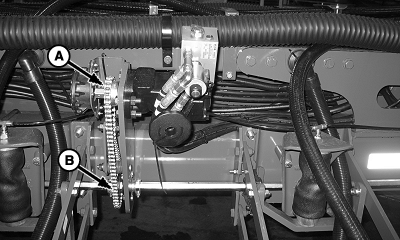
Assign Motor-Rows, Sprockets, and Width DisconnectIMPORTANT: Complete frame configuration first for correct VRD configuration. 1. Select Menu >> Planter button >> Configure softkey >> Drives tab. 2. Highlight drop down box and select Drive Sections 3. Select Settings button and set the number of motors on machine. 4. Select Next Page button. Set up each motor, one at a time, entering the following: NOTE: Row number one is always on left side of machine.
5. Repeat for each motor. |
|

OUO6074,0000FAE -19-28OCT08-1/2 |
|
6.
Select
Enter
button.
NOTE: Message not displayed on half screen layout. 7. Select Clutch Disconnect Warning check box to enable or disable the partial width alarm. If enabled, a full page warning displays for 5 seconds whenever a clutch is disengaged. A message is displayed on bottom line of full page run screen and monitor beeps every 15 seconds as a reminder. |
| Machine | Drive Gear (Motor Sprocket) | Driven Gear (Drillshaft Sprocket) |
|---|---|---|
| All 1790 Machines | 18 | 36 |
| 1770NT (12, 16, and 24 Row) with Mechanical Meters and Cable Drive | 27 | 29 |
| All Other Machines and 1770NT Configurations | 18 | 29 |
|
|
OUO6074,0000FAE -19-28OCT08-2/2 |