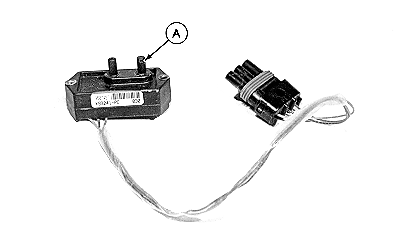
Vacuum SensorUse this to verify proper sensor connection and calibration. 1. Verify vacuum wiring is properly connected.If only one vacuum sensor is used, it MUST be connected to LEFT VAC wire. 2. Verify vacuum hose is properly connected. Connect hose to P2 port (A). 3. Check for air leaks in hose between sensor and vacuum meter. 4. Turn tractor OFF. Turn key to ACC (Accessory). 5. Verify correct number of vacuum sensors are configured. Select Menu >> Planter button >> Configuration softkey >> Sensor tab >> Vacuum drop down. Number of Sensors selected must match number of sensors on machine. 6. Select Sensor drop down and select each sensor one at a time. Select Cal Value and enter 5.66. 7. Select each sensor one at a time and select Zero Sensor button. 8. Verify voltages are correct. Select Diagnostic softkey >> Readings tab >> System Voltages drop down.
|
|
OUO6074,0000FCB -19-24JUL08-1/2 |
|
|
OUO6074,0000FCB -19-24JUL08-2/2 |