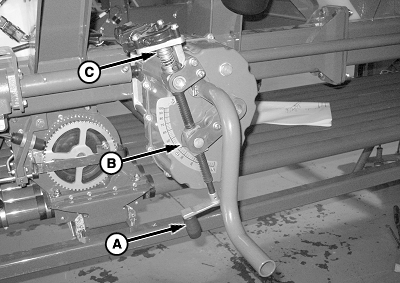
Adjust Transmission SettingIMPORTANT: For 38 cm (15 in.) Row Spacing Only-Multiply transmission setting on Rate Chart times 2 for this row spacing. IMPORTANT: For 76 cm (30 in.) Row Spacing Only-Multiply transmission setting on Rate Chart times 4 for this row spacing. 1. Use rate charts to determine a transmission setting based on the type of product in the tank and the type (color) of meter roller in meter cartridge.2. Standard Transmission: Turn handle (A) until indicator (B) aligns with setting number on gauge. Variable Rate Transmission: To adjust variable rate transmission, hold down on drive disconnect collar (C) and turn handle until indicator aligns with setting number on gauge. Release collar. |
|
AG,OUO6023,1151 -19-02JUN09-1/1 |