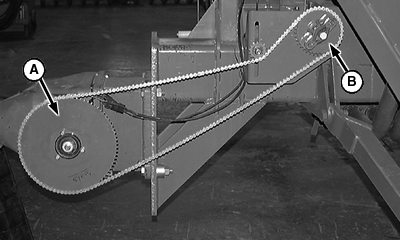
Configure Air Cart Size and Drive Sprockets1. Select primary Menu button >> Air Cart button >> Configuration softkey >> Cart tab.NOTE: Adjust length of chain as necessary when sprockets are changed. 2. Install tire sprocket (A) according to tire on cart. See Tire Sprocket table. 3. Select Tire Sprocket input box and enter the tooth count on tire sprocket (A). 4. Install proper row sprocket (B) according to row spacing on tool. See Row Spacing Sprocket table. 5. Select Row Sprocket input box and enter the tooth count on row spacing sprocket (B).
|
|
||||||||||||||||||||||||||||||||||||||

OUO6074,0000FD3 -19-04JUN08-1/3 |
|
|||||||||||||||
OUO6074,0000FD3 -19-04JUN08-2/3 |
|
|
|
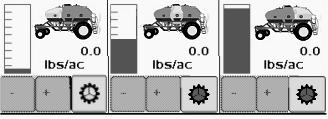
Select the size of this cart from Size drop down box. If cart has three tanks but middle tank is not used, select the related two tank cart size. When two tank |
cart is selected, the middle tank disappears from middle of run screen. |
| Related Cart Sizes | ||||||
|---|---|---|---|---|---|---|
| Three Tank Carts | Two Tank Carts | |||||
| Cart Size | Front Tank | Middle Tank | Rear Tank | Cart Size | Front Tank | Rear Tank |
| 250 | 75 | 55 | 120 | 195 | 75 | 120 |
| 340 | 120 | 70 | 150 | 270 | 120 | 150 |
| 430 | 150 | 80 | 200 | 350 | 150 | 200 |
|
|
|
OUO6074,0000FD3 -19-04JUN08-3/3 |